Saturday, 5 May 2018

VBA - Windows - Code to see if exe is reachable with Path environment variable

I'm trying to run a program called midl.exe but it currently complains that it cannot find the program cl.exe which means I need to triage my Path environment variable so it can be reached. It occurred to me that it would be nice to mimic/predict Windows behaviour as it walks the directories of the Path environment variable. Luckily SO comes to the rescue and yields the PathFindOnPath windows api function.

We can write some client VBA code to call this WinApi function, here it is

Option Explicit

'// https://msdn.microsoft.com/en-us/library/bb773594%28VS.85%29.aspx
Declare Function PathFindOnPath Lib "SHLWAPI.DLL" Alias "PathFindOnPathA" (ByVal pszFile As String, ppszOtherDirs As String) As Long
'BOOL PathFindOnPath(
'  _Inout_  LPTSTR  pszFile,
'  _In_opt_ LPCTSTR *ppszOtherDirs
');

Function PathFindOnPathShim(ByVal pszFile As String, ByVal ppszOtherDirs As String, ByRef sResult As String) As Boolean
    Dim lRetval As Long, sBuffer As String
    
    sBuffer = Left$(pszFile & String$(256, vbNullChar), 256)
    
    lRetval = PathFindOnPath(sBuffer, ppszOtherDirs)
    If lRetval = 1 Then
        sResult = Mid$(sBuffer, 1, InStr(sBuffer, vbNullChar))
        PathFindOnPathShim = True
    Else
        sResult = ""
        PathFindOnPathShim = False
    End If
End Function


Sub TestPathFindOnPathShim()
    
    Dim sFile As String, sOtherDirs As String, sResult As String
    
    sFile = "cl.exe"
    sOtherDirs = "C:\Program Files (x86)\Microsoft Visual Studio 12.0\VC\bin"
    
    If PathFindOnPathShim(sFile, sOtherDirs, sResult) Then
        Debug.Print sResult
    Else
        Debug.Print "not reachable via %PATH%"
    End If

End Sub

Sub WritePathEnvToSheet()

    Dim sPath As String
    sPath = Environ$("PATH")
    
    Dim vSplit As Variant
    vSplit = VBA.Split(sPath, ";")
    
    Dim vPastable As Variant
    vPastable = Application.Transpose(vSplit)
    
    Sheet1.Cells(1, 1).Resize(UBound(vSplit) - LBound(vSplit) + 1, 1).Value2 = vPastable
    Stop


End Sub

Friday, 4 May 2018

VBA - Use Square Brackets trick to prettify strings, especially code fragments

So I learnt all about using a trick to get square bracket syntax in VBA and how the argument is really a string but without the enclosing double quotes or the doubling of internal double quotes as is normally the case with VBA strings.

The following VBA code fragments below should demonstrate where and where not one could use this technique. The code relies on a ATL/C++ component the key sections of which are given at the bottom.

Sub TestSourceCode()

    '* SourceFragmentLib.Src is defined as Global


    '* plain string, note no doubling of double quotes
    Debug.Print Src.[he said "no", she said "yes"]
    
    '* sql statement much more readable without doubling of double quotes
    Debug.Print Src.[SELECT * FROM fooTable WHERE lastName="Devolio"]


End Sub

Let us not forget that Excel's Application object processes expressions in strings but one can still see the advantages of not having to double up double quotes, see this code which allows the evaluation of a string literal to be parsed into a variant array ready for pasting into a block of cells.


Sub XlSerialization1()
    Dim v
    v = [{1,2;"foo",4.5}]    '* this calls Application.Evaluate and parses to 2x2 variant array, note no doubling of double quotes

    '* write all cells in one line
    Sheet1.Cells(1, 1).Resize(2, 2).Value2 = v
End Sub

For regular expressions, this trick is less effective because square brackets are part of the regular expression symbol vocabulary. Here is an example, if only to illustrate that perhaps this is not a good use of this technique.

Sub TestRegularExpression()

    Dim oRE As VBScript_RegExp_55.RegExp    '* Tools->References: Microsoft VBScript Regular Expressions 5.5
    Set oRE = New VBScript_RegExp_55.RegExp
    
    '* following line avoids doubling double quotes
    '* (but regular expressions are cryptic anyhow!)
    oRE.Pattern = Src.["([^"]*)"]
    
    '* here is what it the expression looks like with doubling double quotes
    '* yuck!
    Debug.Assert oRE.Pattern = """([^""]*)"""
    
    oRE.Global = True
    
    Dim sTest As String
    sTest = """Foo Bar"" ""Another Value"" something else"

    Debug.Assert oRE.test(sTest)

    Dim oMatchCol As VBScript_RegExp_55.MatchCollection
    Set oMatchCol = oRE.Execute(sTest)
    Debug.Assert oMatchCol.Count = 2
    
    Dim oMatch As Match
    For Each oMatch In oMatchCol
        Debug.Print oMatch.SubMatches(0)
    
    Next oMatch

End Sub

The ATL source

Not only am I pulling the square bracket trick, using DispId(-5) I am also pulling a trick to make a class global by using appobject idl attribute. Here is the ATL source code for the class SourceFragmentLib.Src

import "oaidl.idl";
import "ocidl.idl";
import "shobjidl.idl";

[
 uuid(45e7ef27-47c2-40cd-8be7-7a943549469d),
 version(1.0),
]
library SourceFragmentLib
{
 importlib("stdole2.tlb");

 [
  odl,
  uuid(f103332b-4ba0-4c4e-b846-020bc694a85b),
  version(1.0),
  dual,
  oleautomation
 ]
 interface ISrc : IDispatch
 {
  [id(0xfffffffb)]
  HRESULT Line([in]BSTR sIn, [out, retval] BSTR* outRetVal);
 };

 [
  uuid(8d8e4c03-9397-4d07-b171-e6aa2ec61aae),
  version(1.0),
  appobject
 ]
 coclass Src
 {
  [default] interface ISrc;
 };
};

For the header file Src.h add the following line

 STDMETHOD(Line)(BSTR sIn, BSTR* outRetVal);

For the source file Src.cpp add the following implementation which simply copies the in string to the return string.

STDMETHODIMP CSrc::Line(BSTR sIn, BSTR* outRetVal)
{
 HRESULT hr = S_OK;
 CComBSTR bstrIn(sIn);

 bstrIn.CopyTo(outRetVal);
 return S_OK;
}

C# Source

Currently working on a C# source alternative to the ATL/C++ and whilst I can style the method with DispId(-5) getting a C# object to be global in VBA client code is problematic but hopefully I will post a solution soon. UPDATE, this involves launching midl after adjusting the idl source code.

VBA - Writing Dictionaries to Worksheet Cells

I love Dictionaries but I ought to post more samples as to how wonderfully versatile they are. Here is a frequently asked question about how to write contents of dictionary to a block of cells.

Option Explicit

Sub FAQDictionariesAndWorksheetCells()

    '* how to populate a dictionary and then write keys of dictionary to sheet

    Dim dic As Scripting.Dictionary     '* Tools->References: Microsoft Scripting Runtime
    Set dic = New Scripting.Dictionary
    
    dic.Add "Red", 128
    dic.Add "Blue", 224
    dic.Add "Green", 255
    
    '* as columns
    Sheet1.Cells(1, 1).Resize(dic.Count, 1).Value2 = Application.Transpose(dic.Keys)
    Sheet1.Cells(1, 2).Resize(dic.Count, 1).Value2 = Application.Transpose(dic.Items)
        
    '* as rows
    Sheet1.Cells(1, 4).Resize(1, dic.Count).Value2 = dic.Keys
    Sheet1.Cells(2, 4).Resize(1, dic.Count).Value2 = dic.Items

End Sub

Thursday, 3 May 2018

VBA - COM - DispId(-5) gives VBA Square Brackets but the argument is passed as a string

So the flurry of posts around DispIds is because of a very interesting question on SO How to use square brackets for a string evaluation in VBA? . I had read in some old COM books that it is an ActiveX Control standard to allow a square bracket syntax, that it requires setting the method's DispId to -5 (hex 0xfffffffb) and that by convention the method name is usually called Evaluate.

I think it's best to start off with some code and then talk about it. We can enable the square brackets for a C# authored component, the code below is a .NET class library with ComVisible(true) is AssemblyInfo.cs and with checkbox 'Register for Interop' checked. You also need to run Visual Studio with admin rights.

using System.Collections.Generic;
using System.Runtime.InteropServices;

namespace SquareBracketsCSharp
{
    public interface IList
    {
        [DispId(-5)]
        object Foo(object idx);
    }

    [ClassInterface(ClassInterfaceType.None)]
    [ComDefaultInterface(typeof(IList))]
    public class CList : IList
    {
        private List m_List = new List();

        public CList()
        {
            for (int i = 1; i < 5; i++)
            {
                m_List.Add(i * i);
            }
        }

        object IList.Foo(object idx)
        {
            int idx2;
            if (int.TryParse((string)idx, out idx2))
            {
                return m_List[idx2];
            }
            else
            {
                return 0;
            }
        }
    }

So the code above creates a short list of square numbers. The method Foo has DispId(-5) which makes it the square brackets method for that class. Note well, that the method does not have to be called Evaluate as written some places. You can change the method's name to Evaluate but it won't help.

Now let's write some client VBA code. Below the code attempts to loop through the list but it fails returning zero for each iteration. Why? Because lLoop gets passed as a string! And you can see that happening if you put a break point in the C# code. So you'll see "lLoop" instead of an integer.

Sub TestFibonacci()
    Dim oList As SquareBracketsCSharp.CList
    Set oList = New SquareBracketsCSharp.CList
    
    Dim lLoop As Long
    For lLoop = 0 To 2
        Dim lTerm As Long
        lTerm = oList.[lLoop]
        Debug.Print lTerm
    Next
End Sub

Wherefore Square Brackets

In the code given above the square brackets are useless for simulating C++/C#/Java square bracketed access to array. They will never be indexers for VBA. So, is there any value at all in this syntax then?

Well there might be use case when an argument itself has many quotation marks; in VBA quotes in strings have to be doubled up making it look a bit ugly so in the Immediate Window we type

?"""He said"",""She said"""
"He said","She said"

To illustrate how we can be liberated from the double quote we can insert the following line of code into the above VBA program...

oList.["He said","She said"]

This isn't a trivial nothing, on many occasions when writing code I have had a need to embed expressions with double quotes, often these expressions are in fact fragments of other programming languages such as SQL or JavaScript. Perhaps another post might illustrate the usefulness of being liberated from doubling double quotes.

DispID(-5) does not work for VBA source

The previous posts on DispID assume the ability to export a class from VBA, and add hidden attribute using Attribute <MethodName>.VB_UserMemId = [0|-4] where 0 denotes the default method and -4 denotes an enumeration factory. Sadly, I could not get DispId -5 to work for a VBA class. So you'll need C# (or C++ ATL) to author components with square brackets enabled.

Wednesday, 2 May 2018

COM - Magic DispIds

So the Microsoft webserver for this page is really slow so I'm recreating this table on this blog post for quick reference. The original is at https://msdn.microsoft.com/en-us/library/windows/desktop/ms221242(v=vs.85).aspx .

Constant/valueDescription
DISPID_COLLECT
-8

The Collect property. You use this property if the method you are calling through Invoke is an accessor function.

DISPID_CONSTRUCTOR
-6

The C++ constructor function for the object.

DISPID_DESTRUCTOR
-7

The C++ destructor function for the object.

DISPID_EVALUATE
-5

The Evaluate method. This method is implicitly invoked when the ActiveX client encloses the arguments in square brackets. For example, the following two lines are equivalent:

x.[A1:C1].value = 10

x.Evaluate("A1:C1").value = 10

DISPID_NEWENUM
-4

The _NewEnum property. This special, restricted property is required for collection objects. It returns an enumerator object that supports IEnumVARIANT, and should have the restricted attribute specified.

DISPID_PROPERTYPUT
-3

The parameter that receives the value of an assignment in a PROPERTYPUT.

DISPID_UNKNOWN
-1

The value returned by IDispatch::GetIDsOfNames to indicate that a member or parameter name was not found.

DISPID_VALUE
0

The default member for the object. This property or method is invoked when an ActiveX client specifies the object name without a property or method.

VBA - Enumeration Methods (DispId(-4))

So magic DispIds (short for Dispatch IDs) have been on my mind today, a clutch of posts earlier about using bang syntax once you set a method dispid to zero. Here we talk about another magic number -4 which denotes an enumeration factory method that VBA will call on your object if found in a For Each .. In .. construct.

Other bloggers usually illustrate this with a canonical example about collection classes. Instead, I'll give a twist on Linq's Where filter function. We'll need a class, but first here is the client (standard) module. This module also houses the predicate SheetIsOdd used to tell if a sheet gets added to the collection or not.

Option Explicit

Sub Test()
    Dim oWhere As New Where
    
    Dim wsOdd As Variant
    For Each wsOdd In oWhere.Init(ThisWorkbook.Worksheets, "SheetIsOdd")
        Debug.Print wsOdd.Name
    Next
End Sub

Function SheetIsOdd(sh As Excel.Worksheet) As Boolean
    Dim lSuffix As Long
    If IsNumeric(Right$(sh.Name, 1)) Then
        lSuffix = Right$(sh.Name, 1)
    End If
    
    If lSuffix Mod 2 = 1 Then
        SheetIsOdd = True
    End If
End Function

Where class

The Where class has an Init method that returns an instance of itself to allow chaining methods. The NewEnum method delegates the enumeration to a VBA.Collection populated during Init. The NewEnum method cannot take parameters because it is defined as parameterless. We supply parameters via Init and use chaining methods so it appears seamless.

VERSION 1.0 CLASS
BEGIN
  MultiUse = -1  'True
END
Attribute VB_Name = "Where"
Attribute VB_GlobalNameSpace = False
Attribute VB_Creatable = False
Attribute VB_PredeclaredId = False
Attribute VB_Exposed = False
Option Explicit

Private mcol As VBA.Collection

Private mSrcCol As Object
Private msCallbackPredicate As String

Public Function Init(ByVal col As Excel.Sheets, ByVal sCallbackPredicate As String) As Where
    Set mSrcCol = col
    msCallbackPredicate = sCallbackPredicate
    Set Init = Me '* allows chaining
End Function

Public Function NewEnum() As IEnumVARIANT
Attribute NewEnum.VB_UserMemId = -4
    'Attribute NewEnum.VB_UserMemId = -4
    
    Set mcol = New VBA.Collection
        
    Dim oLoop As Object
    For Each oLoop In mSrcCol

        If Application.Run(msCallbackPredicate, oLoop) Then
            mcol.Add oLoop
        End If
    Next
    
    Set NewEnum = mcol.[_NewEnum]
End Function

VBA - C# - Bang Syntax Part 3 - C# Interop JSON with Bang Syntax

So it's not just Script Control based JSON parsers that can benefit from the bang ! syntax, we can use C# and COM interop to export Newtonsoft's very popular .NET JSON parser for use in VBA. When defining the interop interface if we add DispId(0) then enable the bang ! operator which calls the default method to get compact syntax. Here is client VBA...

Sub Test()

    Dim sJSON As String
    sJSON = VBA.Replace("{ 'name':'John', 'age':30, 'cars':{ 'car1':'Ford','car2':'BMW','car3':'Fiat'} }", "'", """")

    Dim oCJSONParser As CJSONParser
    Set oCJSONParser = New CJSONParser
    
    Dim oRoot As CJSONToken
    Set oRoot = oCJSONParser.ParseJSONString(sJSON)

    Dim oCars As CJSONToken
    Set oCars = oRoot!cars                  '* equivalent of 'Set oCars = oItem.GetToken("cars")
    
    Dim oCar2
    oCar2 = oCars!car2                      '* equivalent of 'Set oCar2 = oCars.GetToken("car2")
    
    '* or chain syntax
    oCar2 = oRoot!cars!car2
    
    Stop
End Sub

And here is the C# code for a .NET library assembly (i.e. a DLL) with Register for Interop checkbox checked and ComVisible(true) in AssemblyInfo.cs

using Newtonsoft.Json.Linq;   //Nuget Newtonsoft.Json.11.0.2
using System.Runtime.InteropServices;


namespace Foo
{

    public interface IJSONParser
    {
        IJSONToken ParseJSONString(string sJSON);
    }

    [ClassInterface(ClassInterfaceType.None)]
    [ComDefaultInterface(typeof(IJSONParser))]
    public class CJSONParser : IJSONParser
    {
        private JToken m_oJObject;

        IJSONToken IJSONParser.ParseJSONString(string sJSON)
        {
            m_oJObject = JToken.Parse(sJSON);
            CJSONToken oToken = new CJSONToken(m_oJObject);
            return oToken;
        }
    }

    public interface IJSONToken
    {
        [DispId(0)]
        object GetToken(string sKey);
    }

    [ClassInterface(ClassInterfaceType.None)]
    [ComDefaultInterface(typeof(IJSONToken))]
    public class CJSONToken : IJSONToken
    {
        private JToken m_oToken;

        public CJSONToken(JToken token)
        {
            m_oToken = token;
        }

        object IJSONToken.GetToken(string sKey)
        {
            JToken oToken = m_oToken[sKey];

            if (oToken is JValue)
            {
                JValue jv = (JValue)oToken;
                return jv.Value;
            }
            else
            {
                CJSONToken token = new CJSONToken(oToken);
                return token;
            }
        }
    }
}

VBA - Bang Syntax Part2 - JSON Parsing Revisited (again!)

Plenty of JSON parsing posts on this blog and here I return again to the subject.

I was so hopefuil when I discovered the ScriptControl and its ability to return parsed JSON, one could use the dot notation to traverse the hierarchy if it weren't for VBA amending casing, see this SO question for a complete example of this pain. The answer then was to use CallByName and that still is the answer but we can use the bang ! syntax where the dots used to be using the following code.

First, let me show you the client code to whet your appetite. Q. How does this solves the casing issue? A. Because the text to the right of the bang ! is treated as a string to be passed to the default member (which I will show you how to setup shortly).

Sub Test()

    Dim oJSONParser As JSONParser
    Set oJSONParser = New JSONParser
    
    Dim sJSON As String
    sJSON = VBA.Replace("{ 'name':'John', 'age':30, 'cars':{ 'car1':'Ford','car2':'BMW','car3':'Fiat'} }", "'", """")
    
    Dim oJSONBang As JSONBang
    Set oJSONBang = oJSONParser.DecodeJsonString(sJSON)

    Dim oCars As JSONBang
    Set oCars = oJSONBang!cars  ' drill into cars property
    
    Dim sCar2 As String
    sCar2 = oCars!car2     ' drill into car2 property
    
    '* or use chain syntax
    sCar2 = oJSONBang!cars!car2
    

    Stop

End Sub

Ok so there are two classes, JSONParser and JSONBang, the former houses the parser logic whilst the latter represents each segment.

JSONParser class

So this parser class uses the Microsoft Script Control but uses a downloaded script authored by Douglas Crockford that parses JSON to an object. Please use Douglas's script and please DO NOT USE EVAL. I have also added a ToString override helper function.

VERSION 1.0 CLASS
BEGIN
  MultiUse = -1  'True
END
Attribute VB_Name = "JSONParser"
Attribute VB_GlobalNameSpace = False
Attribute VB_Creatable = False
Attribute VB_PredeclaredId = False
Attribute VB_Exposed = False
Option Explicit

'* Tools->References
' MSScriptControl      Microsoft Script Control 1.0    C:\Windows\SysWOW64\msscript.ocx
' Scripting            Microsoft Scripting Runtime     C:\Windows\SysWOW64\scrrun.dll
' MSXML2               Microsoft XML, v6.0             C:\Windows\SysWOW64\msxml6.dll

Private Function SC() As ScriptControl
    Static soSC As ScriptControl
    If soSC Is Nothing Then

        Set soSC = New ScriptControl
        soSC.Language = "JScript"
        
        '* https://stackoverflow.com/questions/45015/safely-turning-a-json-string-into-an-object
        soSC.AddCode GetJavaScriptLibrary("https://raw.githubusercontent.com/douglascrockford/JSON-js/master/json2.js")
        soSC.AddCode "function JSON_parse(sJson) { return JSON.parse(sJson); } "
        soSC.AddCode "function overrideToString(jsonObj) { jsonObj.toString = function() { return JSON.stringify(this); } }"

    End If
    Set SC = soSC
End Function

Private Function GetJavaScriptLibrary(ByVal sURL As String) As String

    Dim xHTTPRequest As MSXML2.XMLHTTP60
    Set xHTTPRequest = New MSXML2.XMLHTTP60
    xHTTPRequest.Open "GET", sURL, False
    xHTTPRequest.send
    GetJavaScriptLibrary = xHTTPRequest.responseText

End Function

Public Function DecodeJsonString(ByVal JsonString As String) As JSONBang
    Dim oSC As ScriptControl
    Set oSC = SC

    Dim obj As Object
    Set obj = oSC.Run("JSON_parse", JsonString)

    Call oSC.Run("overrideToString", obj) '* this gives JSON rendering instead of "[object Object]"

    Set DecodeJsonString = New JSONBang
    Set DecodeJsonString.JScriptTypeInfo = obj

End Function

JSONBang class

So this JSONBang class has the Item method annotated with Attribute Item.VB_UserMemId = 0 so it becomes the default method and that way we can use bang ! because it looks for a default method with a single parameter and passes that to the right of the bang as the parameter.

VERSION 1.0 CLASS
BEGIN
  MultiUse = -1  'True
END
Attribute VB_Name = "JSONBang"
Attribute VB_GlobalNameSpace = False
Attribute VB_Creatable = False
Attribute VB_PredeclaredId = False
Attribute VB_Exposed = False
Option Explicit

Private mobjJScriptTypeInfo As Object

Public Property Set JScriptTypeInfo(rhs As Object)
    If TypeName(rhs) = "JScriptTypeInfo" Then
        Set mobjJScriptTypeInfo = rhs
    Else
        Err.Raise 13
    End If
End Property

Public Property Get JScriptTypeInfo() As Object
    Set JScriptTypeInfo = mobjJScriptTypeInfo
End Property

Public Function ToString() As String
    ToString = mobjJScriptTypeInfo
End Function

Public Function Item(Key)
Attribute Item.VB_UserMemId = 0
    
    'Attribute Item.VB_UserMemID = 0
    
    If mobjJScriptTypeInfo Is Nothing Then Err.Raise vbObjectError, "#base JSON class (JScriptTypeInfo) not yet!"
    
    If IsObject(CallByName(mobjJScriptTypeInfo, Key, VbGet)) Then
    
        Dim obj As Object
        Set obj = CallByName(mobjJScriptTypeInfo, Key, VbGet)
    
        Dim oRet As JSONBang
        Set oRet = New JSONBang
        Set oRet.JScriptTypeInfo = obj
        
        Set Item = oRet
    
    Else
        Dim vVar
        vVar = CallByName(mobjJScriptTypeInfo, Key, VbGet)
        Item = vVar
    End If
    

End Function

VBA - Bang Syntax Part1 - Worksheets, Dictionaries and User Classes

A flurry of ideas occurred today but I will start with the ! bang syntax. The bang (!) allows a more compact syntax of code to be written. It works by passing what follows to the default member. Some examples should clarify

Sub TestWorksheetsBang()
    
    Dim ws As Excel.Worksheet
    
    Set ws = ThisWorkbook.Worksheets!Sheet1
    'is equivalent to
    Set ws = ThisWorkbook.Worksheets.Item("Sheet1")

End Sub

Curiously, the Item method does not have DispId of 0 which is what I'd expect (it has &hAA instead). Nevertheless this works like a default member. Run the above code if you don't believe me.

Next example is using the Scripting.Dictionary from the Microsoft Scripting Runtime, the default methood is item which means we can write the following code. In this case Item does has Disp of 0.

Sub TestScriptingDictionaryBang()

    Dim oDic As Scripting.Dictionary      '* Tools->References Microsoft Scripting Runtime
    Set oDic = New Scripting.Dictionary
    
    oDic.Add "green", &H80
    oDic.Add "red", &H40
    oDic.Add "blue", &HFF
    
    Debug.Assert oDic.Count = 3
    Debug.Print oDic.Item("green")
    
    
    Debug.Print oDic("green")    '* I don't much like this
    Debug.Print oDic!green       '* for compactness I'd prefer this

End Sub

Final example in this part can we write our own classes and take advantage of bang syntax. Yes we can but we have to export the class module and annotate in a text editor the default member with Attribute Item.VB_UserMemID = 0 before re-importing. Here is a class which subclasses the Scripting.Dictionary and I have already annotated the Item method.

VERSION 1.0 CLASS
BEGIN
  MultiUse = -1  'True
END
Attribute VB_Name = "Dictionary2"
Attribute VB_GlobalNameSpace = False
Attribute VB_Creatable = False
Attribute VB_PredeclaredId = False
Attribute VB_Exposed = False
Option Explicit

Private mdic As New Scripting.Dictionary   '* Tools->References Microsoft Scripting Runtime

Public Function Add(Key, Item)
    mdic.Add Key, Item
End Function

Public Function Exists(Key)
    Exists = mdic.Exists(Key)
End Function

Public Function Keys()
    Keys = mdic.Keys
End Function

Public Function Items()
    Items = mdic.Items
End Function

Public Property Get Item(Key)
    Attribute Item.VB_UserMemID = 0
    Item = mdic.Item(Key)
End Property

Public Property Get Count() As Long
    Count = mdic.Count
End Property

Public Sub Reset()
    Set mdic = New Scripting.Dictionary
End Sub

The client code for the above class is almost identical to before. Nevertheless here it is.

Sub TestVBADictionaryBang()

    Dim oDic2 As Dictionary2
    Set oDic2 = New Dictionary2
    
    oDic2.Add "green", &H80
    oDic2.Add "red", &H40
    oDic2.Add "blue", &HFF
    
    Debug.Assert oDic2.Count = 3
    Debug.Print oDic2.Item("green")
    
    
    Debug.Print oDic2("green")
    Debug.Print oDic2!green

End Sub

Thursday, 26 April 2018

C# - VBA - COM - For image processing ditch WinAPI/GDI and use .NET instead

So I had cause to load an image file and query the colour of a pixel, so I needed some image processing code. I had encountered some code before but did not capture it for this blog. Investigating today I was depressed by the obscure way the Windows API worked in this regard, then to find that the Windows API declaration would need to change for 64-bit versions of VBA I rebelled. Instead, I reached for the .NET image classes and chose to export them from a C# class library using .NET/COM interop. Life is much simpler now.

Below is some code that calls into the C# class library, the source for which can be found on this counterpart blog post. Together these programs allow a picture to written to Excel cells like this...


Option Explicit

Sub Test()
    
    DumpPictureToCells "N:\stackoverflowicon.png", False
    'DumpPictureToCells "N:\number.png", True
    
End Sub


Sub DumpPictureToCells(ByVal sFileName As String, ByVal bIsAlphaMask As Boolean)
    Dim oBitMap As ImageToByteArray.BitMap
    Set oBitMap = New ImageToByteArray.BitMap
    
    Dim bSU As Boolean
    bSU = Application.ScreenUpdating
    Application.ScreenUpdating = False
    
    
    Sheet1.Cells.Clear
    
 
    oBitMap.LoadImage sFileName

    Dim x As Long, y As Long
    For x = 0 To oBitMap.Width - 1
        For y = 0 To oBitMap.Height - 1
            Dim col As ImageToByteArray.Colour
            Set col = oBitMap.GetPixel(x, y)
            
            Dim rng As Excel.Range
            Set rng = Sheet1.Cells(y + 1, x + 1)
            
            If bIsAlphaMask Then
                rng.Interior.Color = RGB(256 - col.A, 256 - col.A, 256 - col.A)
            Else
                rng.Interior.Color = RGB(col.R, col.G, col.B)
            End If
        Next
    Next

    Application.ScreenUpdating = bSU
End Sub

Private Function ResizeCellsToBeSquare()
    
    Dim sngColWidth
    sngColWidth = 2.14 '* based on experimentation
    
    Dim lColLoop As Long
    For lColLoop = 1 To Sheet1.UsedRange.Columns.Count
        Dim rngCell As Excel.Range
        Set rngCell = Sheet1.Cells(1, lColLoop)
        
        rngCell.EntireColumn.ColumnWidth = sngColWidth
        
    Next

End Function


P.S. During the WinAPi investigation I came across this excellent website mvps.org

Thursday, 19 April 2018

VBA - Use PivotTable and SpecialCells(xlCellTypeBlanks) to get totals rows

Twenty or so years ago when I learnt Excel VBA I read a book called Excel VBA Step-by-step, it was full of instructive examples as you can imagine. One example stuck with me, it used a pivottable to take some rows, do the totalling and finally format the totals back into normalised rows by pulling a trick using Excel.Range's method SpecialCells(xlCellTypeBlanks)

It remains the only use case for SpecialCells(xlCellTypeBlanks) I have encountered.


Option Explicit

Sub Test()
    Test_FillInPivotBlanks_InitialiseSheet_RunOnce
    Test_FillInPivotBlanks_CreatePivot_RunOnce
    Test_FillInPivotBlanks
End Sub

Private Function WorkingSheet() As Excel.Worksheet
    Set WorkingSheet = Sheet1 '* add as required
End Function

Sub Test_FillInPivotBlanks_InitialiseSheet_RunOnce()

    Dim sh As Excel.Worksheet
    Set sh = WorkingSheet
    sh.Cells.Clear
    
    Dim vSeed As Variant
    vSeed = [{"Colour","Shape","Number";"Red","Triangle",2;"Red","Triangle",22;"Red","Square",3;"Red","Circle",8;"Green","Square",13;"Blue","Circle",21}]
    
    sh.Range("a1:c7").Value2 = vSeed
End Sub

Sub Test_FillInPivotBlanks_CreatePivot_RunOnce()

    Dim sh As Excel.Worksheet
    Set sh = WorkingSheet

    Dim rng As Excel.Range
    Set rng = sh.Range("a1").CurrentRegion
    rng.Select
    
    Dim rngDest As Excel.Range
    Set rngDest = sh.Range("f1")
    rngDest.CurrentRegion.Delete
    
    Dim pvtCache As Excel.PivotCache
    Set pvtCache = ThisWorkbook.PivotCaches.Create(SourceType:=xlDatabase, SourceData:= _
        rng.Address, Version:=xlPivotTableVersion10)
        
    Dim pvtTable As Excel.PivotTable
    Set pvtTable = pvtCache.CreatePivotTable( _
        TableDestination:=sh.Name & "!R1C6", TableName:="PivotTable1", DefaultVersion _
        :=xlPivotTableVersion10)
    
    pvtTable.ColumnGrand = False
    pvtTable.RowGrand = False
    
    Dim pvtfldCol As Excel.PivotField
    Set pvtfldCol = pvtTable.PivotFields("Colour")
    pvtfldCol.Orientation = xlRowField
    pvtfldCol.Position = 1

    With pvtTable.PivotFields("Shape")
        .Orientation = xlRowField
        .Position = 2
        
    End With
    pvtTable.AddDataField pvtTable.PivotFields("Number"), "Sum of Number", xlSum
    
    pvtTable.PivotFields("Colour").Subtotals = Array( _
        False, False, False, False, False, False, False, False, False, False, False, False)
    

End Sub

Sub Test_FillInPivotBlanks()

    Dim sh As Excel.Worksheet
    Set sh = WorkingSheet

    Dim rngDest As Excel.Range
    Set rngDest = sh.Range("f1").CurrentRegion
    
    rngDest.Copy
    sh.Range("J1").PasteSpecial xlPasteValues

    Application.CutCopyMode = False

    Dim rngCopied As Excel.Range
    Set rngCopied = sh.Range("J1").CurrentRegion

    Dim rngBlanks As Excel.Range
    Set rngBlanks = rngCopied.SpecialCells(xlCellTypeBlanks)
    
    Dim rngBlankLoop As Excel.Range
    For Each rngBlankLoop In rngBlanks
        Debug.Assert IsEmpty(rngBlankLoop)
        rngBlankLoop.FormulaR1C1 = "=R[-1]C"
    Next rngBlankLoop

End Sub


Wednesday, 18 April 2018

COM - Windows - WOW32_64 - Isolate legacy 32-bit component from 64-bit clients by using a surrogate process

On StackOverflow, the problem of 64bit vs 32bit for VBA programming arises quite often on SO. I can't claim this will be a definitive blog post but here I gather some thoughts and links that I believe would lead to generic solution.

Firstly, Microsoft has not left 32-bit components completely hanging. It does have an inter-operability technology for this, its called Windows on Windows (WOW), this was invented for the 16bit vs 32bit years ago. WOW also exists for the 32-bit vs 64-bit, it sometimes called Wow64_32 to distinguish from previous generation.

You would have thought Wow64_32 would be enough for 32-bit components to be inter-operable in-process for 64 bit clients. Unfortunately one cannot load win32 modules into a win64 process space. Instead one must use a surrogate as outlined in this article Registering the DLL Server for Surrogate Activation. Using a surrogate process means one can keep 32-bit components separate from 64-bit clients.

Monday, 26 March 2018

VBA - C# - Leverage LINQ and Lambdas in your VBA code

On this blog I have given a VBA implementation of Lambda functions built on the ScriptControl using JScript but I have read reports of the ScriptControl not working with 64-bit Excel VBA which is problematic. To avoid the operating system ground shifting beneath one's feet one should program against a platform, so Java or .NET. I would choose .NET.

I am pleased that a StackOverflow question arose which gave the excuse to go build a second implementation of lambdas in VBA this time using .NET as the engine. The questioner is already using a .NET collection and uses this for sorting but the filtering method Where requires delegates which have generics in the signature thus rendering them un-callable from VBA. Pondering on this obstacle, I wondered if it was possible to pass a lambda string and have it compiled in some C# code in some way. Indeed, it is possible with ExpressionTrees.

ExpressionTrees

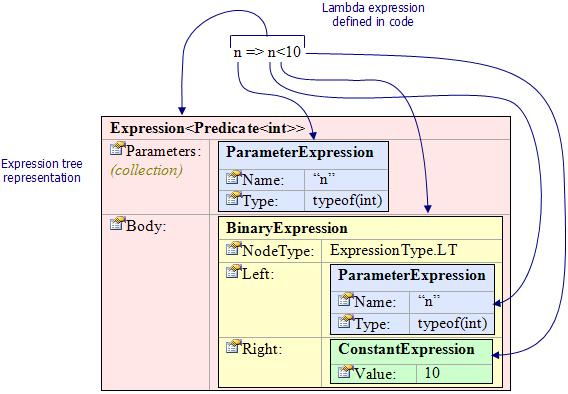
Here is a nice diagram taken from a Code Project article which gives a deep dive into Expression Trees

Diagram from CodeProject article

So knowing it is possible, I pieced together some fragments of code from various sources. The full code is given further below but for now the magic line of code is

var e = myAlias.DynamicExpression.ParseLambda(pList.ToArray(), null, expression);

where the first parameter are the details of the argument(s) used and the third is the expression to the right of the arrow operator.

The Source Code

All the source code is available in a zip here. I also give some excerpts below

Source Talkthrough

I have talked through the source code in a Youtube video. (I recommend the subtitles as my diction is not the best)

VBA - Test Module - tstListOfCartesianPoints

This is the test routine. I have highlighted the lambda expressions in red.

Public Sub TestObjects2()

    Dim oList As LinqInVBA.ListOfPoints
    Set oList = New LinqInVBA.ListOfPoints
    
    Dim o(1 To 3) As CartesianPoint
    Set o(1) = New CartesianPoint
    o(1).x = 3: o(1).y = 4
    
    Set o(2) = New CartesianPoint
    o(2).x = 0.25: o(2).y = 0.5
    Debug.Assert o(2).Magnitude <= 1
    
    Set o(3) = New CartesianPoint
    o(3).x = -0.25: o(3).y = 0.5
    Debug.Assert o(3).Magnitude <= 1
    
    
    oList.Add o(1)
    oList.Add o(2)
    oList.Add o(3)
    
    
    Debug.Print oList.ToString2 'prints (3,4),(0.25,0.5),(-0.25,0.5)
    oList.Sort
    Debug.Print oList.ToString2 'prints (-0.25,0.5),(0.25,0.5),(3,4)
    
    Dim oFiltered As LinqInVBA.ListOfPoints
    Set oFiltered = oList.Where("(o)=>o.Magnitude() <= 1")
    
    Debug.Print oFiltered.ToString2 'prints (-0.25,0.5),(0.25,0.5)

    Dim oFiltered2 As LinqInVBA.ListOfPoints
    Set oFiltered2 = oFiltered.Where("(o)=>o.AngleInDegrees()>=0 && o.AngleInDegrees()<=90")
    
    Debug.Print oFiltered2.ToString2 'prints (0.25,0.5)


'    Dim i
'    For i = 0 To oFiltered.Count - 1
'        Debug.Print oFiltered.Item(i).ToString
'    Next i

End Sub

VBA - CartesianPoint Class Module

Option Explicit

'written by S Meaden

Implements mscorlib.IComparable '* Tools->References->mscorlib
Implements LinqInVBA.ICartesianPoint


Dim PI

Public x As Double
Public y As Double

Public Function Magnitude() As Double
    Magnitude = Sqr(x * x + y * y)
End Function

Public Function Angle() As Double
    Angle = WorksheetFunction.Atan2(x, y)
End Function

Public Function AngleInDegrees() As Double
    AngleInDegrees = Me.Angle * (360 / (2 * PI))
End Function

Private Sub Class_Initialize()
    PI = 4 * Atn(1)
End Sub

Private Function ICartesianPoint_AngleInDegrees() As Double
    ICartesianPoint_AngleInDegrees = Me.AngleInDegrees
End Function

Private Function ICartesianPoint_Magnitude() As Double
    ICartesianPoint_Magnitude = Me.Magnitude
End Function

Private Property Get ICartesianPoint_ToString() As String
    ICartesianPoint_ToString = ToString
End Property

Private Function IComparable_CompareTo(ByVal obj As Variant) As Long
    Dim oPoint2 As CartesianPoint
    Set oPoint2 = obj
    IComparable_CompareTo = Sgn(Me.Magnitude - oPoint2.Magnitude)
    
End Function

Public Function ToString() As String
    ToString = "(" & x & "," & y & ")"
End Function

Public Function Equals(ByVal oPoint2 As CartesianPoint) As Boolean
    Equals = oPoint2.Magnitude = Me.Magnitude
End Function

Private Property Get IToStringable_ToString() As String
    IToStringable_ToString = ToString
End Property

C# - ListsAndLambdas.cs File

This code needs to reside in a Class Library Dll project. You need to run with admin in order to register changes to the registry. You need to check the Register for interop checkbox and you need to make the assembly ComVisible(true). You will also need to install, using NuGet, the package System.Linq.Dynamic.

using System;
using System.Collections.Generic;
using System.Linq;
using System.Linq.Expressions;
using System.Runtime.InteropServices;
using myAlias = System.Linq.Dynamic;   //install package 'System.Linq.Dynamic' v.1.0.7 with NuGet

//https://stackoverflow.com/questions/49453260/datastructure-for-both-sorting-and-filtering/49453892#comment85912406_49453892
//https://www.codeproject.com/Articles/17575/Lambda-Expressions-and-Expression-Trees-An-Introdu
//https://stackoverflow.com/questions/821365/how-to-convert-a-string-to-its-equivalent-linq-expression-tree
//https://stackoverflow.com/questions/33176803/linq-dynamic-parselambda-not-resolving
//https://www.codeproject.com/Articles/74018/How-to-Parse-and-Convert-a-Delegate-into-an-Expres
//https://stackoverflow.com/questions/30916432/how-to-call-a-lambda-using-linq-expression-trees-in-c-sharp-net

namespace LinqInVBA
{
    // in project properties, build tab, check the checkbox "Register for Interop", run Visualstudio in admin so it can registers changes 
    // in AssemblyInfo.cs change to [assembly: ComVisible(true)]

    public class LambdaExpressionHelper
    {
        public Delegate ParseAndCompile(string wholeLambda, int expectedParamsCount, Type[] paramtypes)
        {
            string[] split0 = wholeLambda.Split(new string[] { "=>" }, StringSplitOptions.None);
            if (split0.Length == 1) { throw new Exception($"#Could not find arrow operator in expression {wholeLambda}!"); }
            if (split0.Length != 2) { throw new Exception($"#Expecting only single arrow operator not {split0.Length - 1}!"); }

            string[] args = split0[0].Trim().Split(new char[] { '(', ',', ')' }, StringSplitOptions.RemoveEmptyEntries);
            if (args.Length != expectedParamsCount) { throw new Exception($"#Paramtypes array is of different length {expectedParamsCount} to argument list length{args.Length}"); }
            var expression = split0[1];

            List<ParameterExpression> pList = new List<ParameterExpression>();

            for (int lArgLoop = 0; lArgLoop < args.Length; lArgLoop++)
            {
                Type typLoop = paramtypes[lArgLoop];
                var p = Expression.Parameter(typLoop, args[lArgLoop]);
                pList.Add(p);
            }


            var e = myAlias.DynamicExpression.ParseLambda(pList.ToArray(), null, expression);
            return e.Compile();
        }
    }

    public interface IFilterableListOfPoints
    {
        void Add(ICartesianPoint x);
        string ToString2();
        IFilterableListOfPoints Where(string lambda);

        int Count();
        ICartesianPoint Item(int idx);
        void Sort();
    }

    public interface ICartesianPoint
    {
        string ToString();
        double Magnitude();
        double AngleInDegrees();
        // add more here if you intend to use them in a lambda expression
    }

    [ClassInterface(ClassInterfaceType.None)]
    [ComDefaultInterface(typeof(IFilterableListOfPoints))]
    public class ListOfPoints : IFilterableListOfPoints
    {

        private List<ICartesianPoint> myList = new List<ICartesianPoint>();

        public List<ICartesianPoint> MyList { get { return this.myList; } set { this.myList = value; } }

        void IFilterableListOfPoints.Add(ICartesianPoint x)
        {
            myList.Add(x);
        }

        int IFilterableListOfPoints.Count()
        {
            return myList.Count();
        }

        ICartesianPoint IFilterableListOfPoints.Item(int idx)
        {
            return myList[idx];
        }

        void IFilterableListOfPoints.Sort()
        {
            myList.Sort();
        }

        string IFilterableListOfPoints.ToString2()
        {
            List<string> toStrings = new List<string>();
            foreach (ICartesianPoint obj in myList)
            {
                toStrings.Add(obj.ToString());
            }

            return string.Join(",", toStrings.ToArray());
            
        }

        IFilterableListOfPoints IFilterableListOfPoints.Where(string wholeLambda)
        {
            Type[] paramtypes = { typeof(ICartesianPoint) };


            LambdaExpressionHelper lh = new LambdaExpressionHelper();
            Delegate compiled = lh.ParseAndCompile(wholeLambda, 1, paramtypes);

            System.Func<ICartesianPoint, bool> pred = (System.Func<ICartesianPoint, bool>)compiled;

            ListOfPoints newList = new ListOfPoints();
            newList.MyList = (List<ICartesianPoint>)myList.Where(pred).ToList();
            return newList;
        }

    }

}