Showing posts with label Visual Studio 2017. Show all posts

Sunday, 11 February 2018

VBA - Visual Studio (2017) Interop - Automated copy source of XHTML file

Summary: This VBA will copy a file into a Visual Studio Project Item, in this case an XHTML to check for XHTML5 compliance but could be used for copying other source to other project items.

So, I had cause to upgrade some HTML4 to XHTML5, the best validator would be Visual Studio (I'm using 2017), if one creates a C# WebApplication and adds a WebForm then the default HTML schema is XHTML5 with closed tags and no upper case element tagnames or attributes as well as other structural syntax changes. I needed to eyeball a whole directory of HTML files with this validator so I chose to write some code to automate.

The code first gets hold of the solution from the Running Object Table, in VBA.GetObject will do this. Then we find the project, the project item and then the text. The copy across is based on EditPoints. Warning, the Microsoft web sites for this has long running scripts which is a pain.

The test standard module

Option Explicit
Option Private Module
Private Sub TestReplaceWebPageText()
    
    Dim oVisualStudioSolutionHandler As VisualStudioSolutionHandler
    Set oVisualStudioSolutionHandler = New VisualStudioSolutionHandler
    
    Call oVisualStudioSolutionHandler.ReplaceWebPageText( _
                "C:\Users\Simon\source\repos\WebApplication1\WebApplication1.sln", _
                "WebApplication1", "WebForm1.aspx", _
                "C:\Users\Simon\AppData\Local\Temp\foobar.xhtml")
End Sub

VisualStudioSolutionHandler class module

Option Explicit

'* Tools References
'*
'*   EnvDTE           
'*     Microsoft Development Environment 8.0 (Version 7.0 Object Model)    
'*     C:\Program Files (x86)\Common Files\Microsoft Shared\MSEnv\dte80a.olb
'*
'*   Scripting
'*     Microsoft Scripting Runtime                                         
'*     C:\Windows\SysWOW64\scrrun.dll


Private Function SafeTypeNameGetObject(ByVal sRunningObject As String) As String
    On Error Resume Next
    SafeTypeNameGetObject = TypeName(GetObject(sRunningObject))
End Function

Public Sub ReplaceWebPageText(ByVal sSolutionPath As String, _
                                ByVal sProjectName As String, _
                                ByVal sWebFormName As String, _
                                ByVal sXhtmlFileName As String)

    Const csWebFormHeader As String = _
        "<%@ Page Language=""C#"" AutoEventWireup=""true"" CodeBehind=""WebForm1.aspx.cs"" Inherits=""WebApplication1.WebForm1"" %>"

    If Len(sSolutionPath) = 0 Then Err.Raise vbObjectError, , "#Null sSolutionName!"
    If Len(sProjectName) = 0 Then Err.Raise vbObjectError, , "#Null sProjectName!"
    If Len(sWebFormName) = 0 Then Err.Raise vbObjectError, , "#Null sWebFormName!"
    If Len(sXhtmlFileName) = 0 Then Err.Raise vbObjectError, , "#Null sXhtmlFileName!"

    If StrComp(Right$(sXhtmlFileName, 6), ".xhtml", vbTextCompare) <> 0 Then _
                    Err.Raise vbObjectError, , "#sXhtmlFileName  '" & sXhtmlFileName & "' should end with '.xhtml'!"

    Static fso As New Scripting.FileSystemObject
    If Not fso.FileExists(sXhtmlFileName) Then Err.Raise vbObjectError, , "#sXhtmlFileName '" & sXhtmlFileName & "' does not exist!"
    If Not fso.FileExists(sSolutionPath) Then Err.Raise vbObjectError, , "#sSolutionPath '" & sSolutionPath & "' does not exist!"
    
    If VBA.StrComp(Right$(sSolutionPath, 4), ".sln", vbTextCompare) <> 0 Then _
                    Err.Raise vbObjectError, , "#sSolutionPath '" & sSolutionPath & "' should end with '.sln'!"
    
    Dim sResolvedType As String
    sResolvedType = SafeTypeNameGetObject(sSolutionPath)
    If VBA.StrComp(sResolvedType, "Solution", vbTextCompare) <> 0 Then Err.Raise vbObjectError, , _
            "#Expectin sSolutionPath '" & sSolutionPath & "' to resolve to a solution instead resolved to '" & sResolvedType & "'!"


    Dim sReplacementText As String
    sReplacementText = csWebFormHeader & vbNewLine & vbNewLine
    
    Dim txtIn As Scripting.TextStream
    Set txtIn = fso.OpenTextFile(sXhtmlFileName, ForReading, False, TristateUseDefault)
    
    While Not txtIn.AtEndOfStream
        DoEvents
        sReplacementText = sReplacementText & vbNewLine & txtIn.ReadLine
    Wend
    
    
    Dim sol As EnvDTE.Solution
    Set sol = GetObject(sSolutionPath)

    Dim webProj As EnvDTE.Project
    Set webProj = GetVSProject(sol, sProjectName)

    Dim webForm1 As EnvDTE.ProjectItem
    Set webForm1 = webProj.ProjectItems.Item(sWebFormName)


    Dim webForm1Doc As EnvDTE.Document
    Set webForm1Doc = webForm1.Document

    Dim webForm1TextDoc As EnvDTE.TextDocument
    Set webForm1TextDoc = webForm1Doc.Selection.Parent

    'https://docs.microsoft.com/en-us/dotnet/api/envdte.textdocument.createeditpoint?redirectedfrom=MSDN&view=visualstudiosdk-2017
    Debug.Assert webForm1TextDoc Is webForm1Doc.Object("TextDocument")

    Dim objStartPt As EnvDTE.EditPoint
    Set objStartPt = webForm1TextDoc.CreateEditPoint(webForm1TextDoc.StartPoint)

    Dim objEndPt As EnvDTE.EditPoint
    Set objEndPt = webForm1TextDoc.CreateEditPoint(webForm1TextDoc.EndPoint)


    'https://docs.microsoft.com/en-us/dotnet/api/envdte.editpoint.replacetext?view=visualstudiosdk-2017
    objStartPt.ReplaceText objEndPt, sReplacementText, 0
    
    webForm1.Save

    'Stop
SingleExit:
End Sub


Public Function GetVSProject(ByVal sol As EnvDTE.Solution, ByVal sProjectName As String) As EnvDTE.Project

    If Not sol Is Nothing Then
    
        Dim lProjectLoop As Long
        For lProjectLoop = 1 To sol.Projects.Count
            
            Dim prjLoop As EnvDTE.Project
            Set prjLoop = sol.Projects.Item(lProjectLoop)
            
            If VBA.StrComp(prjLoop.Name, sProjectName, vbTextCompare) = 0 Then
                Set GetVSProject = prjLoop
                GoTo SingleExit
            
            End If
        
        Next lProjectLoop
    
    End If
SingleExit:

End Function
Monday, 22 January 2018

Javascript - Use Visual Studio to write and VBA to run JScript

Ok, so using the ScriptControl is a major pain if you are adding in your code as text strings such as the following one-liners

        Set soSC = New ScriptControl
        soSC.Language = "JScript"

        soSC.AddCode "function deleteValueByKey(obj,keyName) { delete obj[keyName]; } "
        soSC.AddCode "function setValueByKey(obj,keyName, newValue) { obj[keyName]=newValue; } "
        soSC.AddCode "function enumKeysToMsDict(jsonObj,msDict) { for (var i in jsonObj) { msDict.Add(i,0); }  } "

        soSC.AddCode "function subString(sExpr, lStart, lEnd) {  return sExpr.substring(lStart, lEnd) ;}"
        soSC.AddCode "function indexOf(sExpr,searchvalue, start) {  return sExpr.indexOf(searchvalue, start) ;}"

        soSC.AddCode "function CountLeftBrackets(sExpr) {  return sExpr.split('[').length-1 ;}"
        soSC.AddCode "function CountRightBrackets(sExpr) {  return sExpr.split(']').length-1 ;}"

Any double quotes are best changed to single quotes. Each of the lines above fits on one line and so it is not so difficult to add the correct bracketing. But imagine a program full of functions like the following

        soSC.AddCode "function ValidSquareBrackets(sExpr) {" & _
                "   var lCountLeftBrackets = CountLeftBrackets(sExpr); var lCountRightBrackets = CountRightBrackets(sExpr);" & _
                "   if (lCountLeftBrackets!==lCountRightBrackets)  { return -1; } else {" & _
                "         if (lCountLeftBrackets===0 || lCountRightBrackets===1) { return lCountLeftBrackets;} else { return -1;}" & _
                "   }}"
        
        
        soSC.AddCode "function ValidSquareBracketsForPath(sPath) {" & _
                "    var vSplit=sPath.split('.');  var bAllPathSgementsAreValid=true;" & _
                "    for (i = 0; i < vSplit.length; i++) {" & _
                "        var vSplitLoop=vSplit[i];" & _
                "        var lMatchedBracketCount = ValidSquareBrackets(vSplitLoop);" & _
                "        var bValid = (lMatchedBracketCount === 0 || lMatchedBracketCount === 1);" & _
                "        bAllPathSgementsAreValid =  bAllPathSgementsAreValid && bValid;" & _
                "    }" & _
                "    return bAllPathSgementsAreValid;" & _
                "}"

This very quickly gets painful. So ideally we would use Visual Studio to write the Javascript file, debug also in VS and then finally test the code on the ScriptControl because VS2017 will be running a later version of Javascript (Ecmascript 6) whereas I believe the ScriptControl only runs Ecmascript v.3. Once the code is finalised then instead of hard coding in strings we can simply read in the code from a file thus.

Option Explicit

'* Tools->References
'MSScriptControl        Microsoft Script Control 1.0        C:\Windows\SysWOW64\msscript.ocx
'Scripting              Microsoft Scripting Runtime         C:\Windows\SysWOW64\scrrun.dll


Private mfso As New Scripting.FileSystemObject

Private Function SC() As ScriptControl
    Static soSC As ScriptControl
    'If soSC Is Nothing Then


        Set soSC = New ScriptControl
        soSC.Language = "JScript"

        soSC.AddCode ReadFileToString("N:\JScriptDev\Solution1\test.js")
        
        soSC.AddObject "ThisDocument", ThisDocument
    'End If
    Set SC = soSC
End Function

Private Sub RunGreet()
    Call SC.Run("Greet", "Tim")
End Sub


Private Sub TestReadFileToString()
    Dim s As String
    s = ReadFileToString("N:\JSONPath\test.js")
End Sub

Public Function ReadFileToString(ByVal sFilePath As String) As String
    If mfso.FileExists(sFilePath) Then
        ReadFileToString = mfso.OpenTextFile(sFilePath).ReadAll
    End If
End Function


However, we need to pull a couple of tricks on the Visual Studio side. First one needs to create a blank solution, somebody helpful has answered how to do this on StackOverflow. Then add your javascript such as the following

// * the following will run if using cscript.exe
Greet("to you")

function Greet(a) {
    output("Hi, " + a);
}

function output(str) {
    if (typeof this.window != 'undefined') {
        this.window.alert(str);
    }

    if (typeof this.WScript != 'undefined') {
        /* this will run if you ran from cscript.exe */
        WScript.echo(str);
    }

    if (typeof this.ThisDocument != 'undefined') {
        /* For Word VBA projects 
           this will run if you ran a ScriptControl instance (C:\Windows\SysWOW64\msscript.ocx) 
           and you ran ScriptControl.AddObject "ThisDocument", ThisDocument
           and within ThisDocument you defined "Public Function VBAOutput(str): Debug.Print str: End Function"  */
        ThisDocument.VBAOutput(str);
    }

    if (typeof this.ThisWorkbook != 'undefined') {
        /* For Excel VBA projects 
           this will run if you ran a ScriptControl instance (C:\Windows\SysWOW64\msscript.ocx) 
           and you ran ScriptControl.AddObject "ThisWorkbook", ThisWorkbook
           and within ThisWorkbook you defined "Public Function VBAOutput(str): Debug.Print str: End Function"  */
        ThisWorkbook.VBAOutput(str);
    }
}


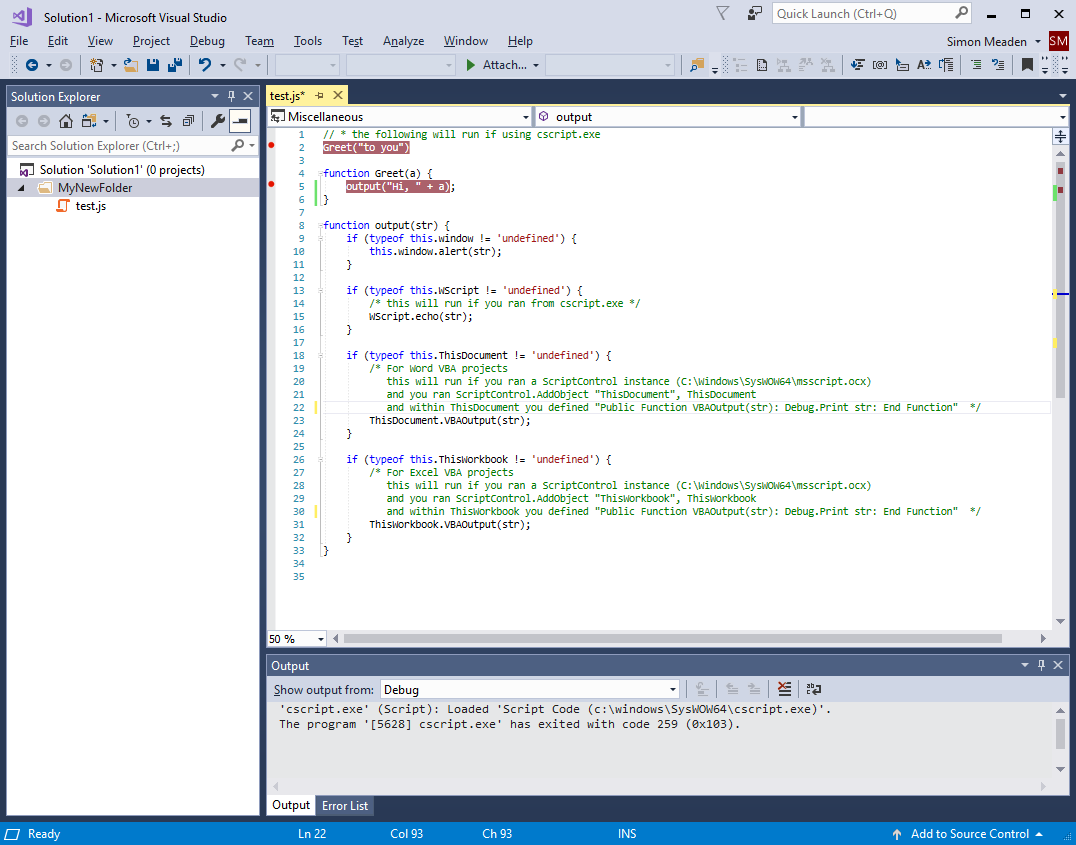
Your VS should look something like the following

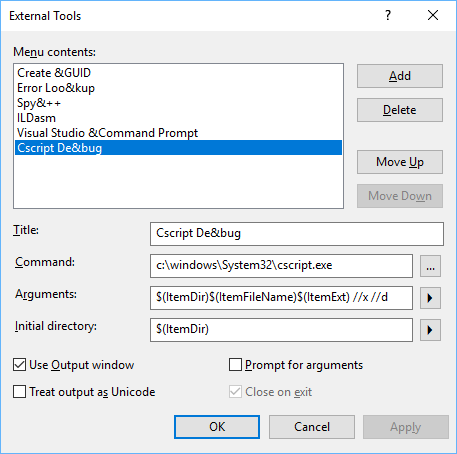
The second trick is to define a custom "External Tool" by taking the Visual Studio menu Tools->External Tools... and then populate the dialog as per the screenshot below.

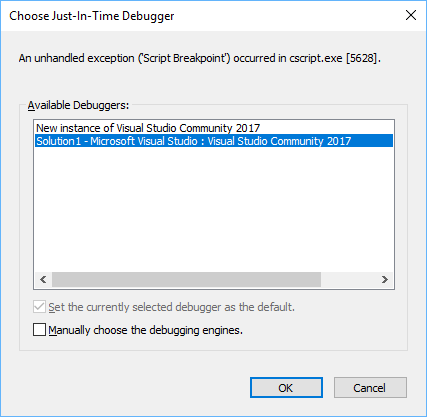
So now when you have your javascript file in view and you take the menu 'Tools->Cscript Debug' then it will run cscript.exe for your file and you will get a 'Choose Just-In-Time Debugger' dialog like this

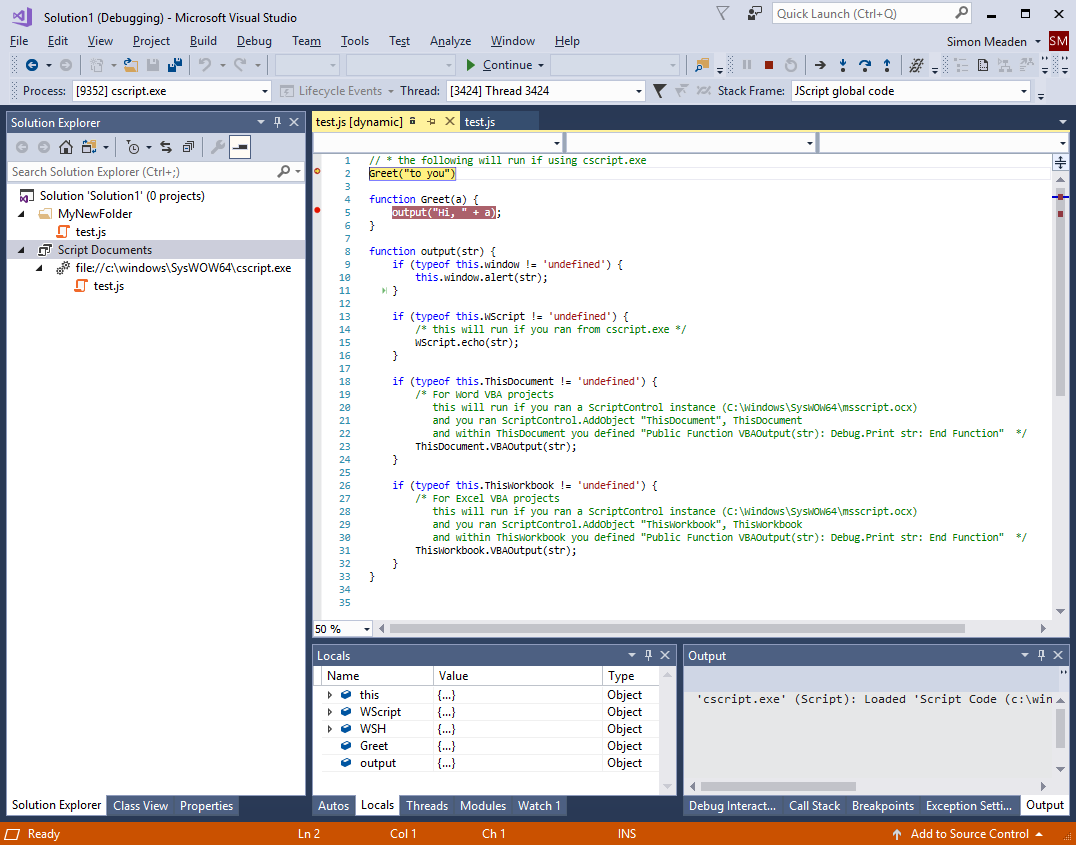
Select the current session of VS, i.e. same session as your javascript file, and then click OK. This will drop you into the first set breakpoint and will look something like the following.

So now you can enjoy the powerful debugging features of Visual Studio 2017, and remember Community Edition is free.