Showing posts with label Ecmascript. Show all posts

Saturday, 24 July 2021

JavaScript Notes and Queries: JavaScript's Prototypical Inheritance is simpler than TypeScript implies

In other posts on this blog I can write with authority rooted in deep experience. Lately, I have been revisiting JavaScript and cannot write on this topic with such confidence but I am keen to master web development. So I begin a new series called JavaScript Notes and Queries and the first topic is prototypical inheritance...

TypeScript, harbinger of change

I cannot write about all the previous versions of JavaScript nor give key milestones, I can only write as to my previous encounters. Decades ago, I remember JavaScript being the language used in web pages to handle mouse clicks etc. and little more. At my clients (Banks etc.) nobody was writing large scale projects in JavaScript. But Microsoft were and they found it wanting, so Microsoft invented TypeScript. Here's John Papa, Principal Developer Advocate with Microsoft ...

TypeScript is a language for application-scale JavaScript development. It’s a typed superset of JavaScript that compiles to plain JavaScript and was originally created out of a need for a more robust tooling experience to complement JavaScript language developers.

So, Microsoft concluded that ordinary JavaScript couldn't cope with large scale projects. The TypeScript tooling, specifically the online transpilers, that arose could be used to compare and contrast syntax patterns between TypeScript and JavaScript, of most interest to me was classes and inheritance.

TypeScript transpilers reveal JavaScript prototypical equivalence of TypeScript classes

Typescript 'transpiles' to plain JavaScript, and you can find tools on line to demonstrate such as TypeScript playground. I find this to be the best tool because you can change the target version of JavaScript. When I first encountered these JavaScript was still at ECMAScript 5, i.e. before the class keyword had arrived. We can play a game of time travel and restrict the target language to ECMAScript 5 by using the options menu. Then, we can write a TyepScript class and see the old school JavaScript equivalent.

Below is a simple class in Typescript (on the left) and its transpiled into old school JavaScript, specifically ECMAScript 5 (because ECMAScript 6 has its own class keyword) equivalent (on the right). Here is the link which you must paste in full because the source code is encoded in the url.

class Animal {
  name: string;
  constructor(theName: string) {
    this.name = theName;
  }
  move(distanceInMeters: number = 0) {
    console.log(`${this.name} moved ${distanceInMeters}m.`);
  }
}
"use strict";
var Animal = /** @class */ (function () {
    function Animal(theName) {
        this.name = theName;
    }
    Animal.prototype.move = function (distanceInMeters) {
        if (distanceInMeters === void 0) { distanceInMeters = 0; }
        console.log(this.name + " moved " + distanceInMeters + "m.");
    };
    return Animal;
}());

The JavaScript on the right is cryptic compared to the Typescript on the left but if you play around (add some more methods etc.) you'll discover the syntax pattern. The pattern is that methods are appended to the prototype property of the Animal object, this means all instances of Animal created will get a move() method, just like it was a class. Other lines in the JavaScript implement the contructor function. A class's modularity is reproduced in JavaScript by using the 'module pattern', this is established with an IIFE (Immediately Invoked Function Expression).

JavaScript's Prototypical Inheritance is simpler than TypeScript implies

So far so good. Now that we know how to append methods to the prototype we could just skip the Transcript and write the JavaScript directly. But what about inheritance? In Typescript you use the extends keyword. I've given a code listing example below and this link will take you again to Typescript playground but brace yourself for the transpiled equivalent for it is very, very scary.

class Animal {
  name: string;
  constructor(theName: string) {
    this.name = theName;
  }
  move(distanceInMeters: number = 0) {
    console.log(`${this.name} moved ${distanceInMeters}m.`);
  }
}

class Dog extends Animal {
  bark() {
    console.log("Woof! Woof!");
  }
}

So the transpiled listing is given below in all its scariness. Don't forget, we're deliberately choosing to target a version of JavaScript before the class keyword arrived. We're doing this in the name of investigation! All the really scary code is in the top code block which defines the __extends function.

"use strict";
var __extends = (this && this.__extends) || (function () {
    var extendStatics = function (d, b) {
        extendStatics = Object.setPrototypeOf ||
            ({ __proto__: [] } instanceof Array && function (d, b) { d.__proto__ = b; }) ||
            function (d, b) { for (var p in b) if (b.hasOwnProperty(p)) d[p] = b[p]; };
        return extendStatics(d, b);
    };
    return function (d, b) {
        extendStatics(d, b);
        function __() { this.constructor = d; }
        d.prototype = b === null ? Object.create(b) : (__.prototype = b.prototype, new __());
    };
})();
var Animal = /** @class */ (function () {
    function Animal(theName) {
        this.name = theName;
    }
    Animal.prototype.move = function (distanceInMeters) {
        if (distanceInMeters === void 0) { distanceInMeters = 0; }
        console.log(this.name + " moved " + distanceInMeters + "m.");
    };
    return Animal;
}());
var Dog = /** @class */ (function (_super) {
    __extends(Dog, _super);
    function Dog() {
        return _super !== null && _super.apply(this, arguments) || this;
    }
    Dog.prototype.bark = function () {
        console.log("Woof! Woof!");
    };
    return Dog;
}(Animal));

I took this code and then I started to remove lines to see what breaks, you might like to do the same as an exercise. I believe the variable b stands for base, d stands for derived and p stands for property. Much of this code is 'polyfill' code which acts to retofit modern features, so a lot could be removed.

My classes are simpler than others and so I could remove loads of code. My classes hold no state which is my preference these days. Without state, my classes have parameterless constructors and the need to call base class constructors is obviated; this also simplified matters.

I had thought that I had completely boiled down the __extends function to one line that uses the Object.create method ...

Dog.prototype = Object.create(Animal.prototype);

An alternative line of code is to the use

Object.setPrototypeOf( Animal.prototype, Creature.prototype )

I asked a pertinent Stack Overflow question while constructing a deeper class hierarchy. That question links to other relevant SO questions.

All this means we can arrive at a much less scary code listing below.

    var Animal = (function () {

        function Animal() {
            return this;
        }

        Animal.prototype.move = function (distanceInMeters) {
            if (distanceInMeters === void 0) {
                distanceInMeters = 0;
            }
            console.log("Animal moved " + distanceInMeters + "m.");
        };

        return Animal;
    }());

    var Dog = (function () {
        
        Object.setPrototypeOf( Dog.prototype, Animal.prototype )

        function Dog() {
            return this;
        }
        Dog.prototype.bark = function () {
            console.log("Woof! Woof!");
        };
        return Dog;
    }());

    var dog = new Dog();
    dog.bark();
    dog.move(10);
    dog.bark();

If we look in the Console in the Chrome Developer Tools then we can see out program's output. If we also type console.info(dog) and expand the nodes then we can see our desired inheritance tree ...

Our target inheritance tree

Speed Warning

Unfortunately that is not the end of the story because during my research I cam across this MDN article which says that the Object.setPrototypeOf technique is ...

Ill-performing. Should be deprecated. Many browsers optimize the prototype and try to guess the location of the method in memory when calling an instance in advance; but setting the prototype dynamically disrupts all those optimizations. It might cause some browsers to recompile your code for de-optimization, to make it work according to the specs.

Clearly, I need to do more research. I will return to this topic...

Links

Other links that maybe useful...

Wednesday, 24 January 2018

Javascript - cscript.exe and script control limited to Ecmascript 3

So the script control (MSScriptControl|Microsoft Script Control 1.0|C:\Windows\SysWOW64\msscript.ocx) is very useful for parsing JSON because Douglas Crockford's scripts run happily but it is limited to Ecmascript version 3. Sadly the command line script executable, cscript.exe (c:\Windows\SysWOW64\cscript.exe) is also restricted to Ecmascript version 3 because they sahare the same JScript engine.

We can see this we some Javascript version detection code. Save this file as test.js

JavaScriptVersion();


function JavaScriptVersion() {
    if (typeof this.WScript != 'undefined') {
        WScript.echo("supports ES3:" + checkES3());
        WScript.echo("supports ES5:" + checkES5());
        WScript.echo("supports foreach:" + forEach());
    }
}


function checkES3() {
    try {
    return "function" === typeof [].hasOwnProperty;
    }
    catch (ex) { }
}

function checkES5() {
    try {
        var methods = 'function' === typeof [].filter &&
            'function' === typeof Function.prototype.bind &&
            'function' === typeof Object.defineProperty &&
            'function' === typeof ''.trim &&
            'object' === typeof JSON;

        var syntax = supports("reservedWords");
    }
    catch (ex) { }

    return methods && syntax;
}

function forEach() {

    try {
        var supportsForEach = false;
        var arr = ['a', 'b', 'c'];

        arr.forEach(function callback(element) {
            var b = element + " ";
        });
        supportsForEach = true;
    }
    catch (ex) { }
    return supportsForEach;
}

So now run this console command

c:\Windows\SysWOW64\cscript.exe test.js

The console command generates the output below showing cscript.exe is limited to ES3.

Microsoft (R) Windows Script Host Version 5.812
Copyright (C) Microsoft Corporation. All rights reserved.

supports ES3:true
supports ES5:false
supports foreach:false

Monday, 22 January 2018

Javascript - Use Visual Studio to write and VBA to run JScript

Ok, so using the ScriptControl is a major pain if you are adding in your code as text strings such as the following one-liners

        Set soSC = New ScriptControl
        soSC.Language = "JScript"

        soSC.AddCode "function deleteValueByKey(obj,keyName) { delete obj[keyName]; } "
        soSC.AddCode "function setValueByKey(obj,keyName, newValue) { obj[keyName]=newValue; } "
        soSC.AddCode "function enumKeysToMsDict(jsonObj,msDict) { for (var i in jsonObj) { msDict.Add(i,0); }  } "

        soSC.AddCode "function subString(sExpr, lStart, lEnd) {  return sExpr.substring(lStart, lEnd) ;}"
        soSC.AddCode "function indexOf(sExpr,searchvalue, start) {  return sExpr.indexOf(searchvalue, start) ;}"

        soSC.AddCode "function CountLeftBrackets(sExpr) {  return sExpr.split('[').length-1 ;}"
        soSC.AddCode "function CountRightBrackets(sExpr) {  return sExpr.split(']').length-1 ;}"

Any double quotes are best changed to single quotes. Each of the lines above fits on one line and so it is not so difficult to add the correct bracketing. But imagine a program full of functions like the following

        soSC.AddCode "function ValidSquareBrackets(sExpr) {" & _
                "   var lCountLeftBrackets = CountLeftBrackets(sExpr); var lCountRightBrackets = CountRightBrackets(sExpr);" & _
                "   if (lCountLeftBrackets!==lCountRightBrackets)  { return -1; } else {" & _
                "         if (lCountLeftBrackets===0 || lCountRightBrackets===1) { return lCountLeftBrackets;} else { return -1;}" & _
                "   }}"
        
        
        soSC.AddCode "function ValidSquareBracketsForPath(sPath) {" & _
                "    var vSplit=sPath.split('.');  var bAllPathSgementsAreValid=true;" & _
                "    for (i = 0; i < vSplit.length; i++) {" & _
                "        var vSplitLoop=vSplit[i];" & _
                "        var lMatchedBracketCount = ValidSquareBrackets(vSplitLoop);" & _
                "        var bValid = (lMatchedBracketCount === 0 || lMatchedBracketCount === 1);" & _
                "        bAllPathSgementsAreValid =  bAllPathSgementsAreValid && bValid;" & _
                "    }" & _
                "    return bAllPathSgementsAreValid;" & _
                "}"

This very quickly gets painful. So ideally we would use Visual Studio to write the Javascript file, debug also in VS and then finally test the code on the ScriptControl because VS2017 will be running a later version of Javascript (Ecmascript 6) whereas I believe the ScriptControl only runs Ecmascript v.3. Once the code is finalised then instead of hard coding in strings we can simply read in the code from a file thus.

Option Explicit

'* Tools->References
'MSScriptControl        Microsoft Script Control 1.0        C:\Windows\SysWOW64\msscript.ocx
'Scripting              Microsoft Scripting Runtime         C:\Windows\SysWOW64\scrrun.dll


Private mfso As New Scripting.FileSystemObject

Private Function SC() As ScriptControl
    Static soSC As ScriptControl
    'If soSC Is Nothing Then


        Set soSC = New ScriptControl
        soSC.Language = "JScript"

        soSC.AddCode ReadFileToString("N:\JScriptDev\Solution1\test.js")
        
        soSC.AddObject "ThisDocument", ThisDocument
    'End If
    Set SC = soSC
End Function

Private Sub RunGreet()
    Call SC.Run("Greet", "Tim")
End Sub


Private Sub TestReadFileToString()
    Dim s As String
    s = ReadFileToString("N:\JSONPath\test.js")
End Sub

Public Function ReadFileToString(ByVal sFilePath As String) As String
    If mfso.FileExists(sFilePath) Then
        ReadFileToString = mfso.OpenTextFile(sFilePath).ReadAll
    End If
End Function


However, we need to pull a couple of tricks on the Visual Studio side. First one needs to create a blank solution, somebody helpful has answered how to do this on StackOverflow. Then add your javascript such as the following

// * the following will run if using cscript.exe
Greet("to you")

function Greet(a) {
    output("Hi, " + a);
}

function output(str) {
    if (typeof this.window != 'undefined') {
        this.window.alert(str);
    }

    if (typeof this.WScript != 'undefined') {
        /* this will run if you ran from cscript.exe */
        WScript.echo(str);
    }

    if (typeof this.ThisDocument != 'undefined') {
        /* For Word VBA projects 
           this will run if you ran a ScriptControl instance (C:\Windows\SysWOW64\msscript.ocx) 
           and you ran ScriptControl.AddObject "ThisDocument", ThisDocument
           and within ThisDocument you defined "Public Function VBAOutput(str): Debug.Print str: End Function"  */
        ThisDocument.VBAOutput(str);
    }

    if (typeof this.ThisWorkbook != 'undefined') {
        /* For Excel VBA projects 
           this will run if you ran a ScriptControl instance (C:\Windows\SysWOW64\msscript.ocx) 
           and you ran ScriptControl.AddObject "ThisWorkbook", ThisWorkbook
           and within ThisWorkbook you defined "Public Function VBAOutput(str): Debug.Print str: End Function"  */
        ThisWorkbook.VBAOutput(str);
    }
}


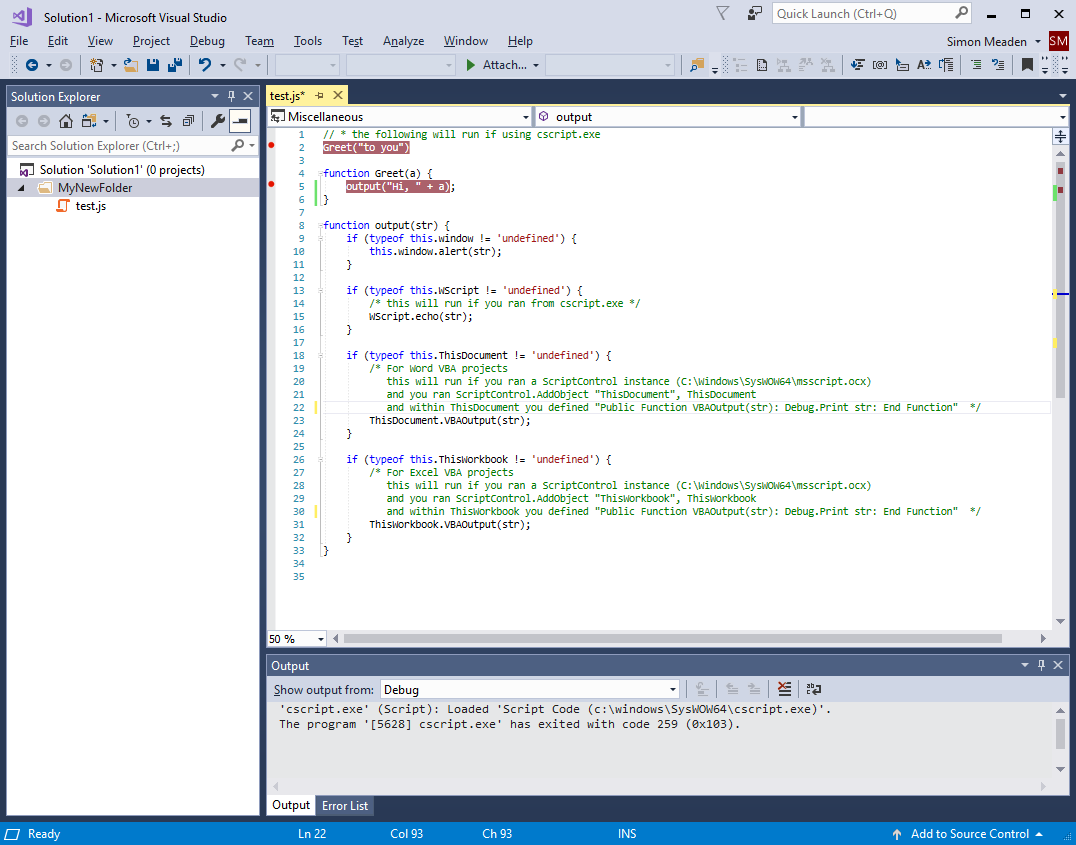
Your VS should look something like the following

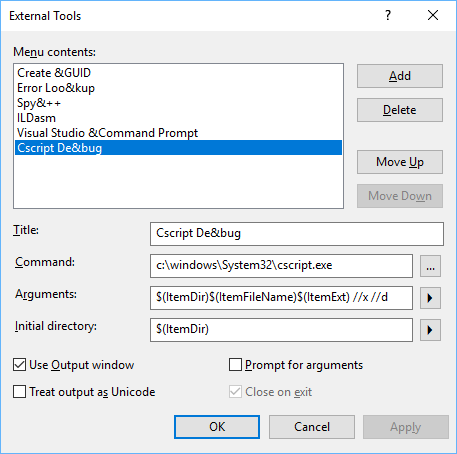
The second trick is to define a custom "External Tool" by taking the Visual Studio menu Tools->External Tools... and then populate the dialog as per the screenshot below.

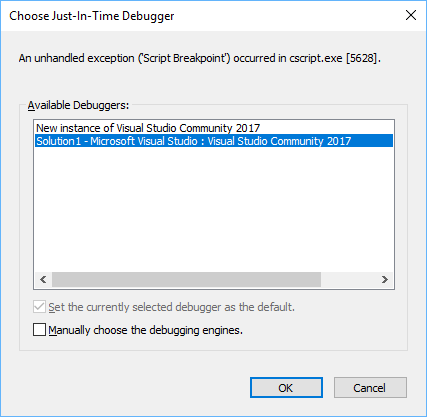
So now when you have your javascript file in view and you take the menu 'Tools->Cscript Debug' then it will run cscript.exe for your file and you will get a 'Choose Just-In-Time Debugger' dialog like this

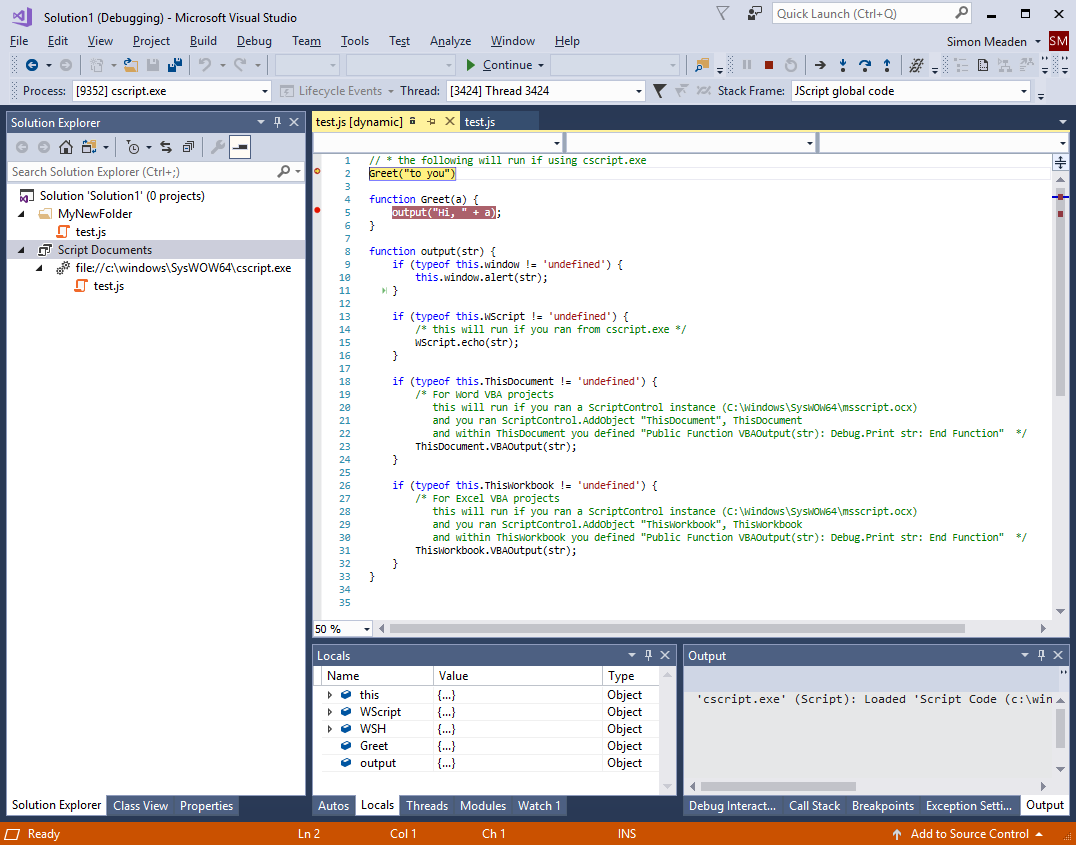
Select the current session of VS, i.e. same session as your javascript file, and then click OK. This will drop you into the first set breakpoint and will look something like the following.

So now you can enjoy the powerful debugging features of Visual Studio 2017, and remember Community Edition is free.