Showing posts with label Windows. Show all posts

Sunday, 22 August 2021

How do web servers tell the (Windows) operating system which port to listen on?

So I chanced upon a beautiful piece of sample C++ whilst wondering around the Microsoft website. Essentially the code creates an http server sample application. If we browse the code we can see that there is a line to register interest in a URL of which the port is a segment by calling HttpAddUrl.

Before we call HttpAddUrl we have to call first HttpInitialize and then httpcreatehttphandle; the latter passes a structure that we can pass into HttpAddUrl.

But now we can get to the heart of the issue: how to register interest in a port. Here is the method signature of HttpAddUrl.

HTTPAPI_LINKAGE ULONG HttpAddUrl(
  HANDLE RequestQueueHandle,
  PCWSTR FullyQualifiedUrl,
  PVOID  Reserved
);

The second parameter is a string, a URLPrefix string to be precise. The syntax and examples are given below.

"scheme://host:port/relativeURI"

https://www.adatum.com:80/vroot/
https://adatum.com:443/secure/database/
https://+:80/vroot/

To start receiving requests the sample code gives a function which handles each request, in this code there is yet another Windows API call this time to HttpReceiveHttpRequest.

And that is enough code, although we should tidy up and this is given in the code. Hopefully this clarifies the relationship between a web server and the (Windows) operating system.

There are some details about upgrading the code when using HTTP Server API Version 2.0. Other than that the code stands

All of this is for Microsoft Windows obviously, but I should imagine the process is similar for Linux and Mac OS.

Previously I have given code (twice!) that allows Excel to run as a web server: once in C# and once in Python. So, it would appear that for the adventurous some C++ Excel addin could also implement an HTTP web server! So that's a third way!

Saturday, 2 June 2018

VBA - Python - Console culture part 1 - setting up environment variables

So in this blog post I show a simple hello world COM class written in Python. Admittedly that post gives few details on working at the command line, let me rectify that here.

Finding the Python folder

Let's work with the same Python install as Visual Studio 2017, so I'm assuming the reader has installed the Python workload for Visual Studio 2017. If installed we can find the python folder within the Visual Studio folder, open up a new command window and type the text highlighted in blue.


Microsoft Windows [Version 10.0.17134.48]
(c) 2018 Microsoft Corporation. All rights reserved.

C:\Users\Simon>cd C:\Program Files (x86)\Microsoft Visual Studio

C:\Program Files (x86)\Microsoft Visual Studio>dir python.exe /s
 Volume in drive C is OS
 Volume Serial Number is D6D5-B454

 Directory of C:\Program Files (x86)\Microsoft Visual Studio\Shared\Anaconda3_64

19/09/2017  17:06            93,696 python.exe
               1 File(s)         93,696 bytes

 Directory of C:\Program Files (x86)\Microsoft Visual Studio\Shared\Anaconda3_64\pkgs\python-3.6.2-h6679aeb_11

19/09/2017  17:06            93,696 python.exe
               1 File(s)         93,696 bytes

 Directory of C:\Program Files (x86)\Microsoft Visual Studio\Shared\Python36_64

03/10/2017  19:15           100,504 python.exe
               1 File(s)        100,504 bytes

     Total Files Listed:
               3 File(s)        287,896 bytes
               0 Dir(s)  2,635,719,708,672 bytes free

C:\Program Files (x86)\Microsoft Visual Studio>

So I going to use C:\Program Files (x86)\Microsoft Visual Studio\Shared\Python36_64 though yours may be different. Irritatingly, environment variables do not like spaces but if you convert to DOS 8.3 format then you ought to get a path that has no spaces; I wrote a program here to shorten a path, I ran this and I now get a shorter (and more cryptic ) path of C:\PROGRA~2\MICROS~4\Shared\PYTHON~1

Setting up Environment Variables

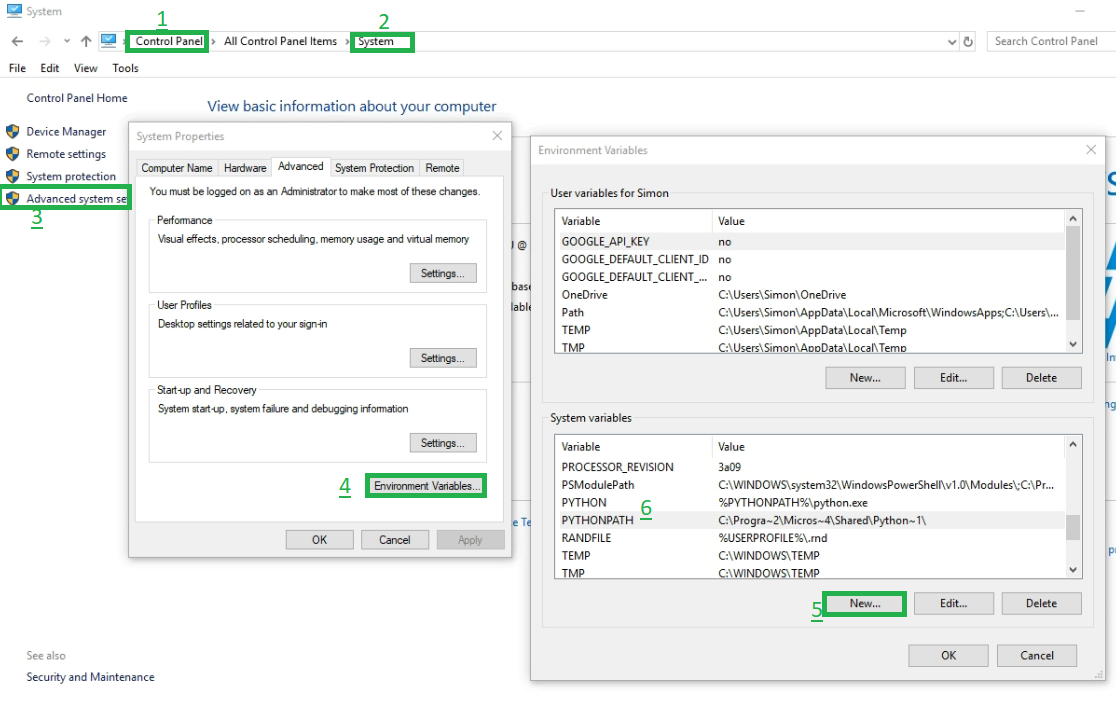
One sets up environment variables via the control panel app and a set of dialogs, here is a helping picture for those unfamiliar.

I have chosen to set up two new environment variables, %pythonpath% for the python folder, %python% for python executable, python.exe. I have also added %pythonpath% to the %PATH% variable, along with %pythonpath%\scripts which makes the pip executable reachable as well.

Remember that any changes to the environment variables need to be saved with the OK button and only command windows opened after the save will reflect the changes.

VBA - Windows API - Code to shorten path to DOS 8.3 format

So just setting up some environment variables and irritatingly they misbehave if they have spaces, converting from a long windows path to a DOS 8.3 format can help even though spaces are legal in DOS 8.3. Anyway, we can write a program to call the relevant windows API. Here is some code adapted from a VBA book by Michael Schwimmer. I ran this for my Python path and I got no spaces so I'm happy.


Option Explicit

'* https://msdn.microsoft.com/en-us/library/windows/desktop/aa364989(v=vs.85).aspx
Private Declare Function GetShortPathName Lib "kernel32" Alias "GetShortPathNameA" _
        (ByVal lpszLongPath As String, _
        ByVal lpszShortPath As String, _
        ByVal cchBuffer As Long) As Long


Function ShortenPath(ByVal sLongPath As String) As String
    '* adapted from Michael Schwimmer
    '* https://www.amazon.de/Excel-VBA-Lerntest-Einstieg-Anspruchsvolle-Master/dp/3827325250/ref=sr_1_1?s=software

    Dim lShortLen As Long
    lShortLen = GetShortPathName(sLongPath, 0, 0)  '* first call it with null to get length only

    Dim sBuffer As String
    sBuffer = String(lShortLen, 0)
    
    lShortLen = GetShortPathName(sLongPath, sBuffer, lShortLen) '* now call it a buffer
    
    If lShortLen > 0 Then
        ShortenPath = Trim(Left$(sBuffer, lShortLen))
    End If

End Function

Sub TestShortenPath()
    Debug.Print ShortenPath("c:\Program Files\")
    Debug.Print ShortenPath("c:\Program Files (x86)\")
    Debug.Print ShortenPath("C:\Program Files (x86)\Microsoft Visual Studio\Shared\Python36_64")
End Sub

Running the procedure TestShortenPath() gives the following output

c:\PROGRA~1\
c:\PROGRA~2\
C:\PROGRA~2\MICROS~4\Shared\PYTHON~1

Monday, 22 January 2018

VBA - Find all Internet Explorer instances by iterating through shell windows

Previously I moaned about how IE cannot be found using the IAccessible trick, well no matter because actually they can be found by iterating through the shell windows collection. Here is the code.

Option Explicit

'* Tools->References
'Shell32        Microsoft Shell Controls And Automation         C:\Windows\SysWOW64\shell32.dll


Private Sub EnumerateInternetExplorers()

    Dim oShell As Shell32.Shell
    Set oShell = New Shell32.Shell
    
    Dim wins As Object 'Shell32.Windows
    Set wins = oShell.Windows

    Dim winLoop As Variant
    For Each winLoop In oShell.Windows
        If "C:\Program Files (x86)\Internet Explorer\IEXPLORE.EXE" = winLoop.FullName Then
            
            Dim oApp As Object
            Set oApp = winLoop.Application
            If oApp.Visible = False Then
                '* why have invisible IE lying around, must have hung, get rid
                oApp.Quit
            End If
            Debug.Print winLoop.LocationName, winLoop.LocationURL
                
        End If
            
    Next

End Sub

Wednesday, 17 January 2018

VBA - Equivalent of Spy++ - JSONified

So I'm interested in all things JSON and will rewrite code to use it. In the previous post we saw some great code to query the Windows API and get the windows hierarchy in a manner similar to Spy++. I rewrote the code. I did this because (a) I wanted to decouple the gui logic from the core logic (b) I wanted to query the hierarchy for all the handles (for a different task) and (c) I wanted to use JSON as the vessel of state.


Option Explicit

'* Tools->References
'MSXML2             Microsoft XML, v6.0             C:\Windows\SysWOW64\msxml6.dll
'MSScriptControl    Microsoft Script Control 1.0    C:\Windows\SysWOW64\msscript.ocx
'Scripting          Microsoft Scripting Runtime     C:\Windows\SysWOW64\scrrun.dll

Private Declare PtrSafe Function FindWindowExA Lib "user32.dll" ( _
  ByVal hwndParent As LongPtr, _
  ByVal hwndChildAfter As LongPtr, _
  ByVal lpszClass As String, _
  ByVal lpszWindow As String) As Long

 
Private Declare Function FindWindowEx Lib "user32" Alias "FindWindowExA" _
(ByVal hWnd1 As Long, ByVal hWnd2 As Long, ByVal lpsz1 As String, ByVal lpsz2 As String) As Long

Private Declare Function GetClassName Lib "user32" Alias "GetClassNameA" _
(ByVal hWnd As Long, ByVal lpClassName As String, ByVal nMaxCount As Long) As Long

Private Declare Function GetWindowText Lib "user32" Alias "GetWindowTextA" _
(ByVal hWnd As Long, ByVal lpString As String, ByVal cch As Long) As Long
 
 
Private Function SC() As ScriptControl
    Static soSC As ScriptControl
    If soSC Is Nothing Then

        Set soSC = New ScriptControl
        soSC.Language = "JScript"

        soSC.AddCode "function deleteValueByKey(obj,keyName) { delete obj[keyName]; } "
        soSC.AddCode "function setValueByKey(obj,keyName, newValue) { obj[keyName]=newValue; } "
        soSC.AddCode "function enumKeysToMsDict(jsonObj,msDict) { for (var i in jsonObj) { msDict.Add(i,0); }  } "
        soSC.AddCode GetJavaScriptLibrary("https://raw.githubusercontent.com/douglascrockford/JSON-js/master/json2.js")
        soSC.AddCode "function JSON_stringify(value, replacer,spacer) { return JSON.stringify(value, replacer,spacer); } "
        soSC.AddCode "function JSON_parse(sJson) { return JSON.parse(sJson); } "

    End If
    Set SC = soSC
End Function

Private Function GetJavaScriptLibrary(ByVal sURL As String) As String

    Dim xHTTPRequest As MSXML2.XMLHTTP60
    Set xHTTPRequest = New MSXML2.XMLHTTP60
    xHTTPRequest.Open "GET", sURL, False
    xHTTPRequest.send
    GetJavaScriptLibrary = xHTTPRequest.responseText

End Function
 
Public Sub GetWindows()
     
    Dim objRoot As Object
    Set objRoot = SC.Run("JSON_parse", "{}")
     
    Dim hWnd As Long
    hWnd = FindWindowExA(0, hWnd, "XLMAIN", vbNullString)
    
    AdornAttributes objRoot, hWnd
    GetWinInfo objRoot, hWnd&
        
    Dim dicHandles As Scripting.Dictionary
    Set dicHandles = New Scripting.Dictionary
    
    AllHandles objRoot, dicHandles
    
    
    '* write to the sheet
    
    Dim ws As Excel.Worksheet
    Set ws = ThisWorkbook.Worksheets.Item("Sheet1")
    ws.Cells.Clear
    ws.Cells(1, 1).Activate
    WriteToSheet objRoot, ws, 1, 1

    
End Sub

Private Function WriteToSheet(ByVal obj As Object, ByVal ws As Excel.Worksheet, ByVal lRow As Long, ByVal lColumn As Long) As Long
    
    Dim hWnd As Long
    hWnd = CallByName(obj, "hWnd", VbGet)
    
    ws.Cells(lRow, lColumn).Formula = "'" & PadHex(hWnd)
    ws.Cells(lRow, lColumn + 1).Value = CallByName(obj, "title", VbGet)
    ws.Cells(lRow, lColumn + 2).Value = CallByName(obj, "class", VbGet)
    
    If obj.hasOwnProperty("childWindows") Then
        Dim objChildWindows As Object
        Set objChildWindows = VBA.CallByName(obj, "childWindows", VbGet)
        
        Dim lLength As Long
        lLength = VBA.CallByName(objChildWindows, "length", VbGet)
        
        Dim lLoop As Long
        For lLoop = 0 To lLength - 1
            
            Dim objChild As Object
            Set objChild = VBA.CallByName(objChildWindows, CStr(lLoop), VbGet)
    
            lRow = WriteToSheet(objChild, ws, lRow + 1, lColumn + 3)
            
        Next lLoop
    End If
    
    WriteToSheet = lRow


End Function
 
Private Sub GetWinInfo(ByVal obj As Object, hParent As Long)
    '* Sub to recursively obtain window handles, classes and text
    '* given a parent window to search
    '* Based on code written by Mark Rowlinson - www.markrowlinson.co.uk - The Programming Emporium
    '* modified to write to JSON document instead of a worksheet
    Dim hWnd As Long
    
    hWnd = FindWindowEx(hParent, 0&, vbNullString, vbNullString)
    While hWnd <> 0
        
        Dim objChildWindows As Object: Set objChildWindows = Nothing
        If obj.hasOwnProperty("childWindows") Then
            Set objChildWindows = VBA.CallByName(obj, "childWindows", VbGet)
        Else
            Set objChildWindows = SC.Run("JSON_parse", "[]")
            Call SC.Run("setValueByKey", obj, "childWindows", objChildWindows)
        End If
    
        Dim objChild As Object
        Set objChild = SC.Run("JSON_parse", "{}")
        AdornAttributes objChild, hWnd
    
        Call CallByName(objChildWindows, "push", VbMethod, objChild)
        
        GetWinInfo objChild, hWnd
        
        hWnd = FindWindowEx(hParent, hWnd, vbNullString, vbNullString)
    Wend
     
End Sub


Public Function AdornAttributes(ByVal obj As Object, ByVal hWnd As Long)
    
    Call SC.Run("setValueByKey", obj, "hWndHex", PadHex(hWnd))
    Call SC.Run("setValueByKey", obj, "hWnd", hWnd)
    Call SC.Run("setValueByKey", obj, "title", GetTitle(hWnd))
    Call SC.Run("setValueByKey", obj, "class", GetClassName2(hWnd))

End Function

Public Function HandleAndHex(ByVal l32Bit As Long) As String
    HandleAndHex = PadHex(l32Bit) & " (" & CStr(l32Bit) & ")"
End Function

Public Function PadHex(ByVal l32Bit As Long) As String
    PadHex = Right$("00000000" & Hex$(l32Bit), 8)
End Function

Public Function GetClassName2(ByVal hWnd As Long)
    Dim lngRet As Long
    Dim strText As String
    
    strText = String$(100, Chr$(0))
    lngRet = GetClassName(hWnd, strText, 100)
    GetClassName2 = Left$(strText, lngRet)
End Function

Public Function GetTitle(ByVal hWnd As Long, Optional ByVal bReportNa As Boolean) As String
    Dim lngRet As Long
    Dim strText As String
    
    strText = String$(100, Chr$(0))
    lngRet = GetWindowText(hWnd, strText, 100)
    If lngRet > 0 Then
        GetTitle = Left$(strText, lngRet)
    Else
        If bReportNa Then
            GetTitle = "N/A"
        End If
    End If
End Function


Public Function AllHandles(ByVal obj As Object, ByVal dic As Scripting.Dictionary)
    Debug.Assert Not dic Is Nothing
    Debug.Assert Not obj Is Nothing
    
    
    If obj.hasOwnProperty("hWnd") Then
        Dim hWnd As Long
        hWnd = VBA.CallByName(obj, "hWnd", VbGet)
        Debug.Assert Not dic.Exists(hWnd) '* one would think!
        dic.Add hWnd, 0
    End If
    If obj.hasOwnProperty("childWindows") Then
        Dim objChildWindows As Object
        Set objChildWindows = VBA.CallByName(obj, "childWindows", VbGet)
        
        Dim lLength As Long
        lLength = VBA.CallByName(objChildWindows, "length", VbGet)
        
        Dim lLoop As Long
        For lLoop = 0 To lLength - 1
            Dim objChild As Object
            Set objChild = VBA.CallByName(objChildWindows, CStr(lLoop), VbGet)
    
            AllHandles objChild, dic
        Next lLoop
    End If
    
End Function


VBA - Equivalent of Spy++ - thanks to Mark Rowlinson

Sometimes, a VBA developer must break out if the VBA sandbox and resort to calling the Windows API directly; in these cases it is often to manipulate or interact with a window for which the developer needs to acquire the window's handle. A good program to investigate the structure and hierarchy of windows of an application is Spy++ (SpyXX.Exe) which dates back Visual Studio 6.0. Here is a screenshot showing the Excel windows and there are many.

Thanks to a clever guy called Mark Rowlinson there is some clever code which replicates the output of Spy++. The code is over at VBA Express. Here is a screenshot of the Excel windows details.

Thursday, 11 January 2018

VBA - RecursiveExplorerWindows class - allows opening (and closing) of directory structures

So I wanted a class to open Windows Explorer windows on specific folders and then also the subfolders. Then I found some code I had written could not progress without those windows being closed. So I wrote some more code to close off all windows in a directory structure. Below is the code.

Much of this is standard. The UnExploreThisFolder method is quite interesting it uses the Microsoft Shell Controls and Automation type library to loop through windows to see if they need closing; the is a slight bug in their enumerator that does not like deletions midway through a loop so we handle that by starting a new enumeration.

The RecursiveExplorerWindows class


Option Explicit

'Class module RecursiveExplorerWindows

'*Tools->References
' *** Microsoft Scripting Runtime
' *** Microsoft Shell Controls and Automation

Private mfso As New Scripting.FileSystemObject

Public Sub OpenFolderAndAllSubfolder(ByVal sFolder As String)

    If mfso.FolderExists(sFolder) Then
    
        OpenFolderAndAllSubfolder2 mfso.GetFolder(sFolder)
    
    End If

End Sub

Private Sub OpenFolderAndAllSubfolder2(ByVal oFolder As Scripting.Folder)
    
    If Not oFolder Is Nothing Then
    
        ExploreThisFolder oFolder.Path
        
        Dim oFolderLoop As Scripting.Folder
        For Each oFolderLoop In oFolder.SubFolders
            
            OpenFolderAndAllSubfolder2 oFolderLoop
        
        Next

    End If

End Sub

Public Sub CloseFolderAndAllSubfolder(ByVal sFolder As String)

    If mfso.FolderExists(sFolder) Then
    
        CloseFolderAndAllSubfolder2 mfso.GetFolder(sFolder)
    
    End If

End Sub


Private Sub CloseFolderAndAllSubfolder2(ByVal oFolder As Scripting.Folder)
    
    If Not oFolder Is Nothing Then
    
        UnExploreThisFolder oFolder.Path
        
        Dim oFolderLoop As Scripting.Folder
        For Each oFolderLoop In oFolder.SubFolders
            
            CloseFolderAndAllSubfolder2 oFolderLoop
        
        Next

    End If

End Sub


Public Sub ExploreThisFolder(ByVal sFolder As String)
    Shell "explorer.exe " & sFolder, vbNormalFocus
End Sub

Public Sub UnExploreThisFolder(ByVal sFolder As String)


    Dim bFullFolder As Boolean
    bFullFolder = mfso.FolderExists(sFolder)

    Dim sComparableProperty As String
    sComparableProperty = VBA.IIf(bFullFolder, "LocationURL", "LocationName")
    
    Dim sCompareValue As String: sCompareValue = vbNullString
    If bFullFolder Then
        If Right$(sCompareValue, 1) = "\" Then
            sCompareValue = Left$(sCompareValue, Len(sCompareValue) - 1)
        End If
    
        sCompareValue = "file:///" & Replace(sFolder, "\", "/", 1)
    Else
        sCompareValue = sFolder
    End If


    Dim bNoMoreToClose As Boolean
    bNoMoreToClose = True

    Dim oShell As Shell32.Shell
    Set oShell = New Shell32.Shell
    
    Dim wins As Object 'Shell32.Windows
    Set wins = oShell.Windows
    
    '* the enumerator does not handle deletions midway thru loop very well
    '* if we delete one then we need to go again and reset the enumerator, *sigh*
    
    While bNoMoreToClose
        
        bNoMoreToClose = False
        DoEvents
    
        Dim winLoop As Variant
        For Each winLoop In oShell.Windows
            Dim sLoopCompareValue As String
            sLoopCompareValue = CallByName(winLoop, sComparableProperty, VbGet)
            
            If StrComp(sLoopCompareValue, sCompareValue) = 0 Then
            'If winLoop.LocationName = sCompareValue Then
                winLoop.Quit
                bNoMoreToClose = True
            End If
        Next
    Wend
End Sub

The tstTestRecursiveExplorerWindows standard (test) module


Option Explicit
Option Private Module

'standard module tstTestRecursiveExplorerWindows

'*Tools->References
' *** Microsoft Scripting Runtime

Private mfso As New Scripting.FileSystemObject

Private Sub TestExploreThisFolder()
    Dim oRecursiveExplorerWindows As RecursiveExplorerWindows
    Set oRecursiveExplorerWindows = New RecursiveExplorerWindows

    Dim s As String
    s = Environ$("userprofile") & "\AppData\Local\Temp\VBAEquivOfOpenXML\Book1\"
    
    Debug.Assert mfso.FolderExists(s)
    
    oRecursiveExplorerWindows.ExploreThisFolder s
End Sub

Private Sub TestUnexploreThisFolder_FullFolder()
    Dim oRecursiveExplorerWindows As RecursiveExplorerWindows
    Set oRecursiveExplorerWindows = New RecursiveExplorerWindows

    Dim s As String
    s = Environ$("userprofile") & "\AppData\Local\Temp\VBAEquivOfOpenXML\Book1\"
    
    Debug.Assert mfso.FolderExists(s)
    
    oRecursiveExplorerWindows.UnExploreThisFolder s
End Sub

Private Sub TestUnexploreThisFolder_LeafFolderName()
    Dim oRecursiveExplorerWindows As RecursiveExplorerWindows
    Set oRecursiveExplorerWindows = New RecursiveExplorerWindows

    
    oRecursiveExplorerWindows.UnExploreThisFolder "Downloads"
    oRecursiveExplorerWindows.UnExploreThisFolder "Book1"
End Sub

Private Sub TestOpenFolderAndAllSubfolder()
    Dim oRecursiveExplorerWindows As RecursiveExplorerWindows
    Set oRecursiveExplorerWindows = New RecursiveExplorerWindows

    Dim s As String
    s = Environ$("userprofile") & "\AppData\Local\Temp\VBAEquivOfOpenXML\Book1\"
    
    Debug.Assert mfso.FolderExists(s)
    
    oRecursiveExplorerWindows.OpenFolderAndAllSubfolder s
End Sub

Private Sub TestCloseFolderAndAllSubfolder()
    Dim oRecursiveExplorerWindows As RecursiveExplorerWindows
    Set oRecursiveExplorerWindows = New RecursiveExplorerWindows

    Dim s As String
    s = Environ$("userprofile") & "\AppData\Local\Temp\VBAEquivOfOpenXML\Book1\"
    
    Debug.Assert mfso.FolderExists(s)
    
    oRecursiveExplorerWindows.CloseFolderAndAllSubfolder s
End Sub

Wednesday, 13 December 2017

Installing Apache directly onto Windows 10

So, this blog gets many hits regarding how to use HTTP(S) and also how to parse JSON. It seems that using Excel as a web service client is quite trendy. The REST Api is an increasingly popular web service paradigm. Excel developers should seriously consider structuring their applications and solutions around a smart client GUI interacting with a middle and data tier sitting behind a web server.

In such an architecture, should we use Microsoft IIS for the web server? Well for developers running a desktop edition of Windows, e.g. Windows 10, the version of IIS is not representative of the version of IIS on a Windows Server edition but then Windows Server costs at least a thousand dollars/pounds/euros. The desktop edition will ALWAYS ship with fewer features which can be very frustrating. And there will ALWAYS be a look and feel difference between developer edition and server edition. In this blog post, we'll explore the open source alternative, Apache.

Installing Apache directly onto Windows is a cinch, the XAMPP technology stack which includes not only Apache but also MariaDB (formerly MySql), PHP and Perl. With XAMPP you even get a nice control panel applet to start and stop your server

However, there are two drawbacks with this configuration. Firstly, if you move from your computer to a web hosting company then you will still need Windows; your hosting company might be puzzled as to why after having accepted Apache you chose Windows and not Linux as the OS. Secondly, one will find that a huge amount of Apache documentation is written for a Unix implementation. At this point I will end this post because the next post shows how to install Linux-like Apache.

Tuesday, 24 October 2017

VBA - Using Application.OnTime to mimic multitasking

I saw someone else's blog today that launched a process and checked the error code to see when it terminates, they suggested waiting between each check. We can do better than that. We can schedule snippets of work using Application.OnTime which can reschedule themselves to keep going.

But we need to know when to stop, so we need a Cancel checking routine, it turns out you'll need to check the cancel also in a procedure scheduled with OnTime. Only when OnTime scheduled procedures have been exhausted does control return to the "normal" code.

This is actually better described as timeslicing, since VBA is single threaded. Using this technique, we can give the illusion of multiple tasks going on. This is fine because all the user really cares about is a responsive GUI.


Option Explicit

Private Declare Function OpenProcess Lib "kernel32" _
            (ByVal dwDesiredAccess As Long, _
            ByVal bInheritHandle As Long, _
            ByVal dwProcessId As Long) As Long
            
Private Declare Function CloseHandle Lib "kernel32" _
            (ByVal hObject As Long) As Long

Private Declare PtrSafe Function GetExitCodeProcess Lib "kernel32" _
                    (ByVal hProcess As LongPtr, lpExitCode As Long) As Long

Private mdicBackgroundTask As New Scripting.Dictionary

Sub LaunchNotePadAndDoBackgroundWork()
    Dim hProg As Long
    Dim hProc As Long
    Const PROCESS_ALL_ACCESS As Long = &H0
    Const SYNCHRONIZE As Long = &H100000
    Const PROCESS_QUERY_LIMITED_INFORMATION As Long = &H1000
    Const INFINITE As Long = &HFFFF
    'hProg = Shell(Environ("comspec") & " /s /c notepad.exe ")
    hProg = Shell("notepad.exe", vbNormalFocus)


    hProc = OpenProcess(SYNCHRONIZE + PROCESS_QUERY_LIMITED_INFORMATION, False, hProg)
    If hProc > 0 Then
        '* delete the dictionary resets the state
        Set mdicBackgroundTask = Nothing
        
        mdicBackgroundTask("MaxSeconds") = 5
        mdicBackgroundTask("hProc") = hProc
        Application.OnTime Now(), "SomeTaskToGetOnWith"
        
        While Not mdicBackgroundTask("Cancel")
            '* yield control to OnTime scheduled procedures
            DoEvents
            
            '* check for cancel here for cases when background task stop scheduling it
            '* even if that means checking more than once
            CheckForCancel
        Wend
        Debug.Print "process terminated"
        CloseHandle hProc
    End If
    
    DoEvents
End Sub

Sub CheckForCancel()
    '* seems that we need to put this in the OnTime queue otherwise never gets checked
    Dim lRetVal As Long
    GetExitCodeProcess mdicBackgroundTask("hProc"), lRetVal
    If lRetVal = 0 Then
        mdicBackgroundTask("Cancel") = True
        Debug.Print "Process exited, request cancel"
    End If
End Sub

Sub SomeTaskToGetOnWith()
    DoEvents
    If mdicBackgroundTask("Cancel") = True Then
        Debug.Print "no more, cancel requested"
    Else
    
        If Not mdicBackgroundTask.Exists("TaskRun") Then
           
            mdicBackgroundTask("Started") = Now
            mdicBackgroundTask("TaskRun") = True
            
            '* ensure MaxSeconds has something sensible
            If Not mdicBackgroundTask.Exists("MaxSeconds") Then
                mdicBackgroundTask("MaxSeconds") = 1
            ElseIf mdicBackgroundTask("MaxSeconds") <= 0 Then
                mdicBackgroundTask("MaxSeconds") = 1
            End If
            
        End If
        
        Dim l As Long
        For l = 1 To 10
            
            Debug.Print Rnd()
        Next l
    
    
        '* some less simple logic to steop this task rescheduling forever
        If Abs(VBA.DateDiff("s", mdicBackgroundTask("Started"), Now())) <= mdicBackgroundTask("MaxSeconds") Then
        
            Application.OnTime Now(), "CheckForCancel"
            Application.OnTime Now(), "SomeTaskToGetOnWith"
            Debug.Print "rescheduled"
        Else
            Debug.Print "no more rescheduling done enough work, " & mdicBackgroundTask("MaxSeconds") & " seconds."
        End If
    
    End If
    
End Sub