So when writing an object with ATL for use in Excel VBA I recommend selecting dual interface from the Simple Object Wizard this gives both a binary vtable interface for early-binding clients as well as an IDispatch implementation for late-binding clients. Note, when I say 'late binding clients' I'm not talking about VBScript clients but VBA developers who'd prefer to call into a COM library with flexibility.
But there is a fly in the ointment here. COM is all about interface based programming where one is supposed to factor out the functionality of a class into separate interfaces, multiple dual interfaces will not compile in ATL because every Com class must only inherit from IDispatch once.
It isn't just the use case of factoring out functionality into separate interfaces but also the use case of shipping an additional interface to supplement, update or enhance the functionality of a class. In both use cases ATL will only allow one of these interfaces to be dual. To resolve the ATL compilation errors you will need designate one interface as being prime and only allow late-binding to that interface.
This pretty much scuppers the factoring out use-case. Developers coming from VBA will probably not grieve over this as they are used to using one interface only (VBA does have the Implements keyword but is rarely used). For the shipping updates use-case you should ship a new Com class with a new expanded all encompassing interface.
I could give some sample code but actually I have found some internet pages that illustrate the problem.
com problem inheriting twice from IDispatch ATL inheritance mistake
They also give the solution which is to make one interface the goto interface when QueryInterface is called for IDispatch by using the COM_INTERFACE_ENTRY2 macro. So the following non-compiling code
So Excel VBA developers may wonder how to make their code run as fast as compiled VB6 and I'm, afraid they can't as VB6 is no longer supported. To increase the speed of your code you need to use C++ and then call in from VBA using COM. So you need a C++ COM technology and this is what Active Template Library is.
The Books
So I have completed reading one ATL book, Beginning ATL Programming by Richard Grimes et al (Wrox 1999) and in the final stages of reading another, Inside ATL by King and Shepherd (MSPress 1999). So it is worth putting up some revision notes so I don't forget all that I have learnt. Whilst the prose of the books was better than the dry Microsoft documentation, the MS website remains the place to link to. To follow these notes you'll need to understand key C++ features such as templates and multiple inheritance. You also need to be very familiar with the COM specification, we shall not here explain the role of IUnknown or IDispatch. We'll limit the focus to in-process DLLs and ignore .EXEs
Walkthrough
So I am walking through creating a new ATL project, my project name is ATLProject2.
Once through the new ATL project wizard one is confronted with a great many files but don't be intimidated, there are more wizards from the Class View so ensure the Class View is visible.
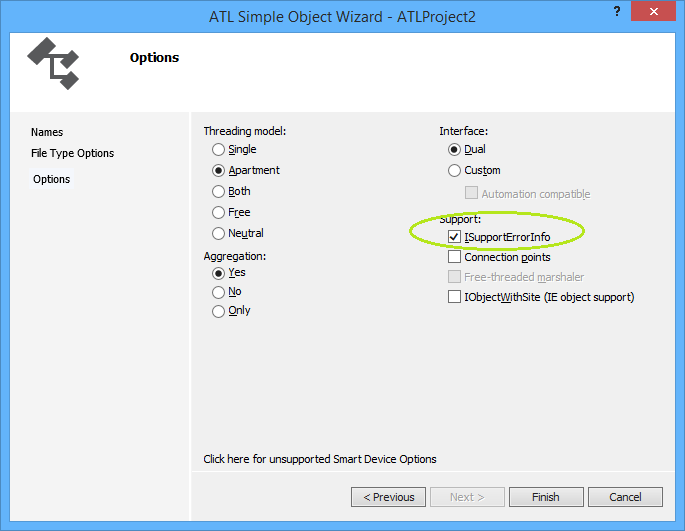
From the Class View go to right-click menu and take Add Class and then take ATL Simple Object which throws the ATL Simple Object Wizard. On the Names Dialog, in the C++ Short Name type "CoolCode" and the other fields are auto-generated for you. Click through the File Type Handler Options to the last dialog, Options which looks like this
So I have checked Support ISupportErrorInfo because we will want to throw rich error information from C++ to VBA. Click Finish and some code is generated for you.
What gets instantiated and what implements IUnknown::QueryInterface
Never new your class
So your class never gets instantiated with the new keyword, it can't because it has no vtable because of the ATL_NO_VTABLE macro. Instead, a creator class such creates an instance of CComObject (when not aggregated) with your class as a template.
To illustrate, it is worth looking at what happens when a client gets hold of IClassFactory and calls IClassFactory::CreateInstance, so find the definition of CComCoClass (select, F12) to get to this (abridged) code
So in the above code one can see CreateInstance being called in two use cases, (i) where there is an aggregating object and (ii) where there isn't but the code shares a common element of T::_CreatorClass::CreateInstance. It is worth knowing that T::_CreatorClass is defined by the DECLARE_AGGREGATABLE macro which was generated by your choice in the wizard to allow aggregation. This macro is defined as
#define DECLARE_AGGREGATABLE(x) public:\
 typedef ATL::CComCreator2< ATL::CComCreator< ATL::CComObject< x > >,
               ATL::CComCreator< ATL::CComAggObject< x > > > _CreatorClass;
Wow, that is really a complicated syntax and I won't try to explain it because that would replicate the book/documentation. Suffice to say one can see the CComObject as referred to in the class diagram above. I will give some links though ...
This class implements the IUnknown interface for an aggregated object. By definition, an aggregated object is contained within an outer object. The CComAggObject class is similar to the CComObject Class, except that it exposes an interface that is directly accessible to external clients.
CComCreator & CComCreator2
These are undocumented though referenced in a Don Box article
If not new then what?
So I mentioned above that one doesn't use new on your class. Let's suppose you have a use case where you have two com classes in your server project and the method on one returns an instance of the other. Without calling the COM API CoCreateInstance (which would be the long way round) how do you create an instance of your com class and return it to a client? The answer is use (some of) the same classes as the class factory above. So here is some sample code
STDMETHODIMP CUncoolCode::CreateCoolCode(ICoolCode ** ppCool)
{
    // From Grimes et al (1999) p. 143
    *ppCool = NULL;
    return CComCreator< CComObject<CCoolCode> >::CreateInstance(
          NULL, IID_ICoolCode, reinterpret_cast<void**>(ppCool) ) ;

}
Summary
Well, ATL is complicated if you come from a VBA background, it is advised to never change code generated by the wizards unless you totally know what you are doing. ATL demonstrates not just the power of templates but also multiple inheritance and templates. Awesome.