Showing posts with label ATL. Show all posts

Monday, 19 November 2018

ATL C++ Automation Add-in gives another way to call C++ from worksheet

I discovered this by accident. I was attempting to get a C# Automation Add-in working (conceptually a very easy task but I keep hitting a barrier) and I got frustrated so I dropped down into C++ to try to get a feel for what is going on. I was surprised to find a simple ATL C++ COM component callable from the worksheet simply by adding the registry key "Programmable" to the registry entries for the COM class.

Automation Add-ins

So there have been various Office addins over the years. Microsoft keeps moving the goalposts as to what it wants developers to build to augment Excel's functionality. As I write, the latest Microsoft is pushing is JavaScript based. But years ago, Automation Add-Ins and COM Add-Ins were trendy.

An Automation Add-in allows developers to create COM components and make them callable from an Excel worksheet function with the addition of the registry key "Programmable" to the registry entries for the COM class. I must confess to associating this primarily with the .NET languages, C# and VB.Net. C++ programmers have always has the C++ Excel Software Development Kit, so I thought Automation Add-ins were pretty much was ignored by C++ developers. Certainly amongst my C++ colleagues they were overlooked.

So it was to my surprise that an ATL project is callable from the worksheet. I may very well post more examples on this. Below you will some simple code but also a video of a part of my investigations.

Incidentally, a COM Add-in goes one better than an Automation Add-in in that the developer can acquire the Application object and thus can script against the Excel COM object library. But that is not discussed in this blog post.

Simple ATL Object

So I added a single Simple ATL Object to a brand new ATL project. And then I declared the interface to have one single method called DivideBy2 for experimentation. The IDL is given here

ATLProject5.idl

  1. // ATLProject5.idl : IDL source for ATLProject5
  2. // Brought to you by the Excel Development Blog https://exceldevelopmentplatform.blogspot.com/2018/11/
  3.  
  4. // This file will be processed by the MIDL tool to
  5. // produce the type library (ATLProject5.tlb) and marshalling code.
  6.  
  7. import "oaidl.idl";
  8. import "ocidl.idl";
  9. import "shobjidl.idl";
  10.  
  11. [
  12.     uuid(B4644DBF-2A3D-4CE7-8A01-B83AAFEBA1F2),
  13.     version(1.0)
  14. ]
  15. library ATLProject5Lib
  16. {
  17.     importlib("stdole2.tlb");
  18.  
  19.     // Forward declare all types defined in this typelib
  20.     interface IATLSimpleObject;
  21.  
  22.     [
  23.         uuid(1a4a53f8-5323-418f-8975-d05f47c1dceb),
  24.         version(1.0),
  25.     ]
  26.     interface IATLSimpleObject : IDispatch
  27.     {
  28.         HRESULT DivideBy2([in]double dIn, [out,retvaldouble* dOut);
  29.     };
  30.  
  31.     [
  32.         uuid(1ABD0403-A8D5-40F6-8D9E-E0343999CD65),
  33.         version(1.0)
  34.     ]
  35.     coclass ATLSimpleObject
  36.     {
  37.         [defaultinterface IATLSimpleObject;
  38.     };
  39. };

ATLSimpleObject.h

The edited class declaration is given here, in the video below I put a breakpoint in the interface map to see what gets interfaces get queried for.

  1. // ATLSimpleObject.h : Declaration of the CATLSimpleObject
  2. // Brought to you by the Excel Development Blog https://exceldevelopmentplatform.blogspot.com/2018/11/
  3.  
  4.  
  5. using namespace ATL;
  6.  
  7.  
  8. // CATLSimpleObject
  9.  
  10. class ATL_NO_VTABLE CATLSimpleObject :
  11.     public CComObjectRootEx<CComSingleThreadModel>,
  12.     public CComCoClass<CATLSimpleObject, &CLSID_ATLSimpleObject>,
  13.     public IDispatchImpl<IATLSimpleObject, &IID_IATLSimpleObject, &LIBID_ATLProject5Lib, /*wMajor =*/ 1, /*wMinor =*/ 0>
  14. {
  15. public:
  16.     CATLSimpleObject()
  17.     {
  18.     }
  19.  
  20. BEGIN_COM_MAP(CATLSimpleObject)
  21.     COM_INTERFACE_ENTRY(IATLSimpleObject)
  22.     COM_INTERFACE_ENTRY(IDispatch)
  23. END_COM_MAP()
  24.  
  25.  
  26.     DECLARE_PROTECT_FINAL_CONSTRUCT()
  27.  
  28.     HRESULT FinalConstruct()
  29.     {
  30.         return S_OK;
  31.     }
  32.  
  33.     void FinalRelease()
  34.     {
  35.     }
  36.  
  37. public:
  38.  
  39.     STDMETHOD(DivideBy2)(double dIndoubledOut);
  40.  
  41. };
  42.  
  43. OBJECT_ENTRY_AUTO(__uuidof(ATLSimpleObject), CATLSimpleObject)

ATLSimpleObject.cpp

The class implementation is trivial

  1. // ATLSimpleObject.cpp : Implementation of CATLSimpleObject
  2. // Brought to you by the Excel Development Blog https://exceldevelopmentplatform.blogspot.com/2018/11/
  3.  
  4. #include "stdafx.h"
  5. #include "ATLSimpleObject.h"
  6.  
  7. // CATLSimpleObject
  8.  
  9. STDMETHODIMP CATLSimpleObject::DivideBy2(double dIndoubledOut)
  10. {
  11.     *dOut dIn / 2;
  12.     return S_OK;
  13. }

Video of QueryInterface Investigation

So I discovered ATL being callable from the worksheet as I was investigating what interfaces neeed to be implemeneted. I made a video of my investigations where I set a breakpoint here...

So there were some links in the video regarding the Sharepoint interface and the PowerBasic forum and these are given here

Friday, 6 July 2018

OLEDB - C++ - Solved: ATL's OLEDB Provider sample crashes Excel (uncaught exception from msado15.dll)

Happy Conclusion

This post initially did not reach a happy conclusion, I investigated compiling the ATL OLEDB Provider samples but reached an impasse as the ADO runtime throws an exception. I wrote up the problem as a blog post nevertheless because sometimes defeats can be as revealing as victories. I asked on StackOverflow and they came through. Especially Simon Mourier on StackOverflow solved it and I am thankful. I have not changed the main body of the original post, instead I have posted solution at the bottom here.

ADO Recordsets as a marshalling vessel

So I was pondering how to get data from Python to VBA without using COM's SAFEARRAY which can often but not always be acquired with tolist(). One alternative is to create an ADO recordset, it is possible to create an ADO recordset by creating the an Xml representation, i.e. to concatenate a correctly formatted string.

In the era of Visual Basic 5 (upon which VBA is based) code marshalled tabular data from one execution process to another (perhaps even on a different computer as part of an N-tiered scalable architecture, DNA) by transmitting a two dimensional array (SafeArray) housed in OLE Variant. In VB6, the recommended vessel for marshalling tabular became the disconnected ADO recordset. Marshalling means serializing in one process and then deserializing in another. For recordsets, the ADO run-time would do the marshalling where as for OLE Variants it was the COM run-time. They have similar speeds but an ADO recordset packs so much more functionality that one should opt for it.

ADO Recordsets come from OLE DB Providers

The vast majority of ADO recordsets are created by an OLE DB Provider such as the Microsoft SQL Server OLE DB Provider. Can we create our own OLE DB Provider? In theory yes, ATL has had for almost two decades the ability to create OLE DB Providers. I never tried until now. My attempt to get the sample working have got stuck. I'll try not to replicate the documentation, instead I will give links plus some extra info where pertinent.

The ATL Sample OLEDB Provider that Finds Files from a directory

ADO and OLEDB were meant to be an advance on the previous generation of data access technology by allowing a single object model to access not just database tables but also non-tabular data sources such as email stores.

In the case of the ATL Sample OLEDB Provider I have read enough code to say that it (when if works, if ever) actually creates a recordset where each row is a file in a given directory. This is useful as a sample because everyone has a file system and this obviates the need to install a database. It is also illustrative of a non-database source.

The sample reads files by calling API functions such as FindFirstFile.

When running the ATL OLEDB Provider wizard one can customise the name, I will choose "FindFiles".

Running Visual Studio 2017 ATL Wizards to create Find File OLEDB Provider Sample

I will try not to recreate the documentation but will give some screenshots as the official documentation does not (I suspect it is not being maintained).

Because we are creating a COM component you will need to run Visual Studio with admin rights

New Project -> Visual C++ -> ATL -> ATL Project

Click OK on the next screen without entering anything

In the solution explorer you'll find two projects, focus on the top project, FindFiles. On the FindFiles project icon or or any folder icon in the FindFiles project right-click mouse button and then select Add -> New Item . You'll get the following screen from which you should select ATL -> ATL OLEDB Provider and then click Add

The next screen is the wizard, enter FindFiles into the ShortName and (nearly) all the other fields are updated to reflect the short name. Also, add FindFiles to the ProgID, whilst not strictly necessary this will help debugging later. Click finish to commit and the wizard will write the code for you.

Save all the files and compile (don't forget you'll need admin rights).

Enumerating OLE DB Providers

I forget where I found this code (somewhere on Microsoft.com) but it enumerates all the OLE DB Providers installed, after a successful compilation FindFiles should appear

using System;
using System.Data;
using System.Data.OleDb;

namespace OldDbEnumerator
{

    class Program
    {
        static void Main()
        {
            OleDbDataReader reader = OleDbEnumerator.GetRootEnumerator();

            DisplayData(reader);

            Console.WriteLine("Press any key to continue.");
            Console.ReadKey();
        }

        static void DisplayData(OleDbDataReader reader)
        {
            while (reader.Read())
            {
                for (int i = 0; i < reader.FieldCount; i++)
                {
                    Console.WriteLine("{0} = {1}",
                     reader.GetName(i), reader.GetValue(i));
                }
                Console.WriteLine("==================================");
            }
        }
    }
}

And in the output of that is the new Provider, your GUID will be different (it is randomly selected)

SOURCES_NAME = FindFiles Class
SOURCES_PARSENAME = {E387836C-6248-4319-92E8-BCD070844D86}
SOURCES_DESCRIPTION = FindFiles Class
SOURCES_TYPE = 1
SOURCES_ISPARENT = False
SOURCES_CLSID = {E387836C-6248-4319-92E8-BCD070844D86}

Excel VBA client code CRASHES EXCEL

Sorry for caps shouting but it is important to save your Excel session before you play with the next chunk of code. Here is some client VBA code. It crashes Excel VBA.

We'll use for debugging later so give your self a new workbook called TestClient.xlsm, in a new standard module paste the following code

Sub TestOleDbProvider()
    
    On Error GoTo ErrHand
    
    
    Dim cn As ADODB.Connection
    Set cn = New ADODB.Connection
    
    cn.Open "Provider=FindFiles;Server=foo;Database=bar" '* this works
    
    Dim cmd As ADODB.Command
    Set cmd = New ADODB.Command
    
    Set cmd.ActiveConnection = cn   '* this works
    
    cmd.CommandText = "*.*"   '* this works
    
    Stop
    Dim rs As ADODB.Recordset
    Set rs = cmd.Execute  '* crashes here


    Exit Sub
ErrHand:
    Debug.Print Err.Description & " (" & Err.Number & ")"
    'Stop

End Sub

Before you run this code, goto ThisWorkbook and enter the following helpful code which will always navigate to the above code upon workbook opening...

Private Sub Workbook_Open()
    Application.GoTo "TestOleDbProvider"
End Sub

Then save the workbook before you run TestOleDbProvider because it will crash and you will not have an opportunity to save it!

So running the above code crashes Excel, later I will show that an uncaught exception is being thrown by msado15.dll. Now this maybe to do with the fact I do not know how to yet supply a query. Peaking ahead I can show some of the C++ code (CFindFilesRowset::Execute) where it is assumes *.* if supplied an empty string

  CW2TEX<_MAX_PATH> szDir(m_strCommandText == L"" ? L"*.*" : m_strCommandText);

Time to investigate.

Debugging the OLEDB Provider with breakpoints

So we must investigate. I set the project's properties to start Excel and load a workbook called TestClient.xlsm as part of the debug properties. So on the FileFind project icon right-click and select properties (last entry on the menu) to display FindFiles Property Pages within which select the Debugging entry on the left hand side.

Running the code I get an unhandled exception and the call stack is firmly in msado15.dll..

 msado15.dll!CQuery::SetSQL(unsigned short *) Unknown Non-user code. Symbols loaded.
  msado15.dll!CQuery::SetCommandText(long,unsigned long,unsigned char,unsigned char) Unknown Non-user code. Symbols loaded.
  msado15.dll!CQuery::Execute(enum ExecuteTypeEnum,char,unsigned long,bool,unsigned long,unsigned long,long,struct tagVARIANT *,unsigned long,void *,long *,struct _ADORecordset * *) Unknown Non-user code. Symbols loaded.
  msado15.dll!CCommand::_Execute(enum ExecuteTypeEnum,char,unsigned long,bool,unsigned long,unsigned long,long,long,struct tagVARIANT *,unsigned long,void *,long *,struct _ADORecordset * *) Unknown Non-user code. Symbols loaded.
  msado15.dll!CCommand::ExecuteWithModeFlag(struct tagVARIANT *,struct tagVARIANT *,long,struct _ADORecordset * *,int) Unknown Non-user code. Symbols loaded.
  msado15.dll!CCommand::Execute(struct tagVARIANT *,struct tagVARIANT *,long,struct _ADORecordset * *) Unknown Non-user code. Symbols loaded.
  VBE7.DLL!1e813579() Unknown No symbols loaded.
  [Frames below may be incorrect and/or missing, no symbols loaded for VBE7.DLL]  Annotated Frame
  VBE7.DLL!1e7cff4b() Unknown No symbols loaded.
  VBE7.DLL!1e829d13() Unknown No symbols loaded.
  VBE7.DLL!1e82fea2() Unknown No symbols loaded.
  VBE7.DLL!1e82bcb5() Unknown No symbols loaded.
  [External Code]  Annotated Frame

And with that I am stuck. I guess I could ask Stack Overflow. I've never bothered Microsoft for support before, might do so on this occasion. I'll try a SO bounty first I think.

Update: Solution given by Simon Mourier

I am delighted to say that Simon Mourier at StackOverflow solved this by adding another interface ICommandText to the interface map.

BEGIN_COM_MAP(CFindFilesCommand)
    ...
    COM_INTERFACE_ENTRY(ICommandText) 
    ...
END_COM_MAP()

Apparently, the ADO runtime was querying for this interface and not finding it and thus calling on a null pointer. I'm surprised the ADO runtime doesn't check for null pointers but never mind. The cased is solved.

Thursday, 15 June 2017

ATL Notes 2 - Only Inherit from IDispatch Once

Continuing on ATL (Active Template Library) ...

So when writing an object with ATL for use in Excel VBA I recommend selecting dual interface from the Simple Object Wizard this gives both a binary vtable interface for early-binding clients as well as an IDispatch implementation for late-binding clients. Note, when I say 'late binding clients' I'm not talking about VBScript clients but VBA developers who'd prefer to call into a COM library with flexibility.

But there is a fly in the ointment here. COM is all about interface based programming where one is supposed to factor out the functionality of a class into separate interfaces, multiple dual interfaces will not compile in ATL because every Com class must only inherit from IDispatch once.

It isn't just the use case of factoring out functionality into separate interfaces but also the use case of shipping an additional interface to supplement, update or enhance the functionality of a class. In both use cases ATL will only allow one of these interfaces to be dual. To resolve the ATL compilation errors you will need designate one interface as being prime and only allow late-binding to that interface.

This pretty much scuppers the factoring out use-case. Developers coming from VBA will probably not grieve over this as they are used to using one interface only (VBA does have the Implements keyword but is rarely used). For the shipping updates use-case you should ship a new Com class with a new expanded all encompassing interface.

I could give some sample code but actually I have found some internet pages that illustrate the problem.

com problem inheriting twice from IDispatch
ATL inheritance mistake
They also give the solution which is to make one interface the goto interface when QueryInterface is called for IDispatch by using the COM_INTERFACE_ENTRY2 macro. So the following non-compiling code

BEGIN_COM_MAP(CAudioRecorder) 
        COM_INTERFACE_ENTRY(IAudioDevice) 
        COM_INTERFACE_ENTRY(IAudioRecorder)   <<<< ERROR 1 
        COM_INTERFACE_ENTRY(IDispatch)        <<<< ERROR 2 
END_COM_MAP()

should be changed to the following to direct QueryInterface calls for IDispatch to IAudioDevice

BEGIN_COM_MAP(CAudioRecorder) 
        COM_INTERFACE_ENTRY(IAudioDevice) 
        COM_INTERFACE_ENTRY(IAudioRecorder)   
        COM_INTERFACE_ENTRY2(IDispatch,IAudioDevice)        
END_COM_MAP()


Wednesday, 14 June 2017

ATL Notes 1 - Inheritance Hierarchy

So Excel VBA developers may wonder how to make their code run as fast as compiled VB6 and I'm, afraid they can't as VB6 is no longer supported. To increase the speed of your code you need to use C++ and then call in from VBA using COM. So you need a C++ COM technology and this is what Active Template Library is.

The Books

So I have completed reading one ATL book, Beginning ATL Programming by Richard Grimes et al (Wrox 1999) and in the final stages of reading another, Inside ATL by King and Shepherd (MSPress 1999). So it is worth putting up some revision notes so I don't forget all that I have learnt. Whilst the prose of the books was better than the dry Microsoft documentation, the MS website remains the place to link to. To follow these notes you'll need to understand key C++ features such as templates and multiple inheritance. You also need to be very familiar with the COM specification, we shall not here explain the role of IUnknown or IDispatch. We'll limit the focus to in-process DLLs and ignore .EXEs

Walkthrough

So I am walking through creating a new ATL project, my project name is ATLProject2. Once through the new ATL project wizard one is confronted with a great many files but don't be intimidated, there are more wizards from the Class View so ensure the Class View is visible.

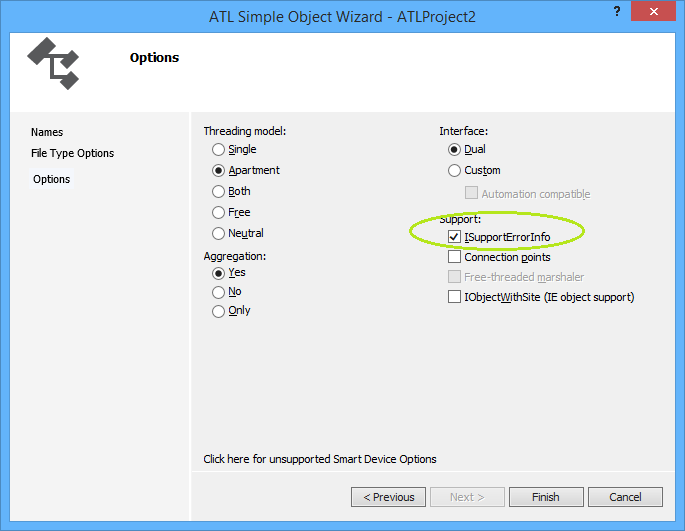
From the Class View go to right-click menu and take Add Class and then take ATL Simple Object which throws the ATL Simple Object Wizard. On the Names Dialog, in the C++ Short Name type "CoolCode" and the other fields are auto-generated for you. Click through the File Type Handler Options to the last dialog, Options which looks like this


So I have checked Support ISupportErrorInfo because we will want to throw rich error information from C++ to VBA. Click Finish and some code is generated for you.

// CCoolCode

class ATL_NO_VTABLE CCoolCode :
 public CComObjectRootEx<CComSingleThreadModel>,
 public CComCoClass<CCoolCode, &CLSID_CoolCode>,
 public ISupportErrorInfo,
 public IDispatchImpl<ICoolCode, &IID_ICoolCode, &LIBID_ATLProject2Lib, 
                                       /*wMajor =*/ 1, /*wMinor =*/ 0>
{
public:
 CCoolCode()
 {
 }

DECLARE_REGISTRY_RESOURCEID(IDR_COOLCODE)


BEGIN_COM_MAP(CCoolCode)
 COM_INTERFACE_ENTRY(ICoolCode)
 COM_INTERFACE_ENTRY(IDispatch)
 COM_INTERFACE_ENTRY(ISupportErrorInfo)
END_COM_MAP()

// ISupportsErrorInfo
 STDMETHOD(InterfaceSupportsErrorInfo)(REFIID riid);


 DECLARE_PROTECT_FINAL_CONSTRUCT()

 HRESULT FinalConstruct()
 {
  return S_OK;
 }

 void FinalRelease()
 {
 }

public:


};

OBJECT_ENTRY_AUTO(__uuidof(CoolCode), CCoolCode)

So it's worth showing the inheritance hierarchy image/svg+xml CComObjectRootBase ISupportErrorInfo IDispatchImpl<ICoolCode, &IID_ICoolCode, &LIBID> CComObject<CCoolCode> CComObjectRootBase CComCoClass<CCoolCode, &CLSID_CoolCode> CComObjectRootEx<CComSingleThreadModel> CCoolCode And we can give information as to what each class in the hierarchy does
ClassNamePurpose
CComObjectRootBaseHolds the reference count member
CComObjectRootExHandles reference counting based on the threading model
CComSingleThreadModelPassed as template parameter to CComObjectRootEx. This means reference counting need not be thread safe.
CComCoClassImplements IClassFactory with the help of a creator class.
ISupportErrorInfoDrives rich error information familiar to VBA devs.
IDispatchImplIf you selected a Dual interface (I recommend) then you get an implementation of IDispatch driven off the type library hence the parameters
CCoolCodeYour class and your logic but never gets directly instantiated
CComObject<CCoolCode>What gets instantiated and what implements IUnknown::QueryInterface

Never new your class

So your class never gets instantiated with the new keyword, it can't because it has no vtable because of the ATL_NO_VTABLE macro. Instead, a creator class such creates an instance of CComObject (when not aggregated) with your class as a template.

To illustrate, it is worth looking at what happens when a client gets hold of IClassFactory and calls IClassFactory::CreateInstance, so find the definition of CComCoClass (select, F12) to get to this (abridged) code

template <class T, const CLSID* pclsid = &CLSID_NULL>
class CComCoClass
{
public:
 DECLARE_CLASSFACTORY()
 DECLARE_AGGREGATABLE(T)
 typedef T _CoClass;

        ...

 template <class Q>
 static HRESULT CreateInstance(
  _Inout_opt_ IUnknown* punkOuter,
  _COM_Outptr_ Q** pp)
 {
  return T::_CreatorClass::CreateInstance(punkOuter, __uuidof(Q), 
                  (void**) pp);
 }
 template <class Q>
 static HRESULT CreateInstance(_COM_Outptr_ Q** pp)
 {
  return T::_CreatorClass::CreateInstance(NULL, __uuidof(Q),
                  (void**) pp);
 }
};

So in the above code one can see CreateInstance being called in two use cases, (i) where there is an aggregating object and (ii) where there isn't but the code shares a common element of T::_CreatorClass::CreateInstance. It is worth knowing that T::_CreatorClass is defined by the DECLARE_AGGREGATABLE macro which was generated by your choice in the wizard to allow aggregation. This macro is defined as

#define DECLARE_AGGREGATABLE(x) public:\
 typedef ATL::CComCreator2< ATL::CComCreator< ATL::CComObject< x > >,
               ATL::CComCreator< ATL::CComAggObject< x > > > _CreatorClass;

Wow, that is really a complicated syntax and I won't try to explain it because that would replicate the book/documentation. Suffice to say one can see the CComObject as referred to in the class diagram above. I will give some links though ...
ClassNamePurpose
CComObjectThis class implements IUnknown for a nonaggregated object.
CComAggObjectThis class implements the IUnknown interface for an aggregated object. By definition, an aggregated object is contained within an outer object. The CComAggObject class is similar to the CComObject Class, except that it exposes an interface that is directly accessible to external clients.
CComCreator & CComCreator2These are undocumented though referenced in a Don Box article

If not new then what?

So I mentioned above that one doesn't use new on your class. Let's suppose you have a use case where you have two com classes in your server project and the method on one returns an instance of the other. Without calling the COM API CoCreateInstance (which would be the long way round) how do you create an instance of your com class and return it to a client? The answer is use (some of) the same classes as the class factory above. So here is some sample code

STDMETHODIMP CUncoolCode::CreateCoolCode(ICoolCode ** ppCool)
{
    // From Grimes et al (1999) p. 143 
    *ppCool = NULL;
    return CComCreator< CComObject<CCoolCode> >::CreateInstance(
          NULL, IID_ICoolCode, reinterpret_cast<void**>(ppCool) ) ;

}

Summary

Well, ATL is complicated if you come from a VBA background, it is advised to never change code generated by the wizards unless you totally know what you are doing. ATL demonstrates not just the power of templates but also multiple inheritance and templates. Awesome.

Miscelaneous Links

As always surfing around in preparation of a blog post throws up some interesting links that are worth saving.
How ATL 7 uses attributes to save lines ATL 3 code
Microsoft Documentation ATL
MSDN ATL