Wednesday, 22 April 2020

VBA calling Python calling back into VBA

In this post I again show a Python COM gateway class callable from VBA; this time it demonstrates calling back into the VBA using Application.Run, ThisWorkbook or a VBA-defined class. It does this by ensuring a win32com.client.Dispatch wrapper. It also demonstrates code to report all the local variables for debugging purposes. Further, it demonstrates running the COM server in a separate process.

Calling back using COM

So, I need some code to callback into VBA from a Python COM component, the mechanism will clearly be another COM call. Let's list the COM ways we can do this...

  1. Pass in the Excel.Application object and call Application.Run with the name of a macro to callback on.
  2. Write callback code in the ThisWorkbook module and pass in the Workbook object and have Python call a method in the workbook's ThisWorkbook module.
  3. Write callback code in a VBA defined class and pass in instance of such a class and have Python call a method on that instance.
  4. Write code to implement COM events, i.e. a source interface and declare a variable in VBA using the WithEvents keyword to sink the events.

I have implemented the top three in the code below. If you want COM events you'll need a Type Library, but Python does not supply one automatically; I did write some code to use Python reflection to generate a type library but this is not out of the box functionality from Python. Never mind, a callback routine in Excel could itself raise events if you really wants events; after all, COM events are simply callbacks to multiple listeners instead of a single listener.

For some very odd reason the third case, the VBA defined case had a bug/glitch. It would report not just the return value but instead a tuple of the return value and all the input parameters. This is a pitfall but easily solved and not a problem once one is aware that the problem exists.

Ensure Dispatch

The key tip in the code with regard to calling back is to wrap whatever is passed in from VBA in a win32com.client.Dispatch wrapper. In testing however, sometimes I use an object which I have acquired from the Running Object Table which already comes wrapped. So I wrote a small class called the DispatchEnsurer to inspect what it has been given and wrap where necessary.

Inability to Attach the Microsoft Visual Studio debugger

So I am embarrassed to admit I cannot get the Microsoft Visual Studio debugger to attach to the Excel session and specifically hit breakpoints in my Python code. This means stepping through the code as initiated by a call from Excel VBA is impossible. If you know how to do this please leave a comment. In the meantime I had to write a class to report all the local variables for a method into a nicely formatted string and pass that back to the calling VBA so I can see what is going on (see below). I would point out that it is still possible to acquire a workbook object from the running object table using win32com.client.GetObject(<<workbook full file path>>) and that is primarily how one can get around this problem.

Perhaps I should report this breakpoint problem as a bug to Microsoft's Visual Studio team. I do not believe it is Python's fault.

Declarative Python COM server registration

So the breakpoint problem above was quite painful. Another painful problem was updating the Python script and have Excel VBA pick up the changes. In some instances I had to change the COM's class's CLSID to force the Excel VBA client code to pick up the script changes. Other tactics involved shutting down Excel and reopening but this didn't always work as I believe there is some sort of session recycling (I'll investigate this at some point). Anyway, I found the best way for rapid iterative development without re-registering and without rebooting Excel was to make the Python COM server sit in a separate process and then kill that process to pick up script changes.

Getting a COM server to sit in its own process requires adding the following line of code to your Python COM gateway class

_reg_clsctx_ = pythoncom.CLSCTX_LOCAL_SERVER

Adding one single line of source to effect this change is quite impressive. To get C# to do this requires a degree of fiddling around in the registry plus some extra code, so Python deserves praise for this declarative simplicity.

With this extra line of code the Python executables will not be loaded into the Excel.exe process but instead loaded into a pythonw.exe process. So this means we can kill the pythonw.exe process and force Excel VBA/COM runtime to spawn a new one that will effect any new script changes. Here is some VBA code to kill the pythonw.exe process...

Sub PickupNewPythonScript()
    '# for development only to help pick up script changes we kill the python process
    Call CreateObject("WScript.Shell").Run("taskkill /f /im pythonw.exe", 0, True)
End Sub

So with the ability to kill the Python process and force it to pick up new changes without rebooting Excel and without incrementing CLSIDs and re-registering meant I could start to get some work done!

Reporting all the local variables

As mentioned above without the ability to step through the code one loses the ability to see the values of the local variables. Luckily and to Python's credit there is a locals() dictionary which contains all the local variables; we can print this although I added some extra line breaking and formatting. I give a formatting class in the code below. I use this to return all the local variables when an error occurs. This allows me to debug in the absence of proper/formal debugger support.

VBA Class use case returns tuple of return value and input arguments

I can only assume that this is a bug or a glitch but in the case of the VBA defined class I found that the return value was returned in a tuple that also consisted on the input arguments. Not a real problem as we simply access the tuple's first element with [0].

Python Code

The Python code is one single listing. Run this within Microsoft Visual Studio or from the command line. One needs to run it at least once to register the COM class registration. If you run without Administrator privileges it will request to elevate.

import win32com.server.register
from win32com.client import Dispatch
import pythoncom

class CallingBackIntoVBA(object):
    _reg_clsid_ = "{352B1FE3-8F8E-478B-93D0-A5AAC612D09A}"
    _reg_progid_ = 'PythonInVBA.CallingBackIntoVBA'
    _reg_desc_ = "Demonstrates a Python COM server calling back into calling VBA code"
    _public_methods_ = ['DemoAppRunCallback','DemoThisWorkbookCallback', 'DemoClassCallback']
    _reg_clsctx_ = pythoncom.CLSCTX_LOCAL_SERVER

    def DemoClassCallback(self, classInstance, arg0=None, arg1=None, arg2=None):
        try:
            dispCb = DispatchEnsurer.EnsureDispatch(classInstance)

            # for some reason a tuple of the return value and arguments is
            # returned, very odd!!
            return dispCb.ClassCallback2(arg0,arg1,arg2)[0]  # [0] gets first element of the tuple

        except Exception as ex:
            return LocalsEnhancedErrorMessager.Enhance(ex,str(locals()))

    def DemoAppRunCallback(self,excelApplication, appRunMacro: str, arg0=None, arg1=None, arg2=None):
        try:
            dispApp = DispatchEnsurer.EnsureDispatch(excelApplication)
            return dispApp.Run(appRunMacro, arg0,arg1,arg2)

        except Exception as ex:
            return LocalsEnhancedErrorMessager.Enhance(ex,str(locals()))

    def DemoThisWorkbookCallback(self, workbook, arg0=None, arg1=None, arg2=None):
        try:
            dispWb = DispatchEnsurer.EnsureDispatch(workbook)
            #dispWb.madeUpName()
            return dispWb.ThisWorkbookCallback2(arg0,arg1,arg2)

        except Exception as ex:
            return LocalsEnhancedErrorMessager.Enhance(ex,str(locals()))

class LocalsEnhancedErrorMessager(object):
    @staticmethod
    def Enhance(ex, localsString):
        locals2 = "n Locals:{ " + (",n".join(localsString[1:-1].split(",")) ) + " }"
        if hasattr(ex,"message"):
            return "Error:" + ex.message + locals2
        else:
            return "Error:" + str(ex) + locals2

class DispatchEnsurer(object):
    @staticmethod
    def EnsureDispatch(comObj):
        """ Sometimes we get a PyIDispatch so we'll need to wrap it, this class takes care of that contingency"""
        try:
            dispApp = None
            apptypename = str(type(comObj))
            if apptypename == "<class 'win32com.client.CDispatch'>":
                # this call from GetObject so no need to Dispatch()
                dispApp = comObj
            elif apptypename == "<class 'PyIDispatch'>":
                # this was passed in from VBA so wrap in Dispatch
                dispApp = Dispatch(comObj)
            else:
                # other cases just attempt to wrap
                dispApp = Dispatch(comObj)
            return dispApp 
        except Exception as ex:
            if hasattr(ex,"message"):
                return "Error:" + ex.message 
            else:
                return "Error:" + str(ex)

def RegisterCOMServers():
    print("Registering COM servers...")
    import win32com.server.register
    win32com.server.register.UseCommandLine(CallingBackIntoVBA)

def TestCallingBackIntoVBA():
    import win32com
    cb = CallingBackIntoVBA()
    wb = win32com.client.GetObject(r"C:\Users\Simon\Downloads\PythonVBACallbackDemo.xlsm")
    app = wb.Parent
    sb = app.StatusBar

    ret = cb.DemoAppRunCallback(app,"PythonVBACallbackDemo.xlsm!Module1_Proc1",0,1,2)
    print(ret)

if __name__ == '__main__':
    pass
    RegisterCOMServers()
    #TestCallingBackIntoVBA()

VBA Code Listings

Whereas the Python code is a single listing the VBA code is in contrast dispersed across several modules, please place into one workbook. I called mine PythonVBACallbackDemo.xlsm.

ThisWorkbook module

Place the following code in the ThisWorkbook module

Public Function ThisWorkbookCallback1()
    Debug.Print "ThisWorkbookCallback1"
End Function

Public Function ThisWorkbookCallback2(arg0, arg1, arg2)
    ThisWorkbookCallback2 = CStr(arg0) & " " & CStr(arg1) & " " & CStr(arg2)
    Debug.Print "ThisWorkbook.ThisWorkbookCallback2"
End Function

Callback Class

Place the following code in a VBA class named Callback with its Instancing type set to 2 - PublicNotCreatable

Public Function ClassCallback1()
    Debug.Print "ClassCallback1"
End Function

Public Function ClassCallback2(arg0, arg1, arg2) As String
    ClassCallback2 = CStr(arg0) & " " & CStr(arg1) & " " & CStr(arg2)
    Debug.Print "Callback.ClassCallback2"
End Function

Standard module code

Place the following code in a standard (non-class module), it doesn't matter what you name this module but I called mine modCallbackDemos . The procedures to run (by placing cursor and pressing F5) are ThisWorkbookCallbackDemo(), AppRunMacroDemo() and ClassCallbackDemo().

Option Explicit

Sub PickupNewPythonScript()
    '# for development only to help pick up script changes we kill the python process
    Call CreateObject("WScript.Shell").Run("taskkill /f /im pythonw.exe", 0, True)
End Sub

Sub ThisWorkbookCallbackDemo()
    Dim obj As Object
    Set obj = VBA.CreateObject("PythonInVBA.CallingBackIntoVBA")
    
    Debug.Print obj.DemoThisWorkbookCallback(ThisWorkbook, 0, 1, 2)
    
    Set obj = Nothing
End Sub

Sub AppRunMacroDemo()
    'Stop
    Dim obj As Object
    Set obj = VBA.CreateObject("PythonInVBA.CallingBackIntoVBA")
    
    Dim sAppRunMacro As String
    sAppRunMacro = ThisWorkbook.Name & "!Module1_Proc1"
    
    Dim vRet As Variant
    vRet = obj.DemoAppRunCallback(Application, sAppRunMacro, 0, 1, 2)
    Debug.Print vRet
    
    Set obj = Nothing
End Sub

Function Module1_Proc1(arg0, arg1, arg2)
    Dim sRet
    sRet = "Module1_Proc1 running"
    Debug.Print sRet
    Module1_Proc1 = sRet & " foobar"
End Function

Sub ClassCallbackDemo()
    Dim obj As Object
    Set obj = VBA.CreateObject("PythonInVBA.CallingBackIntoVBA")
    
    Dim oCallback As Callback
    Set oCallback = New Callback
    
    Debug.Print obj.DemoClassCallback(oCallback, 0, 1, 2)
    
    Set obj = Nothing
End Sub

So if I run ThisWorkbookCallbackDemo() then the expected output is

ThisWorkbook.ThisWorkbookCallback2
0 1 2

And if I run AppRunMacroDemo() then the expected output is

Module1_Proc1 running
Module1_Proc1 running foobar

And finally if I run ClassCallbackDemo() then the expected output is

Callback.ClassCallback2
0 1 2

Amending the script and picking up changes

So in the above code listing there is a routine PickupNewPythonScript() which I use to avoid having to reboot Excel. You might like to experiment with it, so make a change in the Python script, save your Python script changes then run PickupNewPythonScript() and see your changes effected. I have added a commented out line of code in the Python script

#dispWb.madeUpName()

which if uncommented and effected will mean the expected output of running ThisWorkbookCallbackDemo() changes to

Error:<unknown>.madeUpName
 Locals:{ 'self': <CallingBackIntoVBA.CallingBackIntoVBA object at 0x030224D0>,
 'workbook': <PyIDispatch at 0x009EDF70 with obj at 0x009301BC>,
 'arg0': 0,
 'arg1': 1,
 'arg2': 2,
 'dispWb': <COMObject <unknown>>,
 'ex': AttributeError('<unknown>.madeUpName') }

thus demonstrating the local variables report.

Enjoy!

Final thoughts

If I could express a preference for which pattern to use I would pass in the Excel Application and use Application.Run. This is because the Application object is most durable. After all, workbooks can be unloaded meaning the callback target could go missing and you are calling on a null (stale) pointer. Moreover, an instance of a VBA class is even more temporary in that class instances can be torn down during a state loss.

I am pleased about running the Python COM server in a separate process and then killing it to spawn a refreshed and updated new instance picking up code changes. This is a major productivity boon.

Wednesday, 8 April 2020

Call for CoronaVirus Contact Tracing Software

Just heard on the radio that the French government is developing a mobile phone app for contact tracing.  My first thought is they should open source the code.  Then I thought why doesn't the programmer community write its own open source app and put it on GitHub.

Then I'm thinking, well perhaps it already exists?  If you know of such an app and can point to open source then please do write a comment below.   I like to see the code and perhaps help out.

Cheers.

Sunday, 5 April 2020

Python, VBA - Beautiful Soup for webscraping

In this post I use Python's Beautiful Soup library to webscrape data from a web page, hopefully other VBA developers will realise that this is a much better library to use than VBA. But I do give a COM wrapper class so that the Python can be called from VBA.

Use case background

I'm worried about Corona Virus and its impact on stock markets, I very much need to query the London Stock Exchange database of securities to look for some safe government bonds to buy into. I have a list of government bonds from the branch of government that manages the issuance of such bonds but their unique identifier is an ISIN which is unique across the globe. Unfortunately, stockbrokers do not use ISIN numbers and I need to find alternative IDs and ticker codes. The London Stock Exchange (I am UK resident/citizen) has this information so I need to cross-reference the issuance authority's ISINs code with the LSE's database to get codes to present to my stock broker. For this I choose to write a web scraping program for I do not know of an official REST service.

Say No to VBA Webscraping

There was a time on this blog when I shared code that allowed a VBA developer to create an instance of instance of Internet Explorer, navigate to a web page and then traverse the HTML DOM to extract the necessary information. Those days have past now for a number of reasons. Firstly, Internet Explorer is legacy as Microsoft have the Edge browser so it would be foolish to write code against Internet Explorer. Secondly, since I branched out into alternatives to VBA I have discovered the quality of other libaries such as the .NET ecosystem and the Python ecosystem which both have many-fold better libraries.
I'd urge no new development in VBA for webscraping as there are three or four better options depending on your architecture and programming language preferences:
  • Chrome Extension, embedded JavaScript is best placed to traverse an HTML Dom and even sink events (needs a web server to relay info to though)
  • .NET Html Agility Pack, so C# developers would recommends this.
  • Python's Beautiful Soup
  • Webdriver interface, formerly known as Selenium
In this post I'm using Python's Beautiful Soup library but I am giving a COM wrapper so that it is callable from VBA because this is an Excel development blog after all.

I do not wish to replicate the Beautiful Soup documentation so I will be brief. Initially, I felt frustrated because I like to use a CSS selector path such as the following but this didn't not work for me which is a shame as it is a nice one shot declarative way to access an element.
#contentIndex > div.search_results_list > table > tbody > tr > td:nth-child(1)
But, I then read the documentation and saw how easily it was to script against a DOM (and actually a DOM fragment as well!) that the resulting code was perfectly easy to write.
All the web-scraping is packed into a class called LSEWebServices. But I also promised a COM wrapper class and that is LSEWebServicesCOMWrapper which simply delegates to an instance of LSEWebServices; I guess I could have inherited perhaps.

Important note: this code has been updated because London Stock Exchange changes their website

import urllib.request as urllib2
from bs4 import BeautifulSoup
import pythoncom
import logging

class LSEWebServices:

    def ExtractLSESearchResults(self,searchTerm: str):
        try:
            req = urllib2.urlopen("https://www.londonstockexchange.com/search?searchtype=all&q=" + searchTerm)
            html = req.read().decode("utf-8")

            try:
                soup = BeautifulSoup(html, 'html.parser')
                searchResultList = soup.find_all('div','item-separator')
                if (len(searchResultList)==1):
                    subText = str(searchResultList[0])
                    soup2 = BeautifulSoup(subText, 'html.parser')
                    instrumentTidm = soup2.find('span','instrument-tidm').text 
                    instrumentDesc = soup2.find_all('span','instrument-uppercase') [1].text
                    instrumentLink = soup2.find('a','tidm-and-description').attrs['href']
                    return (instrumentTidm, instrumentDesc,instrumentLink)
                pass


            except Exception as ex:
                print(ex)


        except Exception as ex:
            print(ex)

    def ExtractLSESecurityInformation(self, link:str):
        try:
            req = urllib2.urlopen(link)
            html = req.read().decode("utf-8")

            soup = BeautifulSoup(html, 'html.parser')
            instrumentInformation = soup.find_all('div','chart-table-instrument-information')
            if (len(instrumentInformation)==1):
                subText = str(instrumentInformation[0])
                soup2 = BeautifulSoup(subText, 'html.parser')
                spanMarketSegmentParent = soup2.find('span',string=' Market segment ').parent()
                marketSegment  = spanMarketSegmentParent[1].text

                spanSEDOLParent = soup2.find('span',string=' SEDOL ').parent()
                SEDOL  = spanSEDOLParent[1].text

                spanMICParent = soup2.find('span',string=' Market identifier code (MIC) ').parent()
                MIC  = spanMICParent[1].text

                spanISINParent = soup2.find('span',string=' ISIN ').parent()
                ISIN  = spanISINParent[1].text

                return (marketSegment, MIC,  SEDOL, ISIN)

        except Exception as ex:
            print(ex)

def TestLSEWebServices():
    lse = LSEWebServices()
    results = lse.ExtractLSESearchResults("gb0031790826")
    print(results)
    sec_info = lse.ExtractLSESecurityInformation(results[2])
    print(sec_info)
    dummy = 1 # a line of code upon which I can place a breakpoint
    pass

class LSEWebServicesCOMWrapper(object):
    _reg_clsid_ = "{81F3D23E-83E5-42DF-96E8-5042933379CF}"
    _reg_progid_ = 'PythonInVBA.LSEWebServicesCOMWrapper'
    _reg_clsctx_ = pythoncom.CLSCTX_LOCAL_SERVER 
    _public_methods_ = ['ExtractLSESearchResults','ExtractLSESecurityInformation']

    def ExtractLSESearchResults(self,searchTerm: str):
        try:
            lse = LSEWebServices()
            results = lse.ExtractLSESearchResults(searchTerm)
            
            if (results is not None):
                return list(results) 
            else:
                return None

        except Exception as ex:
            print(ex)

    def ExtractLSESecurityInformation(self, link:str):
        try:
            lse = LSEWebServices()
            results = lse.ExtractLSESecurityInformation(link)

            if (results is not None):
                return list(results) #.tolist()
            else:
                return None

        except Exception as ex:
            print(ex)

def TestLSEWebServicesCOMWrapper():
    lse = LSEWebServicesCOMWrapper()
    results = lse.ExtractLSESearchResults("gb0031790826")
    print(results)
    sec_info = lse.ExtractLSESecurityInformation(results[2])
    print(sec_info)
    dummy = 1
    pass

def RegisterThis():
    print("Registering COM servers...")
    import win32com.server.register
    win32com.server.register.UseCommandLine(LSEWebServicesCOMWrapper)

if __name__ == '__main__':
    #TestLSEWebServicesCOMWrapper()
    RegisterThis()

Client VBA Code

So the Python code needs to be run once to register the COM servers and for this you need Administrator rights; once run the following VBA code can run.
All the hard work has been done for us in the Python code. In VBA, we create the COM wrapper class and call a couple of methods, the Python returns Python lists which are converted into COM/VBA variant arrays and we just pull out the relevant item. Simple.
Option Explicit

Sub TestLSEWebServicesCOMWrapper()
    
    Dim obj As Object
    Set obj = VBA.CreateObject("PythonInVBA.LSEWebServicesCOMWrapper")
    
    Dim vResult As Variant
    vResult = obj.ExtractLSESearchResults("gb0031790826")
    
    'Stop
    Dim vSecInfo As Variant
    vSecInfo = obj.ExtractLSESecurityInformation(vResult(2))

    Debug.Print "ISIN:" & vSecInfo(3), vResult(1), "TIDM:" & vResult(0), "SEDOL:" & vSecInfo(2), ""
    
    'Stop

End Sub
And the above code gives the output
ISIN:GB0031790826           UNITED KINGDOM 2% IL TREASURY 35          TIDM:T2IL     SEDOL:3179082 
So now referring back to the use case I can verify that my stock broker recognizes T2IL and 3179082 as identifiers. So we have converted the ISIN into something useful.

Tuesday, 31 March 2020

Javascript - Binary representation of VBA's Variant Array

I am delighted to give a world first in this post where I give JavaScript code to convert a JavaScript array into a byte array loadable into a VBA variant array. This gives an efficient binary serialization format for web services and other network calls where the end client is VBA and especially Excel worksheet cells.

Following on from the previous post where I document an undocumented file serialization format used by VBA with the FreeFile, Open For Binary and Put statements. I can now go on to give some JavaScript to convert two dimensional JavaScript arrays containing JavaScript variables therein to a byte array directly loadable by VBA into a variant array.

This now means a VBA client need not consume Xml or JSON when calling a web service. This is a big win because both Xml and JSON are string based and require parsing into data structures which is expensive. The Xml needs further code to interrogate the nodes with XPath etc. If the end destination for the data is the worksheet then the variant array can be directly pasted into cells (some code is give below).

To get VBA client code to do less work requires the server-side code to do more work. A JavaScript module, JavaScriptToVBAVariantArray.js, is given below which converts JavaScript arrays and variables into a byte array directly loadable by VBA (save for an few initial bytes conveying number of rows and columns).

As well the key JavaScript module, JavaScriptToVBAVariantArray.js, I also give some Node.js server-side JavaScript code to implement a web service that demonstrates the byte array being communicated to a VBA client.

JavaScriptToVBAVariantArray.js - module common to browser and server

So the following JavaScript module is usable in both the browser client and a Node.js server. It encapsulates all the logic to convert a two dimensional (block not nested) JavaScript array containing primitives of strings, Booleans, dates and numbers to a byte array loadable by VBA into a Variant array ready to be pasted onto a worksheet. Also included is logic to take a JavaScript Error object and convert this to an Excel worksheet error code so one can transmit #REF!, #N/A! and #NAME? errors.

The code is implemented as a prototyped class, it includes two test methods JavaScriptToVBAVariantArray.testPersistVar and JavaScriptToVBAVariantArray.testPersistGrid to demonstrate the code's usage. The remaining methods contain production logic that utilize ArrayBuffers and collaborating classes Float64Array and Uint8Array.

So the following code to be saved to its own separate file called JavaScriptToVBAVariantArray.js which then should be added to a Node.js project. I am using Microsoft Visual Studio for a development environment.

'use strict';

// module exporting for node.js and browsers with thanks to
// https://www.matteoagosti.com/blog/2013/02/24/writing-javascript-modules-for-both-browser-and-node/

(function () {
    var JavaScriptToVBAVariantArray = (function () {
        var JavaScriptToVBAVariantArray = function (options) {
            var pass; //...
        };


        JavaScriptToVBAVariantArray.prototype.testPersistVar = function testPersistVar() {
            try {
                var payload;
                //payload = "Hello World";
                //payload = false;
                //payload = 655.35;
                payload = new Date(1989, 9, 16, 12, 0, 0);
                var payloadEncoded = persistVar(payload);
                return payloadEncoded;
            }
            catch (err) {
                console.log(err.message);
            }
        };

        JavaScriptToVBAVariantArray.prototype.testPersistGrid = function testPersistGrid() {
            try {
                var rows = 2;
                var columns = 4;
                var arr = this.createGrid(rows, columns);
                arr[0][0] = "Hello World";
                arr[0][1] = true;
                arr[0][2] = false;
                arr[0][3] = null;

                arr[1][0] = 65535;
                arr[1][1] = 7.5;
                arr[1][2] = new Date(1989, 9, 16, 12, 0, 0);
                arr[1][3] = new Error(2042);

                var payloadEncoded = this.persistGrid(arr, rows, columns);
                return payloadEncoded;
            }
            catch (err) {
                console.log(err.message);
            }
        };

        JavaScriptToVBAVariantArray.prototype.persistGrid = function persistGrid(grid, rows, columns) {
            try {

                var payloadEncoded = new Uint8Array(4);
                payloadEncoded[0] = rows % 256; payloadEncoded[1] = Math.floor(rows / 256);
                payloadEncoded[2] = columns % 256; payloadEncoded[3] = Math.floor(columns / 256);
                var elementBytes;
                for (var colIdx = 0; colIdx < columns; colIdx++) {
                    for (var rowIdx = 0; rowIdx < rows; rowIdx++) {
                        elementBytes = this.persistVar(grid[rowIdx][colIdx]);
                        var arr = [payloadEncoded, elementBytes];

                        payloadEncoded = this.concatArrays(arr); // Browser
                    }
                }
                return payloadEncoded;
            }
            catch (err) {
                console.log(err.message);
            }
        };


        JavaScriptToVBAVariantArray.prototype.concatArrays = function concatArrays(arrays) {
            // With thanks to https://javascript.info/arraybuffer-binary-arrays


            // sum of individual array lengths
            let totalLength = arrays.reduce((acc, value) => acc + value.length, 0);

            if (!arrays.length) return null;

            let result = new Uint8Array(totalLength);

            // for each array - copy it over result
            // next array is copied right after the previous one
            let length = 0;
            for (let array of arrays) {
                result.set(array, length);
                length += array.length;
            }

            return result;
        };

        JavaScriptToVBAVariantArray.prototype.createGrid = function createGrid(rows, columns) {
            try {
                return Array.from(Array(rows), () => new Array(columns));
            }
            catch (err) {
                console.log(err.message);
            }
        };

        JavaScriptToVBAVariantArray.prototype.persistVar = function persistVar(v) {
            try {

                if (v === null) {
                    // return a Null
                    var nullVt = new Uint8Array(2);
                    nullVt[0] = 1;
                    return nullVt;

                } else if (v instanceof Error) {

                    return this.persistError(v);

                } else if (typeof v === 'undefined') {
                    return new Uint8Array(2); // return an Empty

                } else if (typeof v === "boolean") {
                    // variable is a boolean
                    return this.persistBool(v);
                } else if (typeof v.getMonth === "function") {
                    // variable is a Date
                    return this.persistDate(v);
                } else if (typeof v === "string") {
                    // variable is a boolean
                    return this.persistString(v);
                } else if (typeof v === "number") {
                    // variable is a number
                    return this.persistNumber(v);
                }

            }
            catch (err) {
                console.log(err.message);
            }
        };

        JavaScriptToVBAVariantArray.prototype.persistError = function persistError(v) {
            try {
                var errorVt = new Uint8Array(6); // return a vtError
                errorVt[0] = 10; errorVt[4] = 10; errorVt[5] = 128;

                var errorNumber;
                try {
                    errorNumber = parseInt(v.message);
                }
                catch (err) {
                    errorNumber = 2000;
                    console.log(err.message);
                }
                errorVt[2] = errorNumber % 256; errorVt[3] = Math.floor(errorNumber / 256);

                return errorVt;
            }
            catch (err) {
                console.log(err.message);
            }
        };

        JavaScriptToVBAVariantArray.prototype.persistNumber = function persistNumber(v) {
            try {
                var bytes;
                if (Number.isInteger(v)) {
                    bytes = new Uint8Array(6);
                    bytes[0] = 3; bytes[1] = 0;  // VarType 5 = Long
                    bytes[2] = v % 256; v = Math.floor(v / 256);
                    bytes[3] = v % 256; v = Math.floor(v / 256);
                    bytes[4] = v % 256; v = Math.floor(v / 256);
                    bytes[5] = v % 256;

                } else {
                    bytes = this.persistDouble(v, 5);
                }
                return bytes;
            }
            catch (err) {
                console.log(err.message);
            }
        };

        JavaScriptToVBAVariantArray.prototype.persistDate = function persistDate(v) {
            try {
                // convert JavaScript 1970 base to VBA 1900 base
                // https://stackoverflow.com/questions/46200980/excel-convert-javascript-unix-timestamp-to-date/54153878#answer-54153878
                var xlDate = v / (1000 * 60 * 60 * 24) + 25569;
                return this.persistDouble(xlDate, 7);
            }
            catch (err) {
                console.log(err.message);
            }
        };

        JavaScriptToVBAVariantArray.prototype.persistDouble = function persistDouble(v, vt) {
            try {
                var bytes;
                bytes = new Uint8Array(10);
                bytes[0] = vt; bytes[1] = 0;  // VarType 5 = Double or 7 = Date
                var doubleAsBytes = this.doubleToByteArray(v);
                for (var idx = 0; idx < 8; idx++) {
                    bytes[2 + idx] = doubleAsBytes[idx];
                }
                return bytes;
            }
            catch (err) {
                console.log(err.message);
            }
        };

        JavaScriptToVBAVariantArray.prototype.doubleToByteArray = function doubleToByteArray(number) {
            try {
                // https://stackoverflow.com/questions/25942516/double-to-byte-array-conversion-in-javascript/25943197#answer-39515587
                var buffer = new ArrayBuffer(8);         // JS numbers are 8 bytes long, or 64 bits
                var longNum = new Float64Array(buffer);  // so equivalent to Float64

                longNum[0] = number;

                return Array.from(new Int8Array(buffer));
            }
            catch (err) {
                console.log(err.message);
            }
        };

        JavaScriptToVBAVariantArray.prototype.persistString = function persistString(v) {
            try {
                var strlen = v.length;
                var bytes = new Uint8Array(strlen + 4);
                bytes[0] = 8; bytes[1] = 0;  // VarType 8 = String
                bytes[2] = strlen % 256; bytes[3] = Math.floor(strlen / 256);
                for (var idx = 0; idx < strlen; idx++) {
                    bytes[idx + 4] = v.charCodeAt(idx);
                }
                return bytes;
            }
            catch (err) {
                console.log(err.message);
            }
        };

        JavaScriptToVBAVariantArray.prototype.persistBool = function persistBool(v) {
            try {
                var bytes = new Uint8Array(4);
                bytes[0] = 11; bytes[1] = 0;   // VarType 11 = Boolean
                if (v === true) {
                    bytes[2] = 255; bytes[3] = 255;
                } else {
                    bytes[2] = 0; bytes[3] = 0;
                }
                return bytes;
            }
            catch (err) {
                console.log(err.message);
            }
        };

        return JavaScriptToVBAVariantArray;
    })();

    if (typeof module !== 'undefined' && typeof module.exports !== 'undefined')
        module.exports = JavaScriptToVBAVariantArray;
    else
        window.JavaScriptToVBAVariantArray = JavaScriptToVBAVariantArray;
})();

Node.js server code

The following code should is for running in Node.js. Start with a new Blank Node.js Web Application project in Microsoft Visual Studio, add the JavaScriptToVBAVariantArray.js module listed above. In the server.js file replace the code with the listing below. Running the project should spawn a new browser and then print something like the following, i.e. a mix of printable and non-printable characters; this is a browser attempting to display the generated byte array.

    Hello World ÿÿ ÿÿ  @  «ªªª® à@  ú  €
'use strict';

{
    try {
        var JavaScriptToVBAVariantArray = require('./JavaScriptToVBAVariantArray');
        var v = new JavaScriptToVBAVariantArray();
        var payloadEncoded = v.testPersistGrid();
    }
    catch (err) {
        console.log('Could not find JavaScriptToVBAVariantArray.js module:' + err.message);
    }
}

require('http').createServer(function (req, res) {
    try {
        var q = require('url').parse(req.url, true);
        if (q.pathname === '/') {
            /* it's the request for our serialized Variant array */
            res.writeHead(200, { 'Content-Type': 'text/html' });

            // https://stackoverflow.com/questions/8609289/convert-a-binary-nodejs-buffer-to-javascript-arraybuffer
            var buffer = Buffer.from(new Uint8Array(payloadEncoded));
            res.end(buffer);
        }
        else {
            var filename = "." + q.pathname;
            var fs = require('fs');
            fs.readFile(filename, function (err, data) {
                if (err) {
                    res.writeHead(404, { 'Content-Type': 'text/html' });
                    return res.end("404 Not Found");
                }
                res.writeHead(200, { 'Content-Type': 'text/html' });
                res.write(data);
                return res.end();
            });
        }
    }
    catch (err) {
        console.log(err.message);
    }
}).listen(process.env.PORT || 1337);

HTMLPage.html (optional)

I intend the end client to be VBA as we are demonstrating how to serialize to a byte array loadable by VBA. Nevertheless, I include an HTML page to prove the JavaScript works in the browser. Also, if one follows the instructions on the web page and one opens the Dev Tools and the Console then one can see the byte array is a more readily viewable form (or at least more viewable that the non-printable characters above). Once this is added to your Node.js project then in a browser you can type the url http://localhost:1337/HtmlPage.html to access the page.

<!DOCTYPE html>

<html xmlns="http://www.w3.org/1999/xhtml">
<head>
    <meta charset="utf-8" />
    <title></title>
</head>
<body>
    <p>
        <span style="font-family:Courier New, Courier, monospace">
            Look in the console!
            Do this by right-click menu and then Inspect to get the DevTools window
            then click on the Console tab
        </span>
    </p>
    <script src="https://raw.githubusercontent.com/arextar/browser-buffer/master/browser-buffer.min.js"></script>
    <script src="JavaScriptToVBAVariantArray.js"></script>
    <script>
        var v = new JavaScriptToVBAVariantArray();
        var payloadEncoded = v.testPersistGrid();
        console.log(payloadEncoded);
    </script>
</body>
</html>

Client VBA Code

Finally, we get to the VBA client code. Paste this into a standard module, you will need some code from the previous post. You will also need a Tools->Reference to Microsoft WinHTTP Services, version 5.1 to make the HTTP call.

So the listing below will call into the Javascript web service given above, it takes the HTTP response and then reads the rows and columns from the first four bytes, the remaining bytes it will write to a temporary file (this could be speeded with the use of a RAM disk). The temporary file is then read directly into a variant array new dimensioned with the correct rows and columns.

At this point any VBA code can work with this variant array like it was any other as the byte array has been converted to a VBA native data structure! The code below goes on to paste the variant array to a block of cells on a worksheet (please save your work as this overwrites the cells).

In the pasted cells (screenshot given) we can see a string, two booleans, a deliberately empty cell, an integer, a decimal number, a date, and a #N/A worksheet error code. This demonstrates the full range of variable types that can be transmitted via the byte array.

Sub TestByWinHTTP()
    Dim WinHttp As WinHttp.WinHttpRequest '* Tools->References->Microsoft WinHTTP Services, version 5.1
    Set WinHttp = New WinHttp.WinHttpRequest
    WinHttp.Open "GET", "http://localhost:1337/", False
    WinHttp.send
    
    If WinHttp.Status = 200 Then
        If IsEmpty(WinHttp.responseBody) Then Err.Raise vbObjectError, , "No bytes returned!"
        If UBound(WinHttp.responseBody) = 0 Then Err.Raise vbObjectError, , "No bytes returned!"
        
        '**** SAVE ****
        Dim lSaveFileNum As Long
        Dim sFullFilename As String
        sFullFilename = OpenCleanFileForBinary("JavascriptToVBABin.bin", lSaveFileNum)
        
        
        Dim lRows As Long, lColumns As Long
        lRows = WinHttp.responseBody(0) + WinHttp.responseBody(1) * 256
        lColumns = WinHttp.responseBody(2) + WinHttp.responseBody(3) * 256
        
        Dim lByteLoop As Long
        For lByteLoop = 4 To UBound(WinHttp.responseBody)
            Put lSaveFileNum, , CByte(WinHttp.responseBody(lByteLoop))
        Next lByteLoop
        Close lSaveFileNum
        
        '**** LOAD ****
        
        ReDim vGrid(0 To lRows - 1, 0 To lColumns - 1) As Variant
        Dim lLoadFileNum As Long
        lLoadFileNum = OpenFileForBinary(sFullFilename)
        Get lLoadFileNum, , vGrid
        Close lLoadFileNum
        
        '**** WRITE TO WORKSHEET CELLS ****
        
        Stop '* next line will overwrite cells!! please save your work!!
        Sheet1.Range("a11").Resize(lRows, lColumns).Value = vGrid
        Stop '* Observe the cells on the worksheet
    End If
End Sub

Final Thoughts

It is a shame that the serialization format does not natively include the dimensions of the array block/grid as I could shave even more lines of code on the VBA side. It is also a shame we have to write the file to disk instead of being able to load directly into memory; there is the option of using a RAM disk to speed the file operation. In the meantime I feel I can write JavaScript Chrome extensions that could now transmit blocks of cells to an Excel client in VBA's native serialization format. Cool!

Wednesday, 25 March 2020

VBA - Persisting Variant Arrays To File

In this post I investigate the undocumented binary representation of variant arrays in files as saved by VBA using the FreeFile, Open For Binary and Put statements. We'll see how each element is preceded by a vbVarType constant followed by a binary representation. This is another attempt to find a good serialization format suited for VBA developers, one that scores higher than XML or JSON because it is native to the VBA/VB6 ecosystem. I believe the undocumented binary persistence format is a good candidate.

Approach

Some Experiments and Investigations

So the following programs are experimental; they write a variable to a binary file for inspection. The first program will write a string array to file and then the reader is invited to inspect the file in Notepad++ or a Hex Editor (I give a screenshot). In the second program I go on to write some code to dump the bytes in hex form to the Immediate Window because I got frustrated with interpreting non printable ASCII characters.

The Goal is VBA as Consumer

I have absolutely no intention of writing VBA code to manually save/load structures to/from a binary files because VBA already supports this. I demonstrate this serialization logic to support writing code in languages other than VBA such as Javascript to generate a file that can be consumed by VBA. The use case scenario could be a web service returning some data to a VBA caller, rather than parse JSON or XML it would be better if VBA loaded the binary file in a variable using the FreeFile, Open For Binary and Get statements. In this way I am shifting the burden of parsing logic to the server-side.

I hope to go on and actually give some JavaScript code that does implement this serialization format in the next post. Because all JavaScript floating point numbers are Double precision (IEEE 754) I'll skip Single as VBA variable type. Also, I will skip the Decimal VBA variable type. Dates are encoded as Doubles so that will be covered.

Investigate arrays first then concentrate on typing

So the first chunk of code will work with strings only to abstract any typology. The program will save a one-dimensional string array; the code then loads the array back into an identically dimensioned one-dimensional string array as a base case. The program then loads the array back into a two dimensional array to investigate if the persistence is row-wise or column-wise.

The second chunk of code then focuses on persisting a single element array, each time with a different variable type to investigate the binary representation of each variable type. I needed to work with one element only here because otherwise the stream of hex bytes is too much to interpret!

The Code

All the code should be placed in a single standard module. You will also need Tools->References->Microsoft Scripting Runtime for some other file handling. The binary files are generated in a sub-directory of the user's temp directory.

First chunk of code saves a string array

So here is our first chunk of code which experiments with array structures. See below for a screenshot of the file in Notepad++.

You should run TestPersistStringTypedArray as the starting point.

Option Explicit

Private Function GetWorkingDir() As String
    Dim fso As New Scripting.FileSystemObject '* Tools->References->Microsoft Scripting Runtime
    Const TemporaryFolder As Long = 2
    
    Dim fldTemp As Scripting.Folder
    Set fldTemp = fso.GetSpecialFolder(TemporaryFolder)

    Dim sPathVBAPersist As String
    sPathVBAPersist = fso.BuildPath(fldTemp, "VBAPersist")

    If Not fso.FolderExists(sPathVBAPersist) Then
        fso.CreateFolder sPathVBAPersist
    End If
    GetWorkingDir = sPathVBAPersist
End Function

Private Function OpenCleanFileForBinary(ByVal sPartialFileName As String, ByRef plFileNum As Long) As String
    
    Dim fso As New Scripting.FileSystemObject '* Tools->References->Microsoft Scripting Runtime
    
    Dim sFullFileName As String
    sFullFileName = fso.BuildPath(GetWorkingDir(), sPartialFileName)

    If fso.FileExists(sFullFileName) Then
        Kill sFullFileName
    End If

    plFileNum = OpenFileForBinary(sFullFileName)
    OpenCleanFileForBinary = sFullFileName

    '* caller needs to close plFileNum!!
    
End Function

Private Function OpenFileForBinary(ByVal sFullFileName As String) As Long

    Dim lFileNum As Long
    lFileNum = FreeFile
    '* caller needs to close plFileNum!!
    
    Open sFullFileName For Binary As lFileNum

    OpenFileForBinary = lFileNum

End Function

Private Sub TestPersistStringTypedArray()

    Dim lSaveFileNum As Long, sFullFileName As String
    sFullFileName = OpenCleanFileForBinary("persistStringTypedArray.bin", lSaveFileNum)
    Debug.Print sFullFileName

    '**** SAVE ****
    Dim asSave(0 To 3) As String
    asSave(0) = "Hi"
    asSave(1) = "Earth"
    asSave(2) = "Goodbye"
    asSave(3) = "Hercules"
    Put lSaveFileNum, , asSave
    Close lSaveFileNum

    '**** LOAD AS ONE DIM****
    Dim asLoadOneDim(0 To 3) As String
    Dim lLoadFileNum As Long
    lLoadFileNum = OpenFileForBinary(sFullFileName)
    Get lLoadFileNum, , asLoadOneDim
    Close lLoadFileNum

    '*** COMPARE ****
    '* Everything as you would expect
    Debug.Assert asLoadOneDim(0) = asSave(0)
    Debug.Assert asLoadOneDim(1) = asSave(1)
    Debug.Assert asLoadOneDim(2) = asSave(2)
    Debug.Assert asLoadOneDim(3) = asSave(3) 'Hercules


    '**** LOAD AS TWO DIM****
    Dim asLoadTwoDim(0 To 1, 0 To 1) As String

    lLoadFileNum = OpenFileForBinary(sFullFileName)
    Get lLoadFileNum, , asLoadTwoDim
    Close lLoadFileNum

    '*** COMPARE ****
    '* Note how loading a one dimensional array into a two dimensions causes the leftmost column to be populated first
    '* i.e. we load columnwise, not rowwise.  Counter-intuitive?
    Debug.Assert asLoadTwoDim(0, 0) = asSave(0) 'Hi
    Debug.Assert asLoadTwoDim(0, 1) = asSave(2) 'Goodbye
    Debug.Assert asLoadTwoDim(1, 0) = asSave(1) 'Earth
    Debug.Assert asLoadTwoDim(1, 1) = asSave(3) 'Hercules

    Stop '* inspect your Locals window
End Sub

The code above will write a file that looks like the following in Notepad++. You can see that Notepad++ is writing non printable ASCII bytes (ASCII code below 32) as control characters; NUL is zero, STX is two, ENQ is five, BEL is seven and BS is eight. So the non-NUL bytes are showing the following string's length. The NUL characters are not string terminators but instead the second byte of the string length, except the peristence format is little endian which means the least significant byte comes first; this implies a maximum string length of 65535.

Because the variable being saved is specifically a string array (and not a variant array) then there is no byte to indicate the following variable type. So this serves a nice plain example to begin with.

(In the second chunk of code I go on to write some hex byte dump logic because wrestling with Notepad++'s control codes became frustrating.)

Another learning point for this first chunk of code is the experiment with loading into a two-dimensional array and discovering that persistence of arrays is column-wise and not row-wise. That is to say, that given a two dimensional array to populate VBA will populate the leftmost column first and then the second column and then onwards moving left to right across the columns. This maybe counterintutive but veterans of VBA will understand this is related to ReDim Preserve only allowing the final dimension to be altered.

Second chunk of code saves a single element variant array with each a different vartype

So the second chunk of code saves a single element variant array with each a different variable type (VarType).

Thankfully, it also comes with some hex byte printing logic so we can ditch Notepad++. The bytes are given first in their raw little endian form and then in big endian which is easier to interpret. A little barrier also shows the two byte variable type (VarType)

We do a single element at a time otherwise we'll get a blizzard of hex!

The entry point this time is the subroutine TestPersistSole().

Private Function PersistSole(ByRef vSingleElement As Variant, ByVal sPartialFileName As String, Optional sValueAsString As Variant) As String
    'Debug.Print 'vbNewLine

    Dim lSaveFileNum As Long, sFullFileName As String
    sFullFileName = OpenCleanFileForBinary(sPartialFileName, lSaveFileNum)
    'Debug.Print sFullFileName

    '**** SAVE ****
    '* use one element of a one dimensional arrays to avoid clutter
    Dim avSave(0 To 0) As Variant
    avSave(0) = vSingleElement
    
    Put lSaveFileNum, , avSave
    Close lSaveFileNum

    '**** FIND FILE LENGTH ****
    Dim fso As New Scripting.FileSystemObject
    
    Dim lLoadFileNum As Long
    lLoadFileNum = fso.GetFile(sFullFileName).Size


    '**** LOAD ****
    ReDim abLoad(0 To lLoadFileNum - 1) As Byte
    lLoadFileNum = OpenFileForBinary(sFullFileName)
    Get lLoadFileNum, , abLoad()
    Close lLoadFileNum
    
    
    Dim sRawBytes As String:
    sRawBytes = RawBytes(abLoad)
    
    Dim sBigEndianBytes As String:
    sBigEndianBytes = BigEndianBytes(abLoad)
    
    Dim sValue As String
    On Error Resume Next
    sValue = VBA.IIf(IsMissing(sValueAsString), CStr(vSingleElement), sValueAsString)
    
    PersistSole = PadLeft(" ", TypeName(vSingleElement) & "(VarType " & VarType(vSingleElement) & ")", 20) & _
                    " of value " & PadRight(" ", sValue, 20) & sRawBytes & sBigEndianBytes
End Function


Private Function RawBytes(ByRef abBytes() As Byte) As String
    Dim sRawBytes As String: sRawBytes = ""
    sRawBytes = HexPad(abBytes, 0) & " " & HexPad(abBytes, 1) & "|"
    
    Dim lLoop As Long
    For lLoop = 2 To UBound(abBytes())
        sRawBytes = sRawBytes & HexPad(abBytes, lLoop) & " "
    Next lLoop
    
    RawBytes = " has raw hex bytes " & Trim(sRawBytes)
End Function

Private Function BigEndianBytes(ByRef abBytes() As Byte) As String
    
    Dim eVarType As VbVarType
    eVarType = abBytes(0)
    
    If eVarType <> vbString And eVarType <> vbByte And eVarType <> vbBoolean Then
    
        Dim sBigEndianBytes As String: sBigEndianBytes = ""
        sBigEndianBytes = HexPad(abBytes, 1) & " " & HexPad(abBytes, 0) & "|"
        
        Dim lLoop As Long
        For lLoop = UBound(abBytes()) To 2 Step -1
            sBigEndianBytes = sBigEndianBytes & HexPad(abBytes, lLoop) & " "
        Next lLoop
        
        BigEndianBytes = " or big endian " & Trim(sBigEndianBytes)
    End If
End Function


Private Sub TestPersistSole()

    '* string
    Debug.Print PersistSole("HELLO", "persistVariantArrayOfSingleString.bin")

    '* integer numbers
    Debug.Print PersistSole(CByte(8), "persistVariantArrayOfSingleByte.bin")

    Debug.Print PersistSole(CInt(511), "persistVariantArrayOfSingleInteger.bin")
    Debug.Print PersistSole(CLng(65535), "persistVariantArrayOfSingleLong.bin")

    '* skip Decimals
    '* https://docs.microsoft.com/en-us/dotnet/visual-basic/language-reference/data-types/decimal-data-type

    '* Booleans
    Debug.Print PersistSole(CBool(True), "persistVariantArrayOfBooleanTrue.bin")
    Debug.Print PersistSole(CBool(False), "persistVariantArrayOfBooleanFalse.bin")
    
    '* skip Singles
    
    '* doubles, 1 sign bit, 11 bit exponent, 52 fraction
    '* https://en.wikipedia.org/wiki/Double-precision_floating-point_format
    Debug.Print PersistSole(CDbl(-1), "persistVariantArrayOfDoubleFloat.bin")
    Debug.Print PersistSole(CDbl(0), "persistVariantArrayOfDoubleFloat.bin")
    Debug.Print PersistSole(CDbl(7.5), "persistVariantArrayOfDoubleFloat.bin")
    Debug.Print PersistSole(CDbl(Application.WorksheetFunction.Pi()), "persistVariantArrayOfDoubleFloat.bin")


    Debug.Print PersistSole(CDbl(1), "persistVariantArrayOfDoubleFloat.bin")
    Debug.Print PersistSole(CDbl(32767), "persistVariantArrayOfDoubleFloat.bin")
    
    '* Dates
    '* dates are implemented as doubles
    Debug.Print PersistSole(CDate(32767), "persistVariantArrayOfDate.bin")

    '* Specials
    Debug.Print PersistSole(Empty, "persistVariantArrayOfSingleEmpty.bin")
    Debug.Print PersistSole(Null, "persistVariantArrayOfSingleNull.bin")
    Debug.Print PersistSole(CVErr(2023), "persistVariantArrayOfSingleError.bin")


End Sub

Private Function HexPad(ByRef abBytes() As Byte, ByVal lIdx As Long) As String
    HexPad = PadRight("0", Hex$(abBytes(lIdx)), 2)
End Function

Private Function PadRight(ByVal sPad As String, ByVal sCore As String, ByVal lNum As Long) As String
    PadRight = Right$(String(lNum, sPad) & sCore, lNum)
End Function

Private Function PadLeft(ByVal sPad As String, ByVal sCore As String, ByVal lNum As Long) As String
    PadLeft = Left$(sCore & String(lNum, sPad), lNum)
End Function

and this prints the following output

String(VarType 8)    of value                HELLO has raw hex bytes 08 00|05 00 48 45 4C 4C 4F
Byte(VarType 17)     of value                    8 has raw hex bytes 11 00|08
Integer(VarType 2)   of value                  511 has raw hex bytes 02 00|FF 01 or big endian 00 02|01 FF
Long(VarType 3)      of value                65535 has raw hex bytes 03 00|FF FF 00 00 or big endian 00 03|00 00 FF FF
Boolean(VarType 11)  of value                 True has raw hex bytes 0B 00|FF FF
Boolean(VarType 11)  of value                False has raw hex bytes 0B 00|00 00
Double(VarType 5)    of value                   -1 has raw hex bytes 05 00|00 00 00 00 00 00 F0 BF or big endian 00 05|BF F0 00 00 00 00 00 00
Double(VarType 5)    of value                    0 has raw hex bytes 05 00|00 00 00 00 00 00 00 00 or big endian 00 05|00 00 00 00 00 00 00 00
Double(VarType 5)    of value                  7.5 has raw hex bytes 05 00|00 00 00 00 00 00 1E 40 or big endian 00 05|40 1E 00 00 00 00 00 00
Double(VarType 5)    of value     3.14159265358979 has raw hex bytes 05 00|18 2D 44 54 FB 21 09 40 or big endian 00 05|40 09 21 FB 54 44 2D 18
Double(VarType 5)    of value                    1 has raw hex bytes 05 00|00 00 00 00 00 00 F0 3F or big endian 00 05|3F F0 00 00 00 00 00 00
Double(VarType 5)    of value                32767 has raw hex bytes 05 00|00 00 00 00 C0 FF DF 40 or big endian 00 05|40 DF FF C0 00 00 00 00
Date(VarType 7)      of value           16/09/1989 has raw hex bytes 07 00|00 00 00 00 C0 FF DF 40 or big endian 00 07|40 DF FF C0 00 00 00 00
Empty(VarType 0)     of value                      has raw hex bytes 00 00| or big endian 00 00|
Null(VarType 1)      of value                      has raw hex bytes 01 00| or big endian 00 01|
Error(VarType 10)    of value           Error 2023 has raw hex bytes 0A 00|E7 07 0A 80 or big endian 00 0A|80 0A 07 E7

So interpreting the results we can see that for a variant array which is polymorphic/heterogeneous the first two bytes are the VarType of the element. We've already met the string representation in the first chunk of code, vartype then string length then one byte for each character. Persisting a single byte is trivial. The Integer, Long and Boolean types are intuitive. The Double (also Date) type is a IEEE 754 floating-point representation and is thus complex to interpret but the specification says that there is 1 sign bit, 11 exponent bits and 52 fraction bits.

I have even added some special use cases for other VarTypes (variant types): Empty and Null which are trivial; and Error which looks like a 32-bit Long (4 bytes).

Final Thoughts

As mentioned above I do not intend to write VBA code to manually load or save to this persistence format because VBA already does that for us. However, I feel I know enough now to attempt some JavaScript code which will persist a two-dimensional grid and return it from a web service to a VBA caller which VBA can then paste directly to a sheet. (Luckily, there is already a JavaScript library for the Doubles.) Watch out for that blog post next.

Monday, 23 March 2020

Javascript - Serialize Object to XML on both server and in browser

In this post I give some JavaScript code that takes a JavaScript object variable and serializes it to XML. The code works both on Node.js and in the browser. JavaScript developers frown on XML and will advocate JSON. So an XML solution is difficult to find, I have based this code on a StackOverflow answer.

Background

So, I am again contemplating serialization formats. I want to do some web-scraping and I reiterate that Excel Developers should not do this in VBA but instead in a Chrome Extension which is a JavaScript program running in the Chrome Browser. A Chrome Extension can scrape some information and then pass this along as a payload to a web server by calling out with an HTTP POST request. The receiving web server ought to a simple local server dedicated to listening for that particular Chrome Extension. Previously on this blog, I have given code where a C# component running in Excel can serve as a web server; in that example the payload was in JSON format.

A while back on this blog I went crazy for JavaScript once I found the ScriptControl can parse JSON into an object query-able by VBA code. I have since cooled on this JSON/ScriptControl design pattern and have realised I still have a soft spot for XML, mainly for the inbuilt XML parser with which all VBA developers will be familiar. But as mentioned above Javascript developers prefer JSON and so you won't find many examples of serialization to XML out there. So below is some working code based on a StackOverflow answer.

Unifying Browser and Node.js development

I find JavaScript development quite challenging as I'm never sure I'm using the optimal development environment. Using Node.js in Visual Studio is very good but I do not know how to get Visual Studio to attach and debug client side code. To debug client side code I use Chrome's good debugger tools and Notepad++ (I know) or Visual Studio Code. I find I write code in two different styles for each environment. I'd like to write code once for both client and server and for that I have a trick to show you.

By modularizing the code in separate files or modules a JavaScript project can be broken up into more manageable pieces. To control visibility of a module's code to outside callers we use the module.exports construct but this is not available in the browser so we have to add the code to the browser's Window object instead. This is all explained in this article Writing JavaScript modules for both Browser and Node.js by Matteo Agosti.

In the article Matteo Agosti gives a JavaScript class (don't be misled by JavaScript's odd class-by-prototype syntax) in a separate file and it uses the module.exports to make it visible to other files/modules. The code Matteo gives has an encompassing IIFE (Immediately Invoked Function Expression) to determine if running in a browser or not. This IIFE syntax and also the class-by-prototype syntax can be a little confusing and I'd recommend copying, pasting and editing for your own purposes and this is what I did for me.

The code

Node.js dependencies

The code below adds value in that it will run in a Node.js project as well as a browser. Any Node.js project will require the following npm packages installed:

  • xmldom
  • xmlserializer

Test object

An object called foo is created in JavaScriptObjectToXml.prototype.testJavascriptObjectToXml()

                var foo = new Object();
                foo.prop1 = "bar";
                foo.prop2 = "baz";

                foo.objectArray = [];
                var subObject = new Object();
                subObject.laugh = "haha";
                foo.objectArray.push(subObject);
                var subObject1 = new Object();
                subObject1.greeting = "hello";
                foo.objectArray.push(subObject1);

                foo.numberArray = [];
                foo.numberArray.push(0);
                foo.numberArray.push(1);
                foo.numberArray.push(2);

and a JSON representation of this object would be

{"prop1":"bar","prop2":"baz","objectArray":[{"laugh":"haha"},{"greeting":"hello"}],"numberArray":[0,1,2]}

but an XML reprentation would be

<foo xmlns="null" prop1="bar" prop2="baz">
<objectArray>
<objectArray-0 laugh="haha"/>
<objectArray-1 greeting="hello"/>
</objectArray>
<numberArray numberArray-0="0" numberArray-1="1" numberArray-2="2"/>
</foo>

Code Listings

And so here are the full listings:

JavaScriptObjectToXml.js - this is the serialization logic

'use strict';

// module exporting for node.js and browsers with thanks to
// https://www.matteoagosti.com/blog/2013/02/24/writing-javascript-modules-for-both-browser-and-node/

(function () {
    var JavaScriptObjectToXml = (function () {
        var JavaScriptObjectToXml = function (options) {
            var pass; //...
        };

        JavaScriptObjectToXml.prototype.testJavascriptObjectToXml = function testJavascriptObjectToXml() {
            try {
                // debugger;  /* uncomment this line for a breakpoint for both node.js and the browser */
                var foo = new Object();
                foo.prop1 = "bar";
                foo.prop2 = "baz";

                foo.objectArray = [];
                var subObject = new Object();
                subObject.laugh = "haha";
                foo.objectArray.push(subObject);
                var subObject1 = new Object();
                subObject1.greeting = "hello";
                foo.objectArray.push(subObject1);

                foo.numberArray = [];
                foo.numberArray.push(0);
                foo.numberArray.push(1);
                foo.numberArray.push(2);

                //console.log(JSON.stringify(foo));

                var retval = this.javascriptObjectToXml(foo, 'foo');
                console.log(retval);
                return retval;
            }
            catch (err) {
                console.log(err.message);
            }
        };

        JavaScriptObjectToXml.prototype.javascriptObjectToXml = function javascriptObjectToXml(obj, objName) {
            try {
                var rootNodeName = 'root';
                var xmlDoc = this.createXmlDocumentRoot(rootNodeName);
                this.serializeNestedNodeXML(xmlDoc, xmlDoc.documentElement, objName, obj);
                return this.getXmlSerializer().serializeToString(xmlDoc.documentElement.firstChild);
            }
            catch (err) {
                console.log(err.message);
            }
        };

        JavaScriptObjectToXml.prototype.createXmlDocumentRoot = function createXmlDocumentRoot(rootNodeName) {
            try {
                var xmlDoc;
                if (typeof document !== 'undefined') {
                    /* for browsers where document is available */
                    xmlDoc = document.implementation.createDocument(null, rootNodeName, null);
                }
                else {
                    /* for node.js code, needs npm install xmldom */
                    var DOMParser = require('xmldom').DOMParser;
                    xmlDoc = new DOMParser().parseFromString('<' + rootNodeName + '/>');
                }
                return xmlDoc;
            }
            catch (err) {
                console.log(err.message);
            }
        };

        JavaScriptObjectToXml.prototype.getXmlSerializer = function getXmlSerializer() {
            try {
                if (typeof document !== 'undefined') {
                    /* for browsers */
                    return new XMLSerializer();
                }
                else {
                    /* for node.js code, needs npm install xmlserializer */
                    return require('xmlserializer');
                }
            }
            catch (err) {
                console.log(err.message);
            }
        };

        JavaScriptObjectToXml.prototype.serializeNestedNodeXML = function serializeNestedNodeXML (xmlDoc, parentNode, newNodeName, obj) {
            /* based on StackOverflow answer
            /  https://stackoverflow.com/questions/19772917/how-to-convert-or-serialize-javascript-data-object-or-model-to-xml-using-ext#answer-48967287
            /  by StackOverflow user https://stackoverflow.com/users/355272/martin   */
            try {
                if (Array.isArray(obj)) {
                    var xmlArrayNode = xmlDoc.createElement(newNodeName);
                    parentNode.appendChild(xmlArrayNode);

                    for (var idx = 0, length = obj.length; idx < length; idx++) {
                        serializeNestedNodeXML(xmlDoc, xmlArrayNode, newNodeName + '-' + idx, obj[idx]);
                        //console.log(obj[idx]);
                    }

                    return;     // Do not process array properties
                } else if (typeof obj !== 'undefined') {
                    var objType = typeof obj;
                    switch (objType) {
                        case 'string': case 'number': case 'boolean':
                            parentNode.setAttribute(newNodeName, obj);
                            break;
                        case 'object':
                            var xmlProp = xmlDoc.createElement(newNodeName);
                            parentNode.appendChild(xmlProp);
                            for (var prop in obj) {
                                serializeNestedNodeXML(xmlDoc, xmlProp, prop, obj[prop]);
                            }
                            break;
                    }
                }
            }
            catch (err) {
                console.log(err.message);
            }
        };

        return JavaScriptObjectToXml;
    })();

    if (typeof module !== 'undefined' && typeof module.exports !== 'undefined')
        module.exports = JavaScriptObjectToXml;
    else
        window.JavaScriptObjectToXml = JavaScriptObjectToXml;
})();

server.js - this is web server file

'use strict';

{
    try {
        var JavaScriptObjectToXml = require('./JavaScriptObjectToXml');
        var v = new JavaScriptObjectToXml();
        var fooAsXml = v.testJavascriptObjectToXml();
    }
    catch (err) {
        console.log('Could not find JavaScripObjectToXml.js module:' + err.message);
    }
}

require('http').createServer(function (req, res) {
    try {
        var q = require('url').parse(req.url, true);
        if (q.pathname === '/') {
            /* it's the request for our serialized xml */
            res.writeHead(200, { 'Content-Type': 'text/xml' });
            res.end(fooAsXml + 'n');
        }
        else {
            var filename = "." + q.pathname;
            var fs = require('fs');
            fs.readFile(filename, function (err, data) {
                if (err) {
                    res.writeHead(404, { 'Content-Type': 'text/html' });
                    return res.end("404 Not Found");
                }
                res.writeHead(200, { 'Content-Type': 'text/html' });
                res.write(data);
                return res.end();
            });
        }
    }
    catch (err) {
        console.log(err.message);
    }
}).listen(process.env.PORT || 1337);

HtmlPage.html - this is for serving to the client

<!DOCTYPE html>

<html xmlns="http://www.w3.org/1999/xhtml">
<head>
    <meta charset="utf-8" />
    <title></title>
</head>
<body>
    <p><span style="font-family:Courier New, Courier, monospace">Look in the console!  
        Do this by right-click menu and then Inspect to get the DevTools window 
        then click on the Console tab</span></p>
    <script src="JavaScriptObjectToXml.js"></script>
    <script>
        var v = new JavaScriptObjectToXml();
        var fooAsXml = v.testJavascriptObjectToXml();
    </script>
</body>
</html>

Some VBA test client code to ensure XML does parse in VBA/MSXML parser library.

Option Explicit

Sub Test()

    Dim xhr As MSXML2.XMLHTTP60
    Set xhr = New MSXML2.XMLHTTP60
    xhr.Open "GET", "http://localhost:1337/", False
    xhr.send
    
    Debug.Print xhr.responseText
    Dim xmlDoc As MSXML2.DOMDocument60
    Set xmlDoc = New MSXML2.DOMDocument60
    Debug.Assert xmlDoc.LoadXML(xhr.responseText) '* true means it parsed fine

End Sub

Running the code

So the above files are to be placed into a Visual Studio instance with a blank Node.js project and press F5 and the Xml representation should appear in both the command line window spawned by Visual Studio and in the browser spawned by Visual Studio. This proves it works on the server. To see it working on the client side change the address in the browser to point to http://localhost:1337/HtmlPage.html and then look in Chrome's console (instructions are on the web page).

Final Thoughts

I'm still not totally happy with serialization formats. I'd love to get something from a webservice and paste directly onto an Excel worksheet. I need to think about this.

Unifying browser and server code should be a good win that will pay dividends in the long run so I am happy about that.

In the meantime, enjoy!

Monday, 3 February 2020

Use VBA to generate CSS Grid markup

"The point is, ladies and gentlemen, that grids are good, grids clarify, cut through and capture the essence of a cool user experience.  Grids, in all of their forms, grids on spreadsheets, grids on street plans, grids on web pages have marked the upward surge in humankind and CSS Grids, you mark my words, will save the malfunctioning specification called HTML."   -  Not Gordon Gecko

Introduction

Before Excel there was Lotus 1-2-3 which was launched in 1983; seven years later in 1990 Sir Tim Berners Lee invented HTML but sadly missed basing the document layout on a grid despite the success of spreadsheets.  However he did give us HTML tables and these were grids but then the powers that be told us to stop using tables for page structure and instead use CSS features called "floats".  For me this was a wrong turn.

Microsoft's Windows Presentation Foundation (WPF) introduced a grid structure and so was (in opinion) a better technology for laying-out a user interface. It looks like some people in the HTML/CSS world, for example Rachel Andrew, saw WPF and decided to copy it. Good for them. CSS Grids is obviously the right answer and now I can now recommend to any client to build their GUI in HTML and not WPF.

But then comes the issue of tooling and I can't help feeling that the Excel cell grid is a good place to model the HTML interface and we can write some VBA code to convert it to HTML and CSS and that is what the code in this post does.

Thankfully, the way CSS Grids works turns out to be quite simple. See the links at the bottom for CSS Grids documentation.

The set up

So the VBA code below is best saved to its own workbook which I have called ExcelGridToCssGridByColor.xlsm. I found keeping the code separate from the layout data to be invaluable whilst I tracked down some hard bugs. An earlier iteration used names but this was troublesome and so I switched to using colors to denote the regions of a grid.

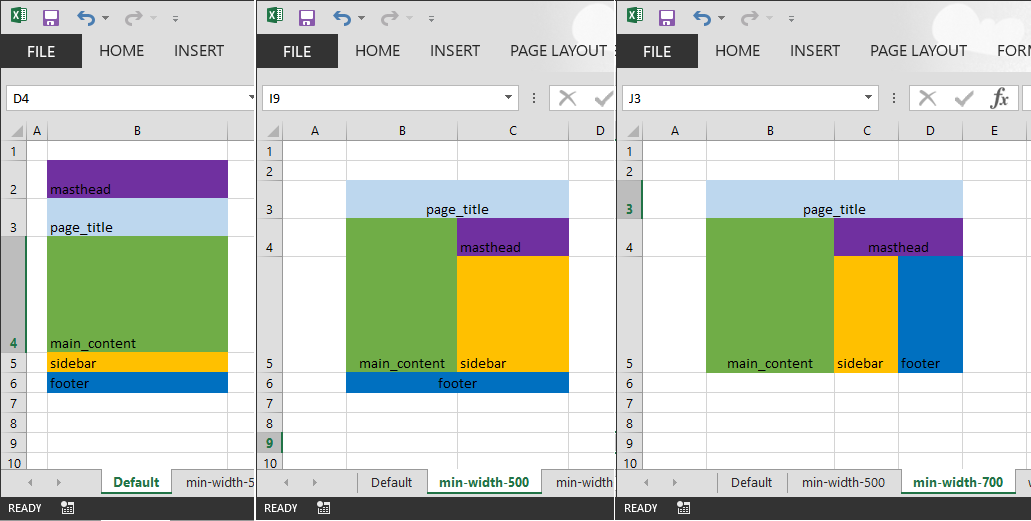
Next, I added a new workbook which contains only layout data and no code, I called mine CssGridLayoutsColors1.xlsx. In it I have three layout sheets but I started with one to begin with, called Default. On this Default sheet I define a stack of colored cells with identifiers which will be used for CSS identifers. The Default sheet looks like the leftmost screenshot below. It is meant to represent the layout for the smallest possible screen and this is why it is a single column of cells. The height of the rows is respected in the HTML (as is the column widths) so feel free to adjust the row heights.

Then, I cloned the Default sheet twice and renamed them min-width-500 and min-width-700 which forms the media query that drives the responsive web design that allows the page to take advantage of more screen real estate. On the these two new sheets and I gave myself two columns and three columns respectively and I moved the regions around. The cells on these extra sheets can contain whatever text you want, i.e. they don't have to be identifiers like the Default sheet. The final sheet contains the text that will reach the markup.

The three sheets should look like the following screen shot...

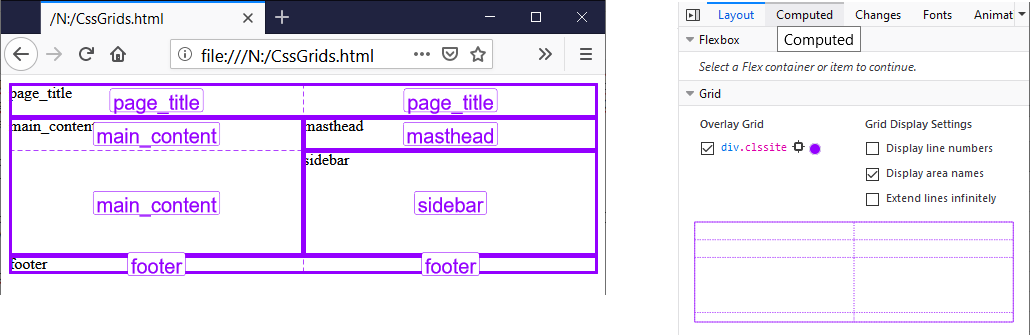
The code's output is both to the immediate window but also to a file; I called mine N:\CssGrids.html but you can change the filename in the first subroutine of code. The output file is HTML and CSS and a rendering is shown on the left below. The best browser to use for CSS Grids is Firefox because it has a Grid developer tool shown on the right in the screenshot below and this is why the page shot on the left is annotated with the grid lines and grid area names.

If you play with the browser window's width then you'll see it respond to narrowest widths with a single column and the widest widths with three columns. Hence you now have responsive web design and all this is achieved without using Bootstrap and its twelve columns (incidentally you can replicate that if you want, see the docs).

The Html file

Here is the output of HTML and CSS. Please see links below to the documentation to understand it.

<html>
<head>
<style>
.clssite {
  display: grid;
  grid-template-columns:  135fr;
  grid-template-rows:  28fr 28fr 87fr 15fr 15fr;
  grid-template-areas: "masthead"
                       "page_title"
                       "main_content"
                       "sidebar"
                       "footer"
                       ;
}

.clsfooter {
  grid-area: footer;
}

.clsmain_content {
  grid-area: main_content;
}

.clsmasthead {
  grid-area: masthead;
}

.clspage_title {
  grid-area: page_title;
}

.clssidebar {
  grid-area: sidebar;
}

@media (min-width: 500px) {
  .clssite {
    display: grid;
    grid-template-columns:  83fr 83fr;
    grid-template-rows:  28fr 28fr 87fr 15fr;
    grid-template-areas: "page_title page_title"
                         "main_content masthead"
                         "main_content sidebar"
                         "footer footer"
                         ;
  }
}

@media (min-width: 700px) {
  .clssite {
    display: grid;
    grid-template-columns:  96fr 48fr 48fr;
    grid-template-rows:  28fr 28fr 87fr;
    grid-template-areas: "page_title page_title page_title"
                         "main_content masthead masthead"
                         "main_content sidebar footer"
                         ;
  }
}

</style>
</head>
<body>
<div class="clssite">
<div class="clsfooter">footer</div>
<div class="clsmain_content">main_content</div>
<div class="clsmasthead">masthead</div>
<div class="clspage_title">page_title</div>
<div class="clssidebar">sidebar</div>
</div>
</body>
</html>

The VBA code

So finally here is the VBA code, you will need a Tools->Reference to Microsoft Scripting Runtime.

Option Explicit

'* Tools->References
'*   Microsoft Scripting Runtime

Private mdicLines As New Scripting.Dictionary
Private Const csMinWidth As String = "min-width-"
Private Const csAnchorCellAddress As String = "B3"

Sub Test()

    Dim wb As Excel.Workbook
    Set wb = Application.Workbooks.Item("CssGridLayoutsColors1.xlsx")

    With wb.Worksheets
        
        Dim wsDefault As Excel.Worksheet
        Set wsDefault = .Item("Default")
        
        Dim ashtLayoutSheets As Variant
        ashtLayoutSheets = Array(wsDefault, .Item("min-width-500"), .Item("min-width-700"))
    End With
    
    Dim dicKeyColors As Scripting.Dictionary
    Set dicKeyColors = ReadKeyColors(wsDefault)
    
    WriteCssGrid ashtLayoutSheets, dicKeyColors
    WriteToFile "N:\CssGrids.html"
End Sub

Function ReadKeyColors(ByVal wsDefault As Excel.Worksheet) As Scripting.Dictionary
    
    Dim rngColorKey As Excel.Range
    Set rngColorKey = wsDefault.Range(csAnchorCellAddress).CurrentRegion
    
    Dim dicKeyColors As Scripting.Dictionary
    Set dicKeyColors = New Scripting.Dictionary

    Dim rngLoop As Excel.Range
    For Each rngLoop In rngColorKey
    
        Dim sColorName As String
        sColorName = rngLoop.Value
        
        If InStr(1, sColorName, " ", vbBinaryCompare) > 0 Then
            Err.Raise vbObjectError, "", "Input Error: Default sheet has cell content with spaces." & vbNewLine & _
                    "Please omit spaces as content here defines identifiers in the HTML/CSS."
        
        End If
        
        Dim lColor As Long
        lColor = rngLoop.Interior.Color
        
        If LenB(sColorName) > 0 Then
            If Not dicKeyColors.Exists(lColor) Then
                dicKeyColors.Add lColor, sColorName
            Else
                Err.Raise vbObjectError, "", "Key colors are not unique"
            End If
        End If
    Next

    Set ReadKeyColors = dicKeyColors

End Function

Sub WriteCssGrid(ByRef ashtLayoutSheets As Variant, ByVal dicKeyColors As Scripting.Dictionary)
    
    Call ValidateInputParameters(ashtLayoutSheets)

    Set mdicLines = Nothing '* reset the output buffer

    WL "<html>"
    WL "<head>"
    WL "<style>"
    
    Dim vLoop As Variant
    For Each vLoop In ashtLayoutSheets
        
        Dim wsLoop As Excel.Worksheet
        Set wsLoop = vLoop
        
        Call WriteCSSForGridSite(wsLoop, dicKeyColors)
    Next
    
    WL "</style>"
    WL "</head>"
    WL "<body>"

    Call WriteHtmlForGridSite(ashtLayoutSheets(UBound(ashtLayoutSheets)), dicKeyColors)

    WL "</body>"
    WL "</html>"

    Debug.Print VBA.Join(mdicLines.Items, vbNewLine)

End Sub


Sub WriteCSSForGridSite(ByVal wsLoop As Excel.Worksheet, ByVal dicKeyColors As Scripting.Dictionary)

    Dim lMinWidth As Long
    If wsLoop.Name = "Default" Then
        lMinWidth = 0
    Else
        lMinWidth = CLng(Mid$(wsLoop.Name, Len(csMinWidth) + 1))
    End If

    Dim bMediaQuery As Boolean
    bMediaQuery = (lMinWidth > 0)
    
    Dim rngSite As Excel.Range
    Set rngSite = wsLoop.Range(csAnchorCellAddress).CurrentRegion

    Dim sIndent As String
    sIndent = VBA.IIf(bMediaQuery, "  ", "")
    
    Dim dicRegions As Scripting.Dictionary
    Dim sAreas As String
    sAreas = DetermineRegionsByColor(wsLoop, dicKeyColors, lMinWidth, dicRegions)

    If bMediaQuery Then WL "@media (min-width: " & lMinWidth & "px) {"
    WL sIndent & ".clsSite  {"
    WL sIndent & "  display: grid;"
    WL sIndent & "  grid-template-columns: " & siteColumnsOrRows(rngSite, XlRowCol.xlColumns) & ";"
    WL sIndent & "  grid-template-rows: " & siteColumnsOrRows(rngSite, XlRowCol.xlRows) & ";"
    WL sIndent & "  grid-template-areas: " & sAreas & ";"
    WL sIndent & "}"
    If bMediaQuery Then WL "}"
    WL ""

    Dim wb As Excel.Workbook
    Set wb = rngSite.Worksheet.Parent
    
    If Not bMediaQuery Then

        Dim vRegion As Variant
        For Each vRegion In dicKeyColors.Items

            WL ".cls" & vRegion & " {"
            WL "  grid-area: " & vRegion & ";"

            WL "}"
            WL ""
        Next
    End If
End Sub


Function siteColumnsOrRows(ByVal rngSite As Excel.Range, ByVal eRowcol As XlRowCol) As String
    Dim sReturn As String
    
    If eRowcol = xlRows Then
        Dim rngRowLoop As Excel.Range
        For Each rngRowLoop In rngSite.Rows
            Dim lRowHeight As Long
            lRowHeight = rngRowLoop.Height
             
            sReturn = sReturn & " " & CStr(lRowHeight) & "fr"
        Next
    End If
    
    If eRowcol = xlColumns Then
        Dim rngColumnLoop As Excel.Range
        For Each rngColumnLoop In rngSite.Columns
            Dim lColumnWidth As Long
            lColumnWidth = rngColumnLoop.Width
             
            sReturn = sReturn & " " & CStr(lColumnWidth) & "fr"
        Next
    End If
    
    siteColumnsOrRows = sReturn
    
End Function

Function DetermineRegionsByColor(ByVal ws As Excel.Worksheet, _
                ByVal dicKeyColors As Scripting.Dictionary, ByVal lMinWidth As Long, _
                ByRef pdicRegions As Scripting.Dictionary) As String

    Dim rngAnchor As Excel.Range
    Set rngAnchor = ws.Range(csAnchorCellAddress)
    
    Dim rngCurrentRegion As Excel.Range
    Set rngCurrentRegion = rngAnchor.CurrentRegion
    
    Dim sReturn As String
    sReturn = ""
    
    Set pdicRegions = New Scripting.Dictionary
    
    Dim rngRowLoop As Excel.Range
    For Each rngRowLoop In rngCurrentRegion.Rows
    
        Dim sRow As String: sRow = """"
    
        Dim rngLoop As Excel.Range
        For Each rngLoop In rngRowLoop.Cells
                
            Dim sRegion As String
            sRegion = "."
            If dicKeyColors.Exists(rngLoop.Interior.Color) Then
                sRegion = dicKeyColors.Item(rngLoop.Interior.Color)
                
                If pdicRegions.Exists(sRegion) Then
                
                    Dim rngUnion As Excel.Range
                    Set rngUnion = Application.Union(rngLoop, pdicRegions.Item(sRegion))
                    
                    If rngUnion.Areas.Count > 1 Then
                        Err.Raise vbObjectError, "", "Error: Non-contiguous color block detected at cell " & ws.Name & "!" & rngLoop.Address
                    Else
                        Set pdicRegions.Item(sRegion) = rngUnion
                    End If
                Else
                    pdicRegions.Add sRegion, rngLoop
                
                End If
                
            End If
            sRow = sRow & sRegion & " "
        Next
        
        sRow = Trim(sRow) & """"
        
        sReturn = sReturn & sRow & vbNewLine & Space$(VBA.IIf(lMinWidth = 0, 23, 25))
        
    Next
    
    DetermineRegionsByColor = sReturn

End Function

Sub WriteHtmlForGridSite(ByVal ws As Excel.Worksheet, ByVal dicKeyColors As Scripting.Dictionary)

    Dim dicRegions As Scripting.Dictionary
    DetermineRegionsByColor ws, dicKeyColors, 0, dicRegions
    
    WL "<div class=""clssite"">"

    Dim wb As Excel.Workbook
    Set wb = ws.Parent

    Dim vRegionLoop As Variant
    For Each vRegionLoop In dicRegions
    
        Dim rngRegion As Excel.Range
        Set rngRegion = dicRegions.Item(vRegionLoop)
        
        Dim vRangeValues As Variant
        vRangeValues = rngRegion.Value

        Dim sRangeValues As String: sRangeValues = ""
        If IsEmpty(vRangeValues) Then
            sRangeValues = ""
        ElseIf IsArray(vRangeValues) Then

            Dim vLoop As Variant
            For Each vLoop In vRangeValues
                sRangeValues = sRangeValues & CStr(vLoop)
            Next vLoop
        Else
            sRangeValues = CStr(vRangeValues)
        End If

        WL "<div class=""cls" & vRegionLoop & """>" & sRangeValues & "</div>"
    Next

    WL "</div>"
End Sub

Sub WL(sLineToWrite As String)
    mdicLines.Add mdicLines.Count, sLineToWrite
End Sub

Sub WriteToFile(ByVal sFileName As String)

    Dim fso As Scripting.FileSystemObject
    Set fso = New Scripting.FileSystemObject
    
    Dim txtOut As Scripting.TextStream
    Set txtOut = fso.CreateTextFile(sFileName, True)
    
    Dim vLine As Variant
    For Each vLine In mdicLines.Items
        txtOut.WriteLine vLine
    Next
    txtOut.Close
    Set txtOut = Nothing


End Sub

Function ValidateInputParameters(ByRef ashtLayoutSheets As Variant)
    Dim ws As Excel.Worksheet
    Dim vLoop As Variant
    Dim sErrMsg As String
    
    Const csOneDim As String = "Input Error: ashtLayoutSheets should be a one-dimensional array" & _
                                " of at least 1 worksheet"
                                
    Const csNameConvention As String = _
        "Input Error: ashtLayoutSheets contains worksheet '{ws.Name}' which breaks naming convention." & _
                vbNewLine & "The sheet should be called either 'Default' or " & _
                "begin with '" & csMinWidth & "' following by pixel number"
    
    '* Ensure ashtLayoutSheets is an array
    If Not IsArray(ashtLayoutSheets) Then Err.Raise vbObjectError, "", csOneDim
                
    '* Ensure ashtLayoutSheets array is one-dimensional
    Dim lLength As Long: lLength = -1
    On Error Resume Next
    lLength = UBound(ashtLayoutSheets) - LBound(ashtLayoutSheets) + 1
    On Error GoTo 0
    If lLength = -1 Then Err.Raise vbObjectError, "", csOneDim
                
    '* Ensure all given worksheets conform to naming convention
    For Each vLoop In ashtLayoutSheets
        Set ws = vLoop
        
        '* check the sheet is called either 'Default' or begins with 'min-width-'
        If ws.Name = "Default" Then
            '* fine, do nothing
        
        ElseIf Left$(ws.Name, Len(csMinWidth)) = csMinWidth Then
            '* check the remains are numeric
            
            Dim sPixel As String
            sPixel = Mid$(ws.Name, Len(csMinWidth) + 1)
            
            If Not IsNumeric(sPixel) Then Err.Raise vbObjectError, "", Replace(csNameConvention, "{ws.Name}", ws.Name)
        
        Else
            Err.Raise vbObjectError, "", Replace(csNameConvention, "{ws.Name}", ws.Name)
                
        End If
    Next
End Function

Links

Friday, 6 December 2019

VBA, Python, Multi-threading - Stoppable Folder Replicator

In this post I give a multi-threaded Python script which replicates one folder to another. It uses the Windows API ReadDirectoryChangesW function to watch for directory changes. It is start-able and stoppable from Excel VBA using the Windows Synchronization Events which I explored in the previous couple of posts.

Background

So I wanted some code to replicate a folder. Of course I could have written some VBA code to scan both a source and a destination folder every few seconds and figure what needed copying but this is a bit lame because it has needless disk activity and other techniques must be available. It is possible to use the Windows API, and specifically the ReadDirectoryChangesW function to watch a folder. .NET also has a folder watcher feature but I am happy to stick to Windows API.

ReadDirectoryChangesW blocks (in synchronous case)

But the problem with ReadDirectoryChangesW is that is blocks in the synchronous case. It is not like other waitable API function such as WaitForSingleObject(handle,interval) in that one can wait for a fixed time interval before breaking off to do some other work and give the impression of multi-threading.

I have seen on some VB6 forums some programmers attempt to use CreateThread() to give themselves another thread but they report crashes and this is because threads in VB6 and VBA need to obey COM apartment threading rules. I have yet to see successfully robust multi-threaded code for VB6 or VBA. Sure, I've seen code that looks like it runs multiple threads but the moment one puts in a break point and starts debugging Excel crashes. Perhaps one day I might solve that problem. In the meantime, I strongly recommend *not* creating threads in VBA. If you want concurrency then you should shell another process.

However, shelling another process raises the issue on how to communicate between the processes. In the previous two posts I demonstrated the use of Windows Synchronization Events as an inter process communication (IPC) mechanism and I will use this to signal the folder replicator to stop. To shell a child process on the VBA side, I am using Windows Script Host Object Model (wshom.ocx) and at some point the code could call Terminate() to kill the shelled process but this does not give the shelled process a chance to tidy up its resources. Instead, I am going to give VBA code which signals an Windows Synchronization Event object to politely ask the shelled process to tidy up and terminate itself.

ReadDirectoryChangesW is waitable in the asynchronous case

So upon further researching it turns out ReadDirectoryChangesW has a asynchronous use case as well which is helpful. Even more helpful is the fact I discovered Python code to call ReadDirectoryChangesW asynchronously in the test scripts of Mark Hammond's Win32 library, test_win32file.py. I am truly grateful for Mark Hammond's Windows Python library. For an explanation as to how the asynchronous use case works see the remarks section of ReadDirectoryChangesW docs page. So in the Python code it shows we can call WaitForSingleObject(handle,interval) in the asynchronous case.

But we still need two threads, one will watch the directory for changes and the other will wait for the stop signal to be issued by the Excel VBA code. So the following Python script is an example of how to launch a second thread in Python.

StoppableFolderReplicator.py

The core of the Python script below is based upon a unit test file for Mark Hammond's Windows Python library, test_win32file.py. The main() function runs first and validates the command line arguments, if valid it creates the class StoppableFolderReplicator where the real action takes place.

In the constructor of StoppableFolderReplicator class a handle to the directory to watch is obtained and then a second Thread is created to run the class's _watcherThreadOverlapped() method. Then the main thread runs the class's waitForEvent() method where it sits waiting for the Windows Synchronization Event (the stop event) to be signalled (by VBA).

The second thread runs the class's _watcherThreadOverlapped() method and loops around watching the directory by calling the ReadDirectoryChangesW() function. ReadDirectoryChangesW() returns either on a timeout or if there is a change in the directory it is watching; if the latter then any new file is copied across. Each iteration of the loop this thread also checks to the class's tearDownInProgress boolean property which is signalled by the main thread (in waitForEvent()) when the stop event is signalled; if signalled this second thread releases its handle and then quits.

A key line of code in the class's waitForEvent() method is self.watcher_thread.join(5) where the first thread pauses and waits for the second thread to acknowledge the stop, tidy up and then quit. Without this line, the main thread would quit earlier than the second thread with unexpected results.

Most messages printed are prefixed by a thread number to help folks understand how it works.

import win32api
import win32file
import pywintypes
import winerror
import win32event
import win32con
import ntsecuritycon
import sys
import os
import tempfile
import threading
import time
import shutil
from shutil import copyfile

class StoppableFolderReplicator(): 

    def __init__(self, srcFolder, destFolder, hEvent):
        self.srcFolder = srcFolder
        self.destFolder = destFolder
        self.hEvent = hEvent
        self.tearDownInProgress = False

        self.ACTIONS = {
                1 : "Created",
                2 : "Deleted",
                3 : "Updated",
                4 : "Renamed from something",
                5 : "Renamed to something"
            }
        
        self.dir_handle = win32file.CreateFile(srcFolder, 
                                        ntsecuritycon.FILE_LIST_DIRECTORY,
                                        win32con.FILE_SHARE_READ,
                                        None, # security desc
                                        win32con.OPEN_EXISTING,
                                        win32con.FILE_FLAG_BACKUP_SEMANTICS | win32con.FILE_FLAG_OVERLAPPED,
                                        None)

        self.watcher_thread = threading.Thread(target=self._watcherThreadOverlapped,
                            args=(srcFolder, destFolder, self.dir_handle))
        self.watcher_thread.start()


    def _watcherThreadOverlapped(self, srcFolder, destFolder, dir_handle):
        print("thread #2:waiting for directory changes")
        changes = []
        flags = win32con.FILE_NOTIFY_CHANGE_FILE_NAME
        buf = win32file.AllocateReadBuffer(8192)
        overlapped = pywintypes.OVERLAPPED()
        overlapped.hEvent = win32event.CreateEvent(None, 0, 0, None)
        while 1:
            if self.tearDownInProgress:
                print("thread #2:tidying up")
                if self.dir_handle != 0:
                    win32api.CloseHandle(self.dir_handle)
                    self.dir_handle = 0
                break
            try:
                win32file.ReadDirectoryChangesW(self.dir_handle,
                                                buf,
                                                False, #sub-tree
                                                flags,
                                                overlapped)
            except Exception as e:
                print("thread #2: Exception whilst ReadDirectoryChangesW:" + str(e) + "\n")
                break 
            # Wait for our event or for a short time.
            rc = win32event.WaitForSingleObject(overlapped.hEvent, 1000)
            if rc == win32event.WAIT_OBJECT_0:
                # got some data!  Must use GetOverlappedResult to find out
                # how much is valid!  0 generally means the handle has
                # been closed.  Blocking is OK here, as the event has
                # already been set.
                nbytes = win32file.GetOverlappedResult(dir_handle, overlapped, True)
                if nbytes:
                    bits = win32file.FILE_NOTIFY_INFORMATION(buf, nbytes)
                    changes.extend(bits)

                    for action, file in changes:
                        full_filename = os.path.join(srcFolder, file)
                        print("thread #2:" , full_filename, self.ACTIONS.get(action, "Unknown"))
                        if action == 1 or action == 3:
                            #
                            # perhaps put some filtering or file renaming logic
                            # in here
                            #
                            if os.path.isfile(full_filename):
                                sDestFilename = os.path.join(destFolder, file)
                                try:
                                    copyfile(full_filename,sDestFilename)
                                except Exception as e:
                                    print("thread #2: Exception whilst copying file '" + full_filename + "':" + str(e) + "\n")
                    changes = []  # bugfix, need to clear this other it accumulates
                else:
                    # This is "normal" exit - our 'tearDown' closes the
                    # handle.
                    # print "looks like dir handle was closed!"
                    break
        print ("thread #2:stopped")

    def waitForEvent(self):
        try:
            print("thread #1:waiting for stop event")
            while 1:
                
                dwWaitResult = win32event.WaitForSingleObject(self.hEvent.handle, 500)
                if dwWaitResult == win32event.WAIT_OBJECT_0:
                    print("thread #1:stop signal received...")
                    self.tearDownInProgress = True
                    self.watcher_thread.join(5)
                    return
                pass

        except Exception as e:
            print("thread #1:Exception whilst polling for event:'" + self.stopEventName + "':" + str(e) + "\n")

        
if __name__ == '__main__':

    if len(sys.argv) < 4:
        print("Usage:" + os.path.basename(__file__) + " <sourceFolder> <destinationFolder> <stopEventName>")
    else:
        srcFolder = sys.argv[1]
        destFolder = sys.argv[2]
        stopEventName = sys.argv[3]

        ok = True
        if not os.path.isdir(srcFolder):
            print("Error, srcFolder '" + srcFolder + "' does not exist!  Abandoning.")
            ok = False

        if not os.path.isdir(destFolder):
            print("Error, destFolder '" + destFolder + "' does not exist!  Abandoning.")
            ok = False

        if ok == True:
            try:
                stoppable = False
                hEvent = win32event.OpenEvent(ntsecuritycon.SYNCHRONIZE, 0, stopEventName)
                
                stoppable = True
            except Exception as e:
                print("Exception whilst opening event:'" + stopEventName + "':" + str(e) + "\n")

            if stoppable:
                foo = StoppableFolderReplicator(srcFolder, destFolder, hEvent) 
                foo.waitForEvent()
                win32api.CloseHandle(hEvent)
                print("all stopped")
            else:
                print("Not stoppable, abandoning!")

Calling Excel VBA code

So two lines of the VBA code depend upon Chip Pearson's FormatMessage() function is a freely downloadable module from his website; alternatively you could comment them out.

In the previous two posts, I wrote about Windows Synchronization Event objects and how to use them in VBA so I won't duplicate explanation of that.

You should run the TestStoppableFolderReplicator() procedure. The other procedure is there for debugging against a Visual Studio launched Python process and is useful for development.

The stop event is created before the Python script is shelled because the Python script is expecting to open the event object; we create the event object in an initial state of being unset.

Next, the code uses the Windows Script Host Object Model (wshom.ocx) type library to shell the Python script, we supply three extra arguments after the script name (i) source folder, (ii) destination folder and (iii) the stop event name.

The code then reaches a Stop statement at which point you are invited to pop off to the source folder and create some files to test the replication. For the quickest way to create a file, I right click in a folder's explorer window and in the context menu I select the menu option New->Text Document. When a file is created it is replicated to the destination folder specified.

Once you've got bored of creating files and seeing them replicated then press F5 to move off the Stop statement and send the stop signal, the code then loops waiting for the Python process to quit voluntarily, this should be for only a split second.

When running the code below the shelled process appears as a blank window but once finished the output to that window is displayed in the VBA IDE's Immediate window. Underneath the code listing is a sample of what appeared for me in the Immediate window.

Option Explicit

'* Tools->References
'*   Windows Script Host Object Model (wshom.ocx)

Private Declare Function CreateEventWithoutSec Lib "kernel32" Alias "CreateEventA" (lpEventAttributes As Long, _
                    ByVal bManualReset As Long, ByVal bInitialState As Long, ByVal lpName As String) As Long
Private Declare Function CloseHandle Lib "kernel32" (ByVal hObject As Long) As Long
Private Declare Function SetEvent Lib "kernel32.dll" (ByVal hEvent As Long) As Long
Private Declare Function ResetEvent Lib "kernel32.dll" (ByVal hEvent As Long) As Long

Private hEvent As Long


Sub TestStoppableFolderReplicator()

    Dim oWshShell As IWshRuntimeLibrary.WshShell
    Set oWshShell = New IWshRuntimeLibrary.WshShell

    Const csPythonScriptFilePath As String = "C:\Users\Simon\source\repos\StoppableFolderReplicator\StoppableFolderReplicator\StoppableFolderReplicator.py "
    Const csSourceFolder As String = """N:\Folder Replication Sandbox\Source"""
    Const csDestinationFolder As String = """N:\Folder Replication Sandbox\Destination"""
    Const csStopEvent As String = "stopReplicator"
    
    Dim sCmdLine As String
    sCmdLine = "python " & csPythonScriptFilePath & " " & csSourceFolder & " " & csDestinationFolder & " " & csStopEvent
    
    hEvent = CreateEventWithoutSec(0, 1, 0, csStopEvent)
    If hEvent = 0 Then
        Debug.Print GetSystemErrorMessageText(Err.LastDllError)
        GoTo SingleExit
    End If
    
    '*
    '* launch the python script
    '*
    Dim oWshExec As IWshRuntimeLibrary.WshExec
    Set oWshExec = oWshShell.Exec(sCmdLine)
    Debug.Assert oWshExec.Status = WshRunning

    '* stop here for a while, pop off to source folder and create some files
    '* and watch them replicate to destination folder
    '* once you've got bored press F5 to send the stop signal
    Stop
    
    '* Ill-advised to use oWshExec.Terminate() because of resources not being tidied up cleanly
    '* so instead we set a signal which the shelled process looks for a shutdowns cleanly and voluntarily
    Call SetEvent(hEvent)

    '* allow the Python script a split second to respond the stop signal
    '* in the meantime we'll loop until the Python process quits
    While oWshExec.Status = WshRunning
        DoEvents '* stay responsive
    Wend

    '* very important to reset event if you want subsequent runs to work as well!
    Call ResetEvent(hEvent)
    Debug.Assert oWshExec.Status = WshFinished
    
    '* we can access what would have been printed to the console
    Debug.Print oWshExec.StdOut.ReadAll
    
    '* tidy up our handle, very important!
SingleExit:
    If hEvent <> 0 Then
        Call CloseHandle(hEvent)
        hEvent = 0
    End If

End Sub

Private Sub DebugStopSignal()
    '* I used this procedure for debugging the stop signal
    hEvent = CreateEventWithoutSec(0, 1, 0, "stopReplicator")
    If hEvent = 0 Then
        Debug.Print GetSystemErrorMessageText(Err.LastDllError)
        GoTo SingleExit
    Else
        Stop
        Call SetEvent(hEvent)
    
        Stop
        Call ResetEvent(hEvent)
    End If
    
SingleExit:
    If hEvent <> 0 Then
        Call CloseHandle(hEvent)
        hEvent = 0
    End If
End Sub

Here is some sample output copied from my Immediate window

thread #2:waiting for directory changes
thread #1:waiting for stop event
thread #2: N:\Folder Replication Sandbox\Source\New Text Document.txt Created
thread #2: N:\Folder Replication Sandbox\Source\New Rich Text Document.rtf Created
thread #1:stop signal received...
thread #2:tidying up
thread #2:stopped
all stopped

Final thoughts

The Python script replicated a folder but it could do anything that you wanted to offload from VBA because of VBA's lack of multi-threading. Signalling a stop is a vital IPC mechanism. This is much better than just calling the Terminate() method. I really like Python as a means of extending VBA's power. Enjoy!

Links