Tuesday, 26 February 2019

VBA - Installing and calling Microsoft Message Queue

A question was asked on StackOverflow the solution to which was using a message queue. The questioner had a database and wanted notification to reach his Excel workbook application when the number of rows in a database table changed. On the database side one would use a database trigger to detect insertions but how would the database trigger notify Excel?

Whilst it is possible to open an ADODB Connection and sink events, holding that connection open for however long seemed wrong. Better if the notification was loosely coupled, so the database trigger could send a message to a message queue which would reliable be received by Windows and readable for later. A COM event is not persisted, if the Excel workbook application was closed or not running for some reason then the COM event would be lost.

So in the given scenario a message queue is better than sinking COM events. So for the benefit of that StackOverflower, this post highlights how to install and call Windows Message Queue.

Steps to install Microsoft Message Queue

I have verified these steps on my Windows 10 box

  1. Open Control Panel (classic view I loathe Windows 8 app view).
  2. Within control panel click on Programs and Features
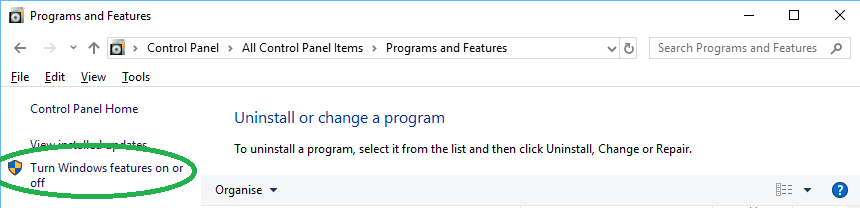
  3. Within Programs and Features on the left hand side click on the blue yellow chequered shield labelled 'Turn Windows features on or off'
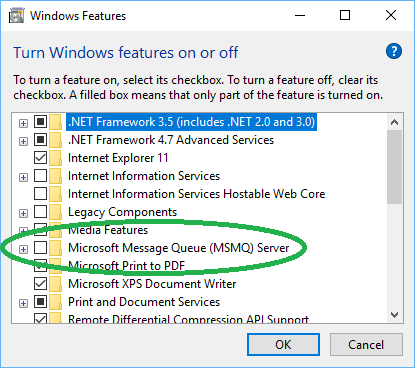
  4. Within the Windows Features dialog box scroll down until you find Microsoft Message Queue (MSMQ) Server, the check the checkbox and click OK.
  5. Wait patiently as progress dialog box appears for two minutes during install. The messages that pass by are 'Searching for required files', 'Applying changes' and finally 'Windows completed the requested changes.'
  6. Click Close.

Creating a Queue

So to create a queue we have to start with the control panel again. Here are the steps ...

  1. Open Control Panel (classic view I loathe Windows 8 app view).
  2. Within control panel click on Administrative Tools
  3. Within the Administrative Tools explorer click on Computer Management, this launches the Computer Management Microsoft Management Console (MMC)
  4. In the Computer Management MMC expand the Services and Applications tree node, then Message Queueing tree node, then Private Queues tree node
  5. On the Private Queues node right-click to get context menu and select New -> Private Queue
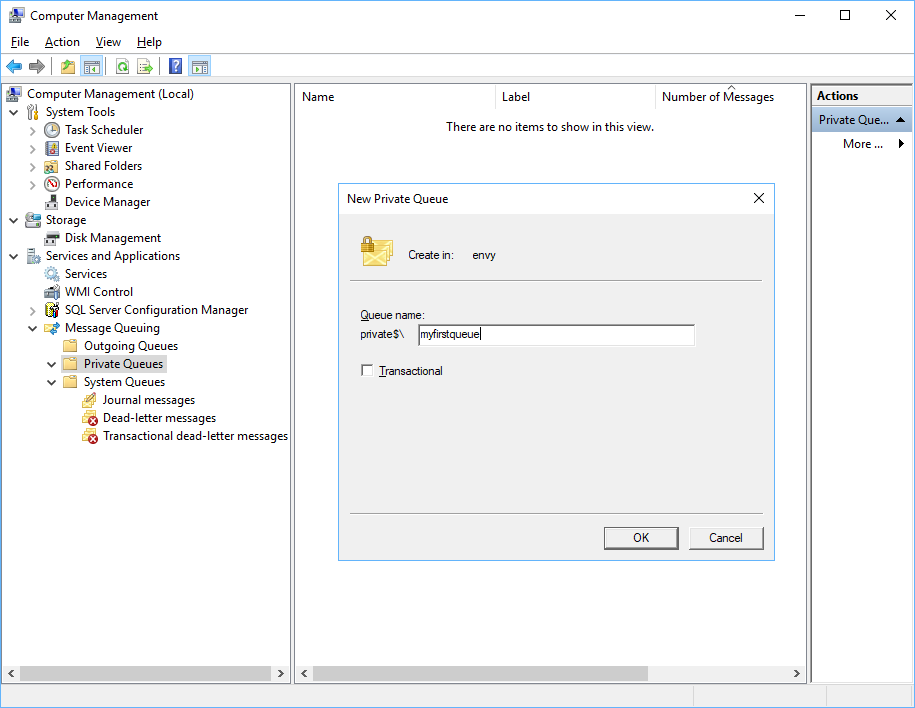
  6. In the New Private Queue give you queue a name, I named mine myfirstqueue and the code samples below are coded to this name but you can obviously change the names to suit.
  7. Click OK and you're done.

Do Add Security

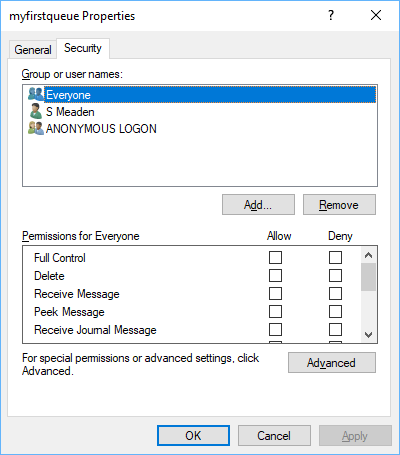
I'm not sitting in an enterprise as I write this so I cannot inform as how to secure your message queue at the enterprise level but obviously you would want to tie down access. As a message queue is a Windows resource then it can be permission-ed like other Windows resources such as directories and printers etc. Indeed the security tab on the queue's properties looks pretty much like a standard Windows permissioning dialog.

Leaving a message queue with no security is a big no-no.

Finding the Message Queue Type Library

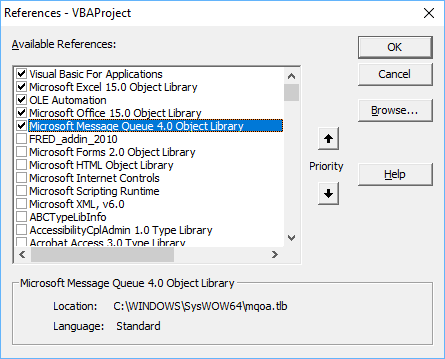
So after installing I had thought it would be simple to go to the VBA IDE and find a brand new choice in the Tools->References dialog box but it seems the type library is not registered correctly and so it will not appear in the list. Nevertheless, I have managed to track it down. So in the Tools->References dialog box, click Browse and then go find the file ...

c:\windows\system32\mqoa.tlb

And once checked you should see the following ...

Note how the filename has been resolved to the SysWOW64 directory. Now we can write some VBA code to both send and receive messages.

VBA code to send and receive messages

So here is some client code which was quite straight forward. The only trap was when calling Receive you should definitely supply a timeout otherwise you code will hang which for a single threaded environment such as VBA is bad.

Option Explicit

Private Function GetQueueInfo(Optional ByVal sPrivateQueueName As String = "myfirstqueue") As MSMQ.MSMQQueueInfo
    Dim oQueueInfo As MSMQ.MSMQQueueInfo
    Set oQueueInfo = New MSMQ.MSMQQueueInfo

    Dim sComputerName As String
    sComputerName = Environ$("COMPUTERNAME")
    
    oQueueInfo.FormatName = "direct=os:" + sComputerName + "\PRIVATE$\" + sPrivateQueueName
    Set GetQueueInfo = oQueueInfo
End Function

Sub TestSend()
    Dim oQueueInfo As MSMQ.MSMQQueueInfo
    Set oQueueInfo = GetQueueInfo("myfirstqueue")
    
    Dim oQueue As MSMQ.MSMQQueue
    Set oQueue = oQueueInfo.Open(MSMQ.MQACCESS.MQ_SEND_ACCESS, MSMQ.MQSHARE.MQ_DENY_NONE)
    
    Dim oMessage As MSMQ.MSMQMessage
    Set oMessage = New MSMQ.MSMQMessage
    
    oMessage.Label = "TestMsg"
    oMessage.Body = "Message queues facilitate loose coupling in a distributed component system."
    
    Call oMessage.Send(oQueue)

End Sub

Sub TestReceive()
    Dim oQueueInfo As MSMQ.MSMQQueueInfo
    Set oQueueInfo = GetQueueInfo("myfirstqueue")

    Dim oQueue As MSMQ.MSMQQueue
    Set oQueue = oQueueInfo.Open(MSMQ.MQACCESS.MQ_RECEIVE_ACCESS, MSMQ.MQSHARE.MQ_DENY_NONE)
    
    Dim oMessage As MSMQ.MSMQMessage
    '* IF YOU DO NOT SUPPLY A TIMEOUT THE NEXT LINE WILL HANG!!!
    Set oMessage = oQueue.Receive(ReceiveTimeout:=1000) '1000 milliseconds = 1 second
    If Not oMessage Is Nothing Then
        Debug.Print oMessage.Label
        Debug.Print oMessage.Body
    End If
End Sub

Client C# Code

If in the use case given at the top of the article, the database is SQL Server so the database trigger would be written in C#.

So I have not given any C# code because I think one can easily use a Primary Interop Assembly to deal with a COM library so the above code can be easily translated. However, if writing a .NET language you should use the .NET API and the System.Messaging namespace is where you will find the equivalent .NET objects.

Client Python Code

If the database in the use case is PostgreSQL one can write database triggers in Python and so some Python code would be useful.

So here is a good link to an great article Send MSMQ messages using python and actually that article inspired me to write this one.

Sunday, 24 February 2019

VBA - Python - COM Interoperability error when you forget error handler

I have been writing quite a lot of Python using the gateway class pattern. Python does COM inter-operability well including throwing errors with rich error info. However, do remember to provide an error handler or you get a strange error message.

Background: Error Handling in COM

I sketch the briefest of details below on HRESULT and ICreateErrorInfo but for a fuller read see this link.

HRESULT

Consider the following extract from the IDL of the Microsoft Scripting Runtime, specifically the Dictionary's RemoveAll method. (There is no return value to confuse matters). Understand that the HRESULT signals the success or failure of the method invocation. An HRESULT is a 32-bit integer, if it is zero (symbollically S_OK) then the method succeeded but any other value is an error, so 32-bits can support billions or error numbers. You can see how this 'error space' is divided at this link.

interface IDictionary : IDispatch {

        [id(0x00000008), helpstring("Remove all information from the dictionary."), helpcontext(0x00214b41)]
        HRESULT RemoveAll();

ICreateErrorInfo interface

Nevertheless, VBA programmers are used to error description strings and the HRESULT does not carry this information. Instead, an ErrorInfo object is created by calling the ICreateErrorInfo there you can see the error Description being settable. Python supports rich error handling via ICreateErrorInfo.

Code

So some code we illustrate..

Python Class

So the following Python code is a class with two methods, the first method PythonThrowsAnEror results in Python throwing an error because we try to call a method that does not exist. In the second method, we throw a custom error; this could be a business logic error as well as a system error.

class ThrowsErrors(object):
    _reg_clsid_ = "{FD538AF6-6B9C-4E53-8013-93D74665F23E}"
    _reg_progid_ = 'PythonComTypes.ThrowsErrors'
    _public_methods_ = ['PythonThrowsAnEror','ThrowMyOwnError']

    def PythonThrowsAnEror(self):
        a=self.noexist()

    def ThrowMyOwnError(self):
        a=2+2
        raise COMException(description="Throw an error!", scode=winerror.E_FAIL, source = "ThrowsErrors")

if __name__ == '__main__':
    print("Registering COM servers...")
    import win32com.server.register
    win32com.server.register.UseCommandLine(ThrowsErrors)


VBA Test Client code

So here is some test code but you must run the above Python class first to register it!

Sub TestThrowsErrors()
    On Error GoTo PythonErrHand
    Dim obj As Object
    Set obj = VBA.CreateObject("PythonComTypes.ThrowsErrors")
    Debug.Print obj.PythonThrowsAnEror
    'Debug.Print obj.ThrowMyOwnError
SingleExit:
    Exit Sub
PythonErrHand:
    Debug.Print err.Description, Hex$(err.Number), err.source
    
End Sub

Running the code prints the following (edited) in the Immediate window...

Unexpected Python Error: Traceback (most recent call last):
  File "C:\PROGRA~2\MICROS~4\Shared\PYTHON~1\lib\site-packages\win32com\server\policy.py", line 278, in _Invoke_
    return self._invoke_(dispid, lcid, wFlags, args)
  File "C:\PROGRA~2\MICROS~4\Shared\PYTHON~1\lib\site-packages\win32com\server\policy.py", line 283, in _invoke_
    return S_OK, -1, self._invokeex_(dispid, lcid, wFlags, args, None, None)
  File "C:\PROGRA~2\MICROS~4\Shared\PYTHON~1\lib\site-packages\win32com\server\policy.py", line 586, in _invokeex_
    return func(*args)
  File "N:\source\repos\ThrowsErrors\ThrowsErrors\ThrowsErrors.py", line 10, in PythonThrowsAnEror
    a=self.noexist()
AttributeError: 'ThrowsErrors' object has no attribute 'noexist'
              80004005      Python COM Server Internal Error

You can see that Python is passing a whole error stack via the Err.Description field. For the error number it is using &H80004005 which is E_FAIL which signifies a general error.

If &H80004005 is the favoured catch all error number for errors then we can do the same for our custom errors. In the Python code above one can see in the ThrowMyOwnError() method we also use E_FAIL. If you uncomment the second method call (and comment the first to suppress it) then the test code now prints

Throw an error!             80004005      ThrowsErrors

So that's fine but there is one last gotcha.

What happens if I forget my error handler?

Of course, if you write production quality code you'd add an error handler for every single Sub and Function! But if you are playing with some test code you may forget to add an error handler, let's simulate this by commenting out the On Error Goto PythonErrHand line of code. If you then run the code you get the following message box...

and so this is devoid of any rich error information. So just be aware.

Command Line - Running Midl.exe from a batch file

Just a quick one. I have had cause to run the MIDL.exe compiler as I am researching types and type libraries. MIDL.exe can be fussy in that it expects some environmental variables to be set, PATH and INCLUDE, so it can pick up all the files it needs. This is a little frustrating if you forget its prerequisites so I have packaged the details into a batch file to be run from the command line.

There is not much to say about this except note how we can alter (append) the PATH and INCLUDE variables. Also we we can pass arguments to the batch file and then reference them with %1 %2 etc.


SET INCLUDE=C:\Program Files (x86)\Windows Kits\10\Include\10.0.16299.0\um\;C:\Program Files (x86)\Windows Kits\10\Include\10.0.16299.0\shared\;C:\Windows\Microsoft.NET\Framework\v4.0.30319
SET PATH=%PATH%C:\Program Files (x86)\Microsoft Visual Studio 12.0\VC\bin\;

"C:\Program Files (x86)\Windows Kits\10\bin\10.0.16299.0\x86\midl.exe" %1 /tlb %2
pause
Exit

Here is an example of how to run it, one supplies the idl file first and the tlb (type library) file second.

n:\midl.bat "n:\MyTypeLib.idl" "n:\MyTypeLib.tlb"

I actually like this little batch file and I am beginning to wonder what else this vintage technology can offer.

Tuesday, 12 February 2019

VBA - Python Com Class with attributes

Keen readers of this blog will know from time to time I give Python COM gateway classes which are callable from VBA. Up until now I do not think I have given an example of a class that has attributes (or a constructor). Time to rectify this.

Open Visual Studio 2017 and add a new Python Applciation project and then copy and paste in the code below. Save the file, calling it whatever you want mine is called PythonExampleClassWithAttributes.py

  1. class ExampleComClassWithAttributes(object):
  2.  
  3.     _reg_clsid_ = "{EF38F5B8-6E86-4D8E-A93E-C5B6C05CF378}"
  4.     _reg_progid_ = 'PythonLib1.ExampleComClassWithAttributes'
  5.     _public_methods_ = ['AMethod']
  6.     _public_attrs_ = ['Foo','ws','ReadOnlyProp']
  7.     _readonly_attrs_ = ['ReadOnlyProp']
  8.  
  9.     def __init__(self):
  10.         self.ReadOnlyProp = "Not writable!"
  11.  
  12.     def AMethod(self):
  13.         return "AMethod returns"
  14.  
  15. def TestExampleComClassWithAttributes():
  16.     # This test routine gives each feature a spin 
  17.     # (except ws for which see VBA client example)
  18.     test = ExampleComClassWithAttributes()
  19.     test.Foo = 54
  20.     print(test.Foo)
  21.     print(test.AMethod())
  22.     print(test.ReadOnlyProp)
  23.  
  24. def RegisterThis():
  25.     print("Registering COM servers...")
  26.     import win32com.server.register
  27.     win32com.server.register.UseCommandLine(ExampleComClassWithAttributes)
  28.  
  29. if __name__ == '__main__':
  30.     RegisterThis()
  31.     TestExampleComClassWithAttributes()

Running the above code from Visual Studio 2017 should give a command window output of the following...

Registering COM servers...
Registered: PythonLib1.ExampleComClassWithAttributes
54
AMethod returns
Not writable!
Press any key to continue . . .

_public_attrs_ and _readonly_attrs_

the new features in this code are the two class level attributes of _public_attrs_ and _readonly_attrs_. _public_attrs_ is an array of attributes that are to be exposed by Python to COM. That's all you need to get attributes up and running; very economical with lines of code!

You may be wondering where are the property procedures? And also wondering that without them how do you make properties read only? To make properties read only you add them to the _readonly_attrs_ array. In the above code the property named "ReadOnlyProp" is read-only, attempting to write to that property will error.

def __init__(self)

I don't think I have given a Python class constructor example on this blog before either. In the above code I give one, it is the block of code headed def __init__(self) on lines 9-10. Because I made "ReadOnlyProp" read-only I somehow need to set the value, in the code above I set it in the constructor.

Client VBA Code

So here is the client VBA code which can be pasted into a standard module.

modExampleComClassWithAttrs Standard Module

  1. Option Explicit
  2.  
  3. Sub VBATestExampleComClassWithAttributes()
  4.     Dim objExampleWithAttrs As Object
  5.     Set objExampleWithAttrs = VBA.CreateObject("PythonLib1.ExampleComClassWithAttributes")
  6.     Debug.Print objExampleWithAttrs.AMethod
  7.  
  8.     Set objExampleWithAttrs.ws = ThisWorkbook.Worksheets.Item(1)
  9.     Debug.Print objExampleWithAttrs.ws.name
  10.     objExampleWithAttrs.Foo = 54
  11.     Debug.Print objExampleWithAttrs.Foo
  12.     Debug.Print objExampleWithAttrs.ReadOnlyProp
  13.  
  14. End Sub

So one feature above not found in the Python test code is that I am setting one attribute 'ws' to be a object reference to a worksheet and so I need the Set keyword, notice how in the Python code I do not need to give this. Python is less fussy it seems, but with it the responsibility for the programmer to take care and test their code.

Final Thoughts

I have to say I feel quite liberated to be able to define a class that can carry state, i.e. has attributes, without having to add a class module for each class to the VBA project. In my university computer sciences courses I was firmly taught object orientation (OO). And to do good OO can require many classes, some of them potentially quite small. The Python files can hold as many classes as you need. No need to fill your VBA projects up with mini-classes.

Monday, 28 January 2019

VBA - Accessibility Meta Code

So I had some code to generate an illustrative tree of Excel window handles as a by-product for some code to get a pointer to Excel via its window handle using the Accessibility API. On StackOverflow, a questioner wanted something similar for Word. One can also imagine a future question wanted similar for PowerPoint. Code to reach all those three applications via their windows handles are in the previous post. However, I wanted to share the meta code because yet another use case may turn up in the future.

Option Explicit
Option Private Module

'******************************************************************************************************
'* Windows API function to traverse windows and grab attributes
'******************************************************************************************************
Private Declare Function FindWindowEx Lib "user32" Alias "FindWindowExA" _
(ByVal hWnd1 As Long, ByVal hwnd2 As Long, ByVal lpsz1 As String, ByVal lpsz2 As String) As Long

Private Declare Function GetWindowText Lib "user32" Alias "GetWindowTextA" _
(ByVal hwnd As Long, ByVal lpString As String, ByVal cch As Long) As Long

Private Declare Function GetClassName Lib "user32" Alias "GetClassNameA" _
(ByVal hwnd As Long, ByVal lpClassName As String, ByVal nMaxCount As Long) As Long

'******************************************************************************************************
'* Windows API function to get IDispatch COM pointer via Accessibility interface
'******************************************************************************************************
Private Declare PtrSafe Function AccessibleObjectFromWindow Lib "oleacc.dll" ( _
  ByVal hwnd As LongPtr, ByVal dwId As Long, ByRef riid As Any, ByRef ppvObject As Object) As Long

'******************************************************************************************************
'* Entry Points
'******************************************************************************************************
Private Sub TestGetAccessibleOfficeObjects()
    Dim shtExcelReport As Excel.Worksheet
    Set shtExcelReport = ThisWorkbook.Worksheets.Item("Sheet2")
    Dim shtWordReport As Excel.Worksheet
    Set shtWordReport = ThisWorkbook.Worksheets.Item("Sheet3")
    
    Dim shtPowerPointReport As Excel.Worksheet
    Set shtPowerPointReport = ThisWorkbook.Worksheets.Item("Sheet4")
    
    'Dim shtOneNoteReport As Excel.Worksheet
    'Set shtOneNoteReport = ThisWorkbook.Worksheets.Item("Sheet5")
    
    
    GetAccessibleOfficeObjects shtExcelReport, "Excel"
    GetAccessibleOfficeObjects shtWordReport, "Word"
    GetAccessibleOfficeObjects shtPowerPointReport, "PowerPoint"
    'OneNote not accessible GetAccessibleOfficeObjects shtOneNoteReport, "OneNote"

End Sub

'******************************************************************************************************
'******************************************************************************************************
'* Main Controlling code
'******************************************************************************************************
'******************************************************************************************************
Private Function GetAccessibleOfficeObjects(ByVal shOutputSheet As Excel.Worksheet, ByVal sApplication As String)

    Dim sApplicationRootClass As String
    
    sApplicationRootClass = VBA.IIf(sApplication = "Excel", "XLMAIN", VBA.IIf(sApplication = "Word", "OpusApp", "Not yet implemented"))
    sApplicationRootClass = VBA.Switch(sApplication = "Excel", "XLMAIN", sApplication = "Word", "OpusApp", _
                sApplication = "PowerPoint", "PPTFrameClass", sApplication = "OneNote", "Framework::CFrame")
    
    Dim xmlHandlesReport As MSXML2.DOMDocument60
    Set xmlHandlesReport = GetWindows(sApplicationRootClass, True, shOutputSheet)
    
    WriteToSheetStart shOutputSheet, xmlHandlesReport.DocumentElement
    
    QueryInterfaceForAccessibility xmlHandlesReport
    
    UpdateCastableHandles xmlHandlesReport
     
    WriteCodeToGetAppObject xmlHandlesReport, sApplication, sApplicationRootClass
End Function

Private Function WriteCodeToGetAppObject(ByVal xmlHandlesReport As MSXML2.DOMDocument60, _
            ByVal sApplication As String, ByVal sApplicationRootClass As String)

    Dim xmlAppNode As MSXML2.IXMLDOMElement
    Set xmlAppNode = xmlHandlesReport.SelectSingleNode("//*[@obj_Application_Name]")
        
    '******************************************************************************************************
    '* Traverse up the tree to the root node, recording the window class
    '******************************************************************************************************
    Dim dicPathUp As Scripting.Dictionary
    Set dicPathUp = New Scripting.Dictionary
    
    Dim xmlTraverser As MSXML2.IXMLDOMElement
    Set xmlTraverser = xmlAppNode
    
    While Not xmlTraverser Is xmlHandlesReport.DocumentElement
        dicPathUp.Add xmlTraverser.getAttribute("class"), 0
        Set xmlTraverser = xmlTraverser.ParentNode
    Wend
    
    '******************************************************************************************************
    '* Reverse the path
    '******************************************************************************************************
    Dim dicPathDown As Scripting.Dictionary
    Set dicPathDown = New Scripting.Dictionary
    Dim lLoop As Long, lLoop2 As Long
    For lLoop = dicPathUp.Count - 1 To 0 Step -1
        
        dicPathDown.Add dicPathUp.Keys()(lLoop), 0
    Next lLoop
    
    '******************************************************************************************************
    '* Now write the code
    '******************************************************************************************************
    Dim dicCode As Scripting.Dictionary
    Set dicCode = New Scripting.Dictionary
    
    Dim sFuncName As String
    sFuncName = "Get" & sApplication & "AppObjectByIAccessible"
    
    dicCode.Add dicCode.Count, "Private Declare PtrSafe Function AccessibleObjectFromWindow Lib ""oleacc.dll"" ( _"
    dicCode.Add dicCode.Count, "    ByVal hwnd As LongPtr, ByVal dwId As Long, ByRef riid As Any, ByRef ppvObject As Object) As Long" & vbNewLine

    dicCode.Add dicCode.Count, "Private Declare Function FindWindowEx Lib ""user32"" Alias ""FindWindowExA"" _"
    dicCode.Add dicCode.Count, "    (ByVal hWnd1 As Long, ByVal hwnd2 As Long, ByVal lpsz1 As String, ByVal lpsz2 As String) As Long" & vbNewLine
    
    dicCode.Add dicCode.Count, "Public Function " & sFuncName & "() As Object"
    dicCode.Add dicCode.Count, "    Dim guid(0 To 3) As Long, acc As Object"
    dicCode.Add dicCode.Count, "    guid(0) = &H20400: guid(1) = &H0: guid(2) = &HC0: guid(3) = &H46000000"
    dicCode.Add dicCode.Count, ""
    dicCode.Add dicCode.Count, "    Dim alHandles(0 to " & dicPathUp.Count & ") As Long"
    
    dicCode.Add dicCode.Count, "    alHandles(0) = FindWindowEx(0, 0, """ & sApplicationRootClass & """, vbNullString)"
    For lLoop = 0 To dicPathDown.Count - 1
        Dim sInputHandle As String
        If lLoop = 0 Then sInputHandle = "lTopHandle" Else sInputHandle = "alHandles(" & lLoop & ")"
        sInputHandle = "alHandles(" & lLoop & ")"
        
        Dim sClass As String
        sClass = dicPathDown.Keys()(lLoop)
        dicCode.Add dicCode.Count, "    alHandles(" & lLoop + 1 & ") = FindWindowEx(" & sInputHandle & ",0,""" & sClass & """,vbNullString) "
    Next
    
    dicCode.Add dicCode.Count, "    If AccessibleObjectFromWindow(alHandles(" & dicPathDown.Count & "), -16&, guid(0), acc) = 0 Then"
    dicCode.Add dicCode.Count, "        Set " & sFuncName & " = acc.Application"
    dicCode.Add dicCode.Count, "    End If"
    dicCode.Add dicCode.Count, "End Function " & vbNewLine
    dicCode.Add dicCode.Count, "Sub Test" & sFuncName
    dicCode.Add dicCode.Count, "    Dim obj As Object"
    dicCode.Add dicCode.Count, "    Set obj = " & sFuncName & "()"
    dicCode.Add dicCode.Count, "    Debug.Print obj.Name"
    dicCode.Add dicCode.Count, "End Sub "
    
    Debug.Print VBA.Join(dicCode.Items, vbNewLine)
End Function

'******************************************************************************************************
'* Global functions
'******************************************************************************************************
Public Function PadHex(ByVal l32Bit As Long) As String
    PadHex = Right$("00000000" & Hex$(l32Bit), 8)
End Function

'******************************************************************************************************
'******************************************************************************************************
'* Windows Recursion Code
'******************************************************************************************************
'******************************************************************************************************
Private Function GetWindows(ByVal sRootClass As String, ByVal bWriteToSheet As Boolean, ByVal ws As Excel.Worksheet) As MSXML2.DOMDocument60
    Debug.Assert Not ws Is Nothing
    
    Dim xmlDocument As MSXML2.DOMDocument60
    Set xmlDocument = New MSXML2.DOMDocument60
    xmlDocument.LoadXML ""
    Debug.Assert xmlDocument.parseError = 0
    
    Dim xmlRoot As MSXML2.IXMLDOMElement
    Set xmlRoot = xmlDocument.DocumentElement
     
    Dim hwnd As Long
    hwnd = FindWindowEx(0, 0, sRootClass, vbNullString)
    
    AdornAttributes hwnd, xmlRoot
    GetWinInfo hwnd&, xmlRoot
    
    Set GetWindows = xmlDocument
End Function

Private Function AdornAttributes(ByVal hwnd As Long, xmlEle As MSXML2.IXMLDOMElement)
    If Not xmlEle Is Nothing Then
        Call xmlEle.setAttribute("hWndHex", PadHex(hwnd))
        Call xmlEle.setAttribute("hWnd", hwnd)
        Call xmlEle.setAttribute("title", GetTitle(hwnd))
        Call xmlEle.setAttribute("class", GetClassName2(hwnd))
    End If
End Function

Private Sub GetWinInfo(hParent As Long, ByVal xmlEle As MSXML2.IXMLDOMElement)
    '* Sub to recursively obtain window handles, classes and text
    '* given a parent window to search
    '* Based on code written by Mark Rowlinson - www.markrowlinson.co.uk - The Programming Emporium
    '* modified to write to Xml document instead of a worksheet
    Dim hwnd As Long
    
    hwnd = FindWindowEx(hParent, 0&, vbNullString, vbNullString)
    While hwnd <> 0
        
        Dim xmlChild As MSXML2.IXMLDOMElement
        Set xmlChild = xmlEle.OwnerDocument.createElement("Window")
        xmlEle.appendChild xmlChild
        
        AdornAttributes hwnd, xmlChild
        
        GetWinInfo hwnd, xmlChild
        
        hwnd = FindWindowEx(hParent, hwnd, vbNullString, vbNullString)
    Wend
End Sub

Private Function GetTitle(ByVal hwnd As Long, Optional ByVal bReportNa As Boolean) As String
    Dim lngRet As Long
    Dim strText As String
    
    strText = String$(100, Chr$(0))
    lngRet = GetWindowText(hwnd, strText, 100)
    If lngRet > 0 Then
        GetTitle = Left$(strText, lngRet)
    Else
        If bReportNa Then
            GetTitle = "N/A"
        End If
    End If
End Function

Private Function GetClassName2(ByVal hwnd As Long)
    Dim lngRet As Long
    Dim strText As String
    
    strText = String$(100, Chr$(0))
    lngRet = GetClassName(hwnd, strText, 100)
    GetClassName2 = Left$(strText, lngRet)
End Function

'******************************************************************************************************
'******************************************************************************************************
'* Write Report To Worksheet code
'******************************************************************************************************
'******************************************************************************************************
Private Function WriteToSheetStart(ByVal ws As Excel.Worksheet, ByVal xmlEle As MSXML2.IXMLDOMElement)
    ws.Cells.Clear
    ws.Activate
    ws.Cells(1, 1).Activate
    WriteToSheet ws, 1, 1, xmlEle
End Function

Private Function WriteToSheet(ByVal ws As Excel.Worksheet, ByVal lRow As Long, ByVal lColumn As Long, ByVal xmlEle As MSXML2.IXMLDOMElement) As Long
    
    Dim hwnd As Long
    hwnd = xmlEle.getAttribute("hWnd")
    
    
    Call xmlEle.setAttribute("rangeAnchor", "'" & ws.Name & "'!" & ws.Cells(lRow, lColumn).AddressLocal)
    Dim rngTest As Excel.Range
    Set rngTest = Application.Range(xmlEle.getAttribute("rangeAnchor"))
    Debug.Assert Not rngTest Is Nothing
    
    
    ws.Cells(lRow, lColumn).Formula = "'" & PadHex(hwnd) & " (" & CStr(hwnd) & ")"
    ws.Cells(lRow, lColumn + 1).Value = xmlEle.getAttribute("title")
    ws.Cells(lRow, lColumn + 2).Value = xmlEle.getAttribute("class")
    
    If xmlEle.ChildNodes.Length > 0 Then
    
        Dim xmlChildWindows As MSXML2.IXMLDOMNodeList
        Set xmlChildWindows = xmlEle.ChildNodes
        
        Dim lLength As Long
        lLength = xmlEle.ChildNodes.Length
        
        Dim lLoop As Long
        For lLoop = 0 To lLength - 1
            
            Dim xmlChild As MSXML2.IXMLDOMElement
            Set xmlChild = xmlEle.ChildNodes.Item(lLoop)
    
            lRow = WriteToSheet(ws, lRow + 1, lColumn + 3, xmlChild)
            
        Next lLoop
    End If
    
    WriteToSheet = lRow
End Function

Private Sub UpdateCastableHandles(ByVal xmlHandlesReport As MSXML2.DOMDocument60)
    Dim rngCastable As Excel.Range
    
    Dim xmlCastable As MSXML2.IXMLDOMNodeList
    Set xmlCastable = xmlHandlesReport.SelectNodes("//*[@ComInterface]")
    Debug.Assert xmlCastable.Length > 0
    
    Dim xmlCastableLoop As MSXML2.IXMLDOMElement
    For Each xmlCastableLoop In xmlCastable
        Set rngCastable = Application.Range(xmlCastableLoop.getAttribute("rangeAnchor"))
        rngCastable.Resize(1, 3).Interior.Color = rgbYellow
        
        rngCastable.EntireColumn.AutoFit
        rngCastable.Offset(0, 1).EntireColumn.AutoFit
        rngCastable.Offset(0, 2).EntireColumn.AutoFit
        
'        Dim rngAutoFitLoop As Excel.Range
'        For Each rngAutoFitLoop In rngCastable.Cells
'            rngAutoFitLoop.EntireColumn.AutoFit
'        Next
        
        rngCastable.AddComment
        rngCastable.Comment.Visible = True
        rngCastable.Comment.Text Text:=xmlCastableLoop.getAttribute("ComInterface")
        
        Dim shp As Shape
        Set shp = rngCastable.Comment.Shape
        
        shp.ScaleWidth 1.07, msoFalse, msoScaleFromTopLeft
        shp.ScaleHeight 0.29, msoFalse, msoScaleFromTopLeft
        shp.IncrementTop -20
        
    Next
    
    Dim xmlApp As MSXML2.IXMLDOMElement
    Set xmlApp = xmlHandlesReport.SelectSingleNode("//*[@obj_Application_Name]")
    
    Debug.Assert Not xmlApp Is Nothing

    Dim rngApp As Excel.Range
    Set rngApp = Application.Range(xmlApp.getAttribute("rangeAnchor"))
    rngApp.Resize(1, 3).Interior.Color = rgbLightGreen
    Debug.Assert Not rngApp Is Nothing
End Sub

'******************************************************************************************************
'******************************************************************************************************
'* Accessibility QueryInterface code
'******************************************************************************************************
'******************************************************************************************************
Private Sub QueryInterfaceForAccessibility(ByVal xmlHandlesReport As MSXML2.DOMDocument60)

    Dim dicHandles As Scripting.Dictionary
    Set dicHandles = AllHandles(xmlHandlesReport.DocumentElement)

    Dim guid(0 To 3) As Long, acc As Object
    guid(0) = &H20400
    guid(1) = &H0
    guid(2) = &HC0
    guid(3) = &H46000000
    
    Dim vHandleLoop As Variant
    For Each vHandleLoop In dicHandles.Keys
        
        Dim xmlNode As MSXML2.IXMLDOMElement
        Set xmlNode = xmlHandlesReport.SelectSingleNode("//Window[@hWnd='" & vHandleLoop & "']")
        
        If Not xmlNode Is Nothing Then
        
            Set acc = Nothing
            
            DoEvents
            Dim lReturnIDisp As Long
            lReturnIDisp = AccessibleObjectFromWindow(vHandleLoop, -16&, guid(0), acc)
            DoEvents
    
            If lReturnIDisp = 0 Then
                Call xmlNode.setAttribute("ComInterface", TypeName(acc))
                
                'Debug.Print PadHex(vHandleLoop), TypeName(acc)
                
                Dim sAppName As String
                sAppName = ""
                
                Dim objApp As Object
                Set objApp = Nothing
                On Error Resume Next
                sAppName = acc.Application.Name
                On Error GoTo 0
                If Len(sAppName) > 0 Then
                    Call xmlNode.setAttribute("obj_Application_Name", sAppName)
                End If
            End If
           
        End If
        Set acc = Nothing
    Next

End Sub

Private Function AllHandles(ByVal xmlEle As MSXML2.IXMLDOMElement) As Scripting.Dictionary
    
    Dim dicHandles As Scripting.Dictionary
    Set dicHandles = New Scripting.Dictionary

    Dim xmlHandlesList As MSXML2.IXMLDOMNodeList
    Set xmlHandlesList = xmlEle.SelectNodes("//*[@hWnd]")

    Dim vLoop As MSXML2.IXMLDOMElement
    For Each vLoop In xmlHandlesList
        dicHandles.Add CLng(vLoop.getAttribute("hWnd")), 0
    Next

    Set AllHandles = dicHandles
End Function
VBA - Code to get Excel, Word, PowerPoint from window handle

The following code shows three Office applications accessible from their windows handle (please ensure you have them running before testing). They work via the Accessibility API. I had some fun writing code to find the general pattern and that generic code follows in the next post.

  1. Option Explicit
  2. Option Private Module
  3.  
  4. Private Declare PtrSafe Function AccessibleObjectFromWindow Lib "oleacc.dll" ( _
  5.     ByVal hwnd As LongPtr, ByVal dwId As Long, ByRef riid As Any, ByRef ppvObject As Object) As Long
  6.  
  7. Private Declare Function FindWindowEx Lib "user32" Alias "FindWindowExA" _
  8.     (ByVal hWnd1 As Long, ByVal hwnd2 As Long, ByVal lpsz1 As String, ByVal lpsz2 As String) As Long
  9.  
  10. Public Function GetExcelAppObjectByIAccessible() As Object
  11.     Dim guid(0 To 3) As Long, acc As Object
  12.     guid(0) = &H20400 : guid(1) = &H0 : guid(2) = &HC0 : guid(3) = &H46000000
  13.  
  14.     Dim alHandles(0 To 2) As Long
  15.     alHandles(0) = FindWindowEx(0, 0, "XLMAIN", vbNullString)
  16.     alHandles(1) = FindWindowEx(alHandles(0), 0, "XLDESK", vbNullString)
  17.     alHandles(2) = FindWindowEx(alHandles(1), 0, "EXCEL7", vbNullString)
  18.     If AccessibleObjectFromWindow(alHandles(2), -16&, guid(0), acc) = 0 Then
  19.         Set GetExcelAppObjectByIAccessible = acc.Application
  20.     End If
  21. End Function
  22.  
  23.  
  24. Public Function GetWordAppObjectByIAccessible() As Object
  25.     Dim guid(0 To 3) As Long, acc As Object
  26.     guid(0) = &H20400 : guid(1) = &H0 : guid(2) = &HC0 : guid(3) = &H46000000
  27.  
  28.     Dim alHandles(0 To 3) As Long
  29.     alHandles(0) = FindWindowEx(0, 0, "OpusApp", vbNullString)
  30.     alHandles(1) = FindWindowEx(alHandles(0), 0, "_WwF", vbNullString)
  31.     alHandles(2) = FindWindowEx(alHandles(1), 0, "_WwB", vbNullString)
  32.     alHandles(3) = FindWindowEx(alHandles(2), 0, "_WwG", vbNullString)
  33.     If AccessibleObjectFromWindow(alHandles(3), -16&, guid(0), acc) = 0 Then
  34.         Set GetWordAppObjectByIAccessible = acc.Application
  35.     End If
  36. End Function
  37.  
  38.  
  39. Public Function GetPowerPointAppObjectByIAccessible() As Object
  40.     Dim guid(0 To 3) As Long, acc As Object
  41.     guid(0) = &H20400 : guid(1) = &H0 : guid(2) = &HC0 : guid(3) = &H46000000
  42.  
  43.     Dim alHandles(0 To 2) As Long
  44.     alHandles(0) = FindWindowEx(0, 0, "PPTFrameClass", vbNullString)
  45.     alHandles(1) = FindWindowEx(alHandles(0), 0, "MDIClient", vbNullString)
  46.     alHandles(2) = FindWindowEx(alHandles(1), 0, "mdiClass", vbNullString)
  47.     If AccessibleObjectFromWindow(alHandles(2), -16&, guid(0), acc) = 0 Then
  48.         Set GetPowerPointAppObjectByIAccessible = acc.Application
  49.     End If
  50. End Function
  51.  
  52. Sub TestGetExcelAppObjectByIAccessible()
  53.     Dim obj As Object
  54.     Set obj = GetExcelAppObjectByIAccessible()
  55.     Debug.Print obj.Name
  56. End Sub
  57.  
  58.  
  59. Sub TestGetWordAppObjectByIAccessible()
  60.     Dim obj As Object
  61.     Set obj = GetWordAppObjectByIAccessible()
  62.     Debug.Print obj.Name
  63. End Sub
  64.  
  65.  
  66. Sub TestGetPowerPointAppObjectByIAccessible()
  67.     Dim obj As Object
  68.     Set obj = GetPowerPointAppObjectByIAccessible()
  69.     Debug.Print obj.Name
  70. End Sub
  71.  
  72.  
  73.  
  74.  

We can visualise what is going on with the following output reports, first the Excel windows handles report ...

Next the Word windows handles report ...

Finally the PowerPoint windows handles report ...

Tuesday, 22 January 2019

VBA - Sockets - Ruby - Java - Interop Nirvana with Sockets!

I hope you have noticed that inter-operability features large on this blog. Interop is easy with C# because it has an excellent COM interop library. Python and other languages also have COM APIs (not always as comprehensive as C#). But Java and Ruby do not have COM APIs callable from VBA. But this month we have shown that it is possible to use Sockets to connect with other processes (in the demos on the same machine but in real life potentially on remote machines). Thus, using sockets Excel VBA call anything, literally anything (so long the target langauge has a sockets API).

In the previous two articles I wrote sockets servers in Ruby then Java which ran simple calculations. They were just warm-up and test-beds to be honest. What I really wanted to show was VBA calling Ruby and Java.

So in the code below if you run the procedure TestWS2SendAndReceive() at line 159 then you can see the code will attempt to call the Java and Ruby servers, make sure you have these running. If all works then you should get output in the Immediate window

1+3 = 4.0
6*7 = 42.0

modVBASocketsClient Standard Module

  1. Option Explicit
  2.  
  3. Option Private Module
  4.  
  5.  
  6. 'reference Windows Sockets 2 - Windows applications _ Microsoft Docs
  7. 'http://msdn.microsoft.com/en-us/library/windows/desktop/ms740673(v=vs.85).aspx
  8. Private Const INVALID_SOCKET = -1
  9. Private Const WSADESCRIPTION_LEN = 256
  10. Private Const SOCKET_ERROR As Long = -1 'const #define SOCKET_ERROR            (-1)
  11.  
  12. Private Enum AF
  13.     AF_UNSPEC = 0
  14.     AF_INET = 2
  15.     AF_IPX = 6
  16.     AF_APPLETALK = 16
  17.     AF_NETBIOS = 17
  18.     AF_INET6 = 23
  19.     AF_IRDA = 26
  20.     AF_BTH = 32
  21. End Enum
  22.  
  23. Private Enum sock_type
  24.     SOCK_STREAM = 1
  25.     SOCK_DGRAM = 2
  26.     SOCK_RAW = 3
  27.     SOCK_RDM = 4
  28.     SOCK_SEQPACKET = 5
  29. End Enum
  30.  
  31. Private Enum Protocol
  32.     IPPROTO_ICMP = 1
  33.     IPPROTO_IGMP = 2
  34.     BTHPROTO_RFCOMM = 3
  35.     IPPROTO_TCP = 6
  36.     IPPROTO_UDP = 17
  37.     IPPROTO_ICMPV6 = 58
  38.     IPPROTO_RM = 113
  39. End Enum
  40.  
  41. 'Private Type sockaddr
  42. '    sa_family As Integer
  43. '    sa_data(0 To 13) As Byte
  44. 'End Type
  45.  
  46. Private Type sockaddr_in
  47.     sin_family As Integer
  48.     sin_port(0 To 1) As Byte
  49.     sin_addr(0 To 3) As Byte
  50.     sin_zero(0 To 7) As Byte
  51. End Type
  52.  
  53.  
  54. 'typedef UINT_PTR        SOCKET;
  55. Private Type udtSOCKET
  56.     pointer As Long
  57. End Type
  58.  
  59.  
  60.  
  61. ' typedef struct WSAData {
  62. '  WORD           wVersion;
  63. '  WORD           wHighVersion;
  64. '  char           szDescription[WSADESCRIPTION_LEN+1];
  65. '  char           szSystemStatus[WSASYS_STATUS_LEN+1];
  66. '  unsigned short iMaxSockets;
  67. '  unsigned short iMaxUdpDg;
  68. '  char FAR       *lpVendorInfo;
  69. '} WSADATA, *LPWSADATA;
  70.  
  71. Private Type udtWSADATA
  72.     wVersion As Integer
  73.     wHighVersion As Integer
  74.     szDescription(0 To WSADESCRIPTION_LEN) As Byte
  75.     szSystemStatus(0 To WSADESCRIPTION_LEN) As Byte
  76.     iMaxSockets As Integer
  77.     iMaxUdpDg As Integer
  78.     lpVendorInfo As Long
  79. End Type
  80.  
  81. 'int errorno = WSAGetLastError()
  82. Private Declare Function WSAGetLastError Lib "Ws2_32" () As Integer
  83.  
  84. '   int WSAStartup(
  85. '  __in   WORD wVersionRequested,
  86. '  __out  LPWSADATA lpWSAData
  87. ');
  88. Private Declare Function WSAStartup Lib "Ws2_32" _
  89.     (ByVal wVersionRequested As Integer, ByRef lpWSAData As udtWSADATA) As Long 'winsockErrorCodes2
  90.  
  91.  
  92. '    SOCKET WSAAPI socket(
  93. '  __in  int af,
  94. '  __in  int type,
  95. '  __in  int protocol
  96. ');
  97.  
  98. Private Declare Function ws2_socket Lib "Ws2_32" Alias "socket" _
  99.     (ByVal AF As Long, ByVal stype As Long, ByVal Protocol As Long) As LongPtr
  100.  
  101. Private Declare Function ws2_closesocket Lib "Ws2_32" Alias "closesocket" _
  102.     (ByVal socket As Long) As Long
  103.  
  104. 'int recv(
  105. '  SOCKET s,
  106. '  char   *buf,
  107. '  int    len,
  108. '  int    flags
  109. ');
  110. Private Declare Function ws2_recv Lib "Ws2_32" Alias "recv" _
  111.     (ByVal socket As Long, ByVal buf As LongPtr,
  112.      ByVal length As Long, ByVal flags As Long) As Long
  113.  
  114. 'int WSAAPI connect(
  115. '  SOCKET         s,
  116. '  const sockaddr *name,
  117. '  int            namelen
  118. ');
  119.  
  120. Private Declare Function ws2_connect Lib "Ws2_32" Alias "connect" _
  121.     (ByVal S As LongPtr, ByRef name As sockaddr_in, ByVal namelen As Long) As Long
  122.  
  123. 'int WSAAPI send(
  124. '  SOCKET     s,
  125. '  const char *buf,
  126. '  int        len,
  127. '  int        flags
  128. ');
  129. Private Declare Function ws2_send Lib "Ws2_32" Alias "send" _
  130.     (ByVal S As LongPtr, ByVal buf As LongPtr, ByVal buflen As Long, ByVal flags As Long) As Long
  131.  
  132.  
  133. Private Declare Function ws2_shutdown Lib "Ws2_32" Alias "shutdown" _
  134.         (ByVal S As Long, ByVal how As Long) As Long
  135.  
  136. Private Declare Sub WSACleanup Lib "Ws2_32" ()
  137.  
  138. Private Enum eShutdownConstants
  139.     SD_RECEIVE = 0  '#define SD_RECEIVE      0x00
  140.     SD_SEND = 1     '#define SD_SEND         0x01
  141.     SD_BOTH = 2     '#define SD_BOTH         0x02
  142. End Enum
  143.  
  144. Sub TestPortLongToBytes()
  145.     'redis is on port number 6379
  146.     Dim abytPortAsBytes() As Byte
  147.     abytPortAsBytes() = PortLongToBytes(6379)
  148.     Debug.Assert abytPortAsBytes(0) = 24
  149.     Debug.Assert abytPortAsBytes(1) = 235
  150. End Sub
  151.  
  152. Private Function PortLongToBytes(ByVal lPort As Integer) As Byte()
  153.     ReDim abytReturn(0 To 1) As Byte
  154.     abytReturn(0) = lPort \ 256
  155.     abytReturn(1) = lPort Mod 256
  156.     PortLongToBytes = abytReturn()
  157. End Function
  158.  
  159. Private Sub TestWS2SendAndReceive()
  160.  
  161.     Dim sResponse As String
  162.     Const clJavaPort As Long = 6666
  163.     Const clRubyPort As Long = 3000
  164.     If WS2SendAndReceive(clJavaPort, "1+3" & vbCrLf, sResponse) Then
  165.         Debug.Print sResponse
  166.     End If
  167.     If WS2SendAndReceive(clRubyPort, "6*7" & vbCrLf, sResponse) Then
  168.         Debug.Print sResponse
  169.     End If
  170. End Sub
  171.  
  172.  
  173. Public Function WS2SendAndReceive(ByVal lPort As Long,
  174.             ByVal sText As String, ByRef psResponse As String) As Boolean
  175.     'https://docs.microsoft.com/en-gb/windows/desktop/api/winsock/nf-winsock-recv
  176.     If Right$(sText, 2) <> vbCrLf Then Err.Raise vbObjectError, , "Best suffix your sends with a new line (vbCrLf)"
  177.     psResponse = ""
  178.     '//----------------------
  179.     '// Declare and initialize variables.
  180.     Dim iResult As Integer : iResult = 0
  181.     Dim wsaData As udtWSADATA
  182.  
  183.     Dim ConnectSocket As LongPtr
  184.  
  185.     Dim clientService As sockaddr_in
  186.  
  187.     Dim sendBuf() As Byte
  188.     sendBuf = StrConv(sText, vbFromUnicode)
  189.  
  190.     Const recvbuflen As Long = 512
  191.     Dim recvbuf(0 To recvbuflen - 1) As Byte
  192.  
  193.     '//----------------------
  194.     '// Initialize Winsock
  195.     Dim eResult As Long 'winsockErrorCodes2
  196.     eResult = WSAStartup(&H202, wsaData)
  197.     If eResult <> 0 Then
  198.         Debug.Print "WSAStartup failed with error: " & eResult
  199.         WS2SendAndReceive = False
  200.         GoTo SingleExit
  201.     End If
  202.  
  203.  
  204.     '//----------------------
  205.     '// Create a SOCKET for connecting to server
  206.     ConnectSocket = ws2_socket(AF_INET, SOCK_STREAM, IPPROTO_TCP)
  207.     If ConnectSocket = INVALID_SOCKET Then
  208.         Dim eLastError As Long 'winsockErrorCodes2
  209.         eLastError = WSAGetLastError()
  210.         Debug.Print "socket failed with error: " & eLastError
  211.         Call WSACleanup
  212.         WS2SendAndReceive = False
  213.         GoTo SingleExit
  214.     End If
  215.  
  216.  
  217.     '//----------------------
  218.     '// The sockaddr_in structure specifies the address family,
  219.     '// IP address, and port of the server to be connected to.
  220.     clientService.sin_family = AF_INET
  221.  
  222.     clientService.sin_addr(0) = 127
  223.     clientService.sin_addr(1) = 0
  224.     clientService.sin_addr(2) = 0
  225.     clientService.sin_addr(3) = 1
  226.  
  227.     Dim abytPortAsBytes() As Byte
  228.     abytPortAsBytes() = PortLongToBytes(lPort)
  229.  
  230.     clientService.sin_port(1) = 235  '* 6379
  231.     clientService.sin_port(0) = 24
  232.  
  233.     clientService.sin_port(1) = abytPortAsBytes(1)
  234.     clientService.sin_port(0) = abytPortAsBytes(0)
  235.  
  236.     '//----------------------
  237.     '// Connect to server.
  238.  
  239.     iResult = ws2_connect(ConnectSocket, clientService, LenB(clientService))
  240.     If (iResult = SOCKET_ERROR) Then
  241.  
  242.         eLastError = WSAGetLastError()
  243.  
  244.         Debug.Print "connect failed with error: " & eLastError
  245.         Call ws2_closesocket(ConnectSocket)
  246.         Call WSACleanup
  247.         WS2SendAndReceive = False
  248.         GoTo SingleExit
  249.     End If
  250.  
  251.     '//----------------------
  252.     '// Send an initial buffer
  253.     Dim sendbuflen As Long
  254.     sendbuflen = UBound(sendBuf) - LBound(sendBuf) + 1
  255.     iResult = ws2_send(ConnectSocket, VarPtr(sendBuf(0)), sendbuflen, 0)
  256.     If (iResult = SOCKET_ERROR) Then
  257.         eLastError = WSAGetLastError()
  258.         Debug.Print "send failed with error: " & eLastError
  259.  
  260.         Call ws2_closesocket(ConnectSocket)
  261.         Call WSACleanup
  262.         WS2SendAndReceive = False
  263.         GoTo SingleExit
  264.     End If
  265.  
  266.     'Debug.Print "Bytes Sent: ", iResult
  267.  
  268.     '// shutdown the connection since no more data will be sent
  269.     iResult = ws2_shutdown(ConnectSocket, SD_SEND)
  270.     If (iResult = SOCKET_ERROR) Then
  271.  
  272.         eLastError = WSAGetLastError()
  273.         Debug.Print "shutdown failed with error: " & eLastError
  274.  
  275.         Call ws2_closesocket(ConnectSocket)
  276.         Call WSACleanup
  277.         WS2SendAndReceive = False
  278.         GoTo SingleExit
  279.     End If
  280.  
  281.     ' receive only one message (TODO handle when buffer is not large enough)
  282.  
  283.     iResult = ws2_recv(ConnectSocket, VarPtr(recvbuf(0)), recvbuflen, 0)
  284.     If (iResult > 0) Then
  285.         'Debug.Print "Bytes received: ", iResult
  286.     ElseIf (iResult = 0) Then
  287.         Debug.Print "Connection closed"
  288.         WS2SendAndReceive = False
  289.         Call ws2_closesocket(ConnectSocket)
  290.         Call WSACleanup
  291.         GoTo SingleExit
  292.     Else
  293.         eLastError = WSAGetLastError()
  294.         Debug.Print "recv failed with error: " & eLastError
  295.     End If
  296.  
  297.     psResponse = Left$(StrConv(recvbuf, vbUnicode), iResult)
  298.  
  299.     'Debug.Print psResponse
  300.  
  301.     '// close the socket
  302.     iResult = ws2_closesocket(ConnectSocket)
  303.     If (iResult = SOCKET_ERROR) Then
  304.  
  305.         eLastError = WSAGetLastError()
  306.         Debug.Print "close failed with error: " & eLastError
  307.  
  308.         Call WSACleanup
  309.         WS2SendAndReceive = False
  310.         GoTo SingleExit
  311.     End If
  312.  
  313.     Call WSACleanup
  314.     WS2SendAndReceive = True
  315.  
  316. SingleExit:
  317.     Exit Function
  318. ErrHand:
  319.  
  320. End Function