Showing posts with label Xml. Show all posts

Monday, 23 March 2020

Javascript - Serialize Object to XML on both server and in browser

In this post I give some JavaScript code that takes a JavaScript object variable and serializes it to XML. The code works both on Node.js and in the browser. JavaScript developers frown on XML and will advocate JSON. So an XML solution is difficult to find, I have based this code on a StackOverflow answer.

Background

So, I am again contemplating serialization formats. I want to do some web-scraping and I reiterate that Excel Developers should not do this in VBA but instead in a Chrome Extension which is a JavaScript program running in the Chrome Browser. A Chrome Extension can scrape some information and then pass this along as a payload to a web server by calling out with an HTTP POST request. The receiving web server ought to a simple local server dedicated to listening for that particular Chrome Extension. Previously on this blog, I have given code where a C# component running in Excel can serve as a web server; in that example the payload was in JSON format.

A while back on this blog I went crazy for JavaScript once I found the ScriptControl can parse JSON into an object query-able by VBA code. I have since cooled on this JSON/ScriptControl design pattern and have realised I still have a soft spot for XML, mainly for the inbuilt XML parser with which all VBA developers will be familiar. But as mentioned above Javascript developers prefer JSON and so you won't find many examples of serialization to XML out there. So below is some working code based on a StackOverflow answer.

Unifying Browser and Node.js development

I find JavaScript development quite challenging as I'm never sure I'm using the optimal development environment. Using Node.js in Visual Studio is very good but I do not know how to get Visual Studio to attach and debug client side code. To debug client side code I use Chrome's good debugger tools and Notepad++ (I know) or Visual Studio Code. I find I write code in two different styles for each environment. I'd like to write code once for both client and server and for that I have a trick to show you.

By modularizing the code in separate files or modules a JavaScript project can be broken up into more manageable pieces. To control visibility of a module's code to outside callers we use the module.exports construct but this is not available in the browser so we have to add the code to the browser's Window object instead. This is all explained in this article Writing JavaScript modules for both Browser and Node.js by Matteo Agosti.

In the article Matteo Agosti gives a JavaScript class (don't be misled by JavaScript's odd class-by-prototype syntax) in a separate file and it uses the module.exports to make it visible to other files/modules. The code Matteo gives has an encompassing IIFE (Immediately Invoked Function Expression) to determine if running in a browser or not. This IIFE syntax and also the class-by-prototype syntax can be a little confusing and I'd recommend copying, pasting and editing for your own purposes and this is what I did for me.

The code

Node.js dependencies

The code below adds value in that it will run in a Node.js project as well as a browser. Any Node.js project will require the following npm packages installed:

  • xmldom
  • xmlserializer

Test object

An object called foo is created in JavaScriptObjectToXml.prototype.testJavascriptObjectToXml()

                var foo = new Object();
                foo.prop1 = "bar";
                foo.prop2 = "baz";

                foo.objectArray = [];
                var subObject = new Object();
                subObject.laugh = "haha";
                foo.objectArray.push(subObject);
                var subObject1 = new Object();
                subObject1.greeting = "hello";
                foo.objectArray.push(subObject1);

                foo.numberArray = [];
                foo.numberArray.push(0);
                foo.numberArray.push(1);
                foo.numberArray.push(2);

and a JSON representation of this object would be

{"prop1":"bar","prop2":"baz","objectArray":[{"laugh":"haha"},{"greeting":"hello"}],"numberArray":[0,1,2]}

but an XML reprentation would be

<foo xmlns="null" prop1="bar" prop2="baz">
<objectArray>
<objectArray-0 laugh="haha"/>
<objectArray-1 greeting="hello"/>
</objectArray>
<numberArray numberArray-0="0" numberArray-1="1" numberArray-2="2"/>
</foo>

Code Listings

And so here are the full listings:

JavaScriptObjectToXml.js - this is the serialization logic

'use strict';

// module exporting for node.js and browsers with thanks to
// https://www.matteoagosti.com/blog/2013/02/24/writing-javascript-modules-for-both-browser-and-node/

(function () {
    var JavaScriptObjectToXml = (function () {
        var JavaScriptObjectToXml = function (options) {
            var pass; //...
        };

        JavaScriptObjectToXml.prototype.testJavascriptObjectToXml = function testJavascriptObjectToXml() {
            try {
                // debugger;  /* uncomment this line for a breakpoint for both node.js and the browser */
                var foo = new Object();
                foo.prop1 = "bar";
                foo.prop2 = "baz";

                foo.objectArray = [];
                var subObject = new Object();
                subObject.laugh = "haha";
                foo.objectArray.push(subObject);
                var subObject1 = new Object();
                subObject1.greeting = "hello";
                foo.objectArray.push(subObject1);

                foo.numberArray = [];
                foo.numberArray.push(0);
                foo.numberArray.push(1);
                foo.numberArray.push(2);

                //console.log(JSON.stringify(foo));

                var retval = this.javascriptObjectToXml(foo, 'foo');
                console.log(retval);
                return retval;
            }
            catch (err) {
                console.log(err.message);
            }
        };

        JavaScriptObjectToXml.prototype.javascriptObjectToXml = function javascriptObjectToXml(obj, objName) {
            try {
                var rootNodeName = 'root';
                var xmlDoc = this.createXmlDocumentRoot(rootNodeName);
                this.serializeNestedNodeXML(xmlDoc, xmlDoc.documentElement, objName, obj);
                return this.getXmlSerializer().serializeToString(xmlDoc.documentElement.firstChild);
            }
            catch (err) {
                console.log(err.message);
            }
        };

        JavaScriptObjectToXml.prototype.createXmlDocumentRoot = function createXmlDocumentRoot(rootNodeName) {
            try {
                var xmlDoc;
                if (typeof document !== 'undefined') {
                    /* for browsers where document is available */
                    xmlDoc = document.implementation.createDocument(null, rootNodeName, null);
                }
                else {
                    /* for node.js code, needs npm install xmldom */
                    var DOMParser = require('xmldom').DOMParser;
                    xmlDoc = new DOMParser().parseFromString('<' + rootNodeName + '/>');
                }
                return xmlDoc;
            }
            catch (err) {
                console.log(err.message);
            }
        };

        JavaScriptObjectToXml.prototype.getXmlSerializer = function getXmlSerializer() {
            try {
                if (typeof document !== 'undefined') {
                    /* for browsers */
                    return new XMLSerializer();
                }
                else {
                    /* for node.js code, needs npm install xmlserializer */
                    return require('xmlserializer');
                }
            }
            catch (err) {
                console.log(err.message);
            }
        };

        JavaScriptObjectToXml.prototype.serializeNestedNodeXML = function serializeNestedNodeXML (xmlDoc, parentNode, newNodeName, obj) {
            /* based on StackOverflow answer
            /  https://stackoverflow.com/questions/19772917/how-to-convert-or-serialize-javascript-data-object-or-model-to-xml-using-ext#answer-48967287
            /  by StackOverflow user https://stackoverflow.com/users/355272/martin   */
            try {
                if (Array.isArray(obj)) {
                    var xmlArrayNode = xmlDoc.createElement(newNodeName);
                    parentNode.appendChild(xmlArrayNode);

                    for (var idx = 0, length = obj.length; idx < length; idx++) {
                        serializeNestedNodeXML(xmlDoc, xmlArrayNode, newNodeName + '-' + idx, obj[idx]);
                        //console.log(obj[idx]);
                    }

                    return;     // Do not process array properties
                } else if (typeof obj !== 'undefined') {
                    var objType = typeof obj;
                    switch (objType) {
                        case 'string': case 'number': case 'boolean':
                            parentNode.setAttribute(newNodeName, obj);
                            break;
                        case 'object':
                            var xmlProp = xmlDoc.createElement(newNodeName);
                            parentNode.appendChild(xmlProp);
                            for (var prop in obj) {
                                serializeNestedNodeXML(xmlDoc, xmlProp, prop, obj[prop]);
                            }
                            break;
                    }
                }
            }
            catch (err) {
                console.log(err.message);
            }
        };

        return JavaScriptObjectToXml;
    })();

    if (typeof module !== 'undefined' && typeof module.exports !== 'undefined')
        module.exports = JavaScriptObjectToXml;
    else
        window.JavaScriptObjectToXml = JavaScriptObjectToXml;
})();

server.js - this is web server file

'use strict';

{
    try {
        var JavaScriptObjectToXml = require('./JavaScriptObjectToXml');
        var v = new JavaScriptObjectToXml();
        var fooAsXml = v.testJavascriptObjectToXml();
    }
    catch (err) {
        console.log('Could not find JavaScripObjectToXml.js module:' + err.message);
    }
}

require('http').createServer(function (req, res) {
    try {
        var q = require('url').parse(req.url, true);
        if (q.pathname === '/') {
            /* it's the request for our serialized xml */
            res.writeHead(200, { 'Content-Type': 'text/xml' });
            res.end(fooAsXml + 'n');
        }
        else {
            var filename = "." + q.pathname;
            var fs = require('fs');
            fs.readFile(filename, function (err, data) {
                if (err) {
                    res.writeHead(404, { 'Content-Type': 'text/html' });
                    return res.end("404 Not Found");
                }
                res.writeHead(200, { 'Content-Type': 'text/html' });
                res.write(data);
                return res.end();
            });
        }
    }
    catch (err) {
        console.log(err.message);
    }
}).listen(process.env.PORT || 1337);

HtmlPage.html - this is for serving to the client

<!DOCTYPE html>

<html xmlns="http://www.w3.org/1999/xhtml">
<head>
    <meta charset="utf-8" />
    <title></title>
</head>
<body>
    <p><span style="font-family:Courier New, Courier, monospace">Look in the console!  
        Do this by right-click menu and then Inspect to get the DevTools window 
        then click on the Console tab</span></p>
    <script src="JavaScriptObjectToXml.js"></script>
    <script>
        var v = new JavaScriptObjectToXml();
        var fooAsXml = v.testJavascriptObjectToXml();
    </script>
</body>
</html>

Some VBA test client code to ensure XML does parse in VBA/MSXML parser library.

Option Explicit

Sub Test()

    Dim xhr As MSXML2.XMLHTTP60
    Set xhr = New MSXML2.XMLHTTP60
    xhr.Open "GET", "http://localhost:1337/", False
    xhr.send
    
    Debug.Print xhr.responseText
    Dim xmlDoc As MSXML2.DOMDocument60
    Set xmlDoc = New MSXML2.DOMDocument60
    Debug.Assert xmlDoc.LoadXML(xhr.responseText) '* true means it parsed fine

End Sub

Running the code

So the above files are to be placed into a Visual Studio instance with a blank Node.js project and press F5 and the Xml representation should appear in both the command line window spawned by Visual Studio and in the browser spawned by Visual Studio. This proves it works on the server. To see it working on the client side change the address in the browser to point to http://localhost:1337/HtmlPage.html and then look in Chrome's console (instructions are on the web page).

Final Thoughts

I'm still not totally happy with serialization formats. I'd love to get something from a webservice and paste directly onto an Excel worksheet. I need to think about this.

Unifying browser and server code should be a good win that will pay dividends in the long run so I am happy about that.

In the meantime, enjoy!

Thursday, 31 October 2019

VBA - Xml - Pretty printing Xml to the worksheet

Previously, I have given a VBA routine to pretty print an Xml Dom to a file which gives line breaks. In this post, I give code to write the Xml file as report to the worksheet. I even given code to color in the document to highlight the Xml syntax.

Warning: The coloring code is not very fast, I think the Excel.Range.Characters() method which allows the subselection and formatting of portions of text within a cell is the performance bottlenext (this is Microsoft code and not my code, I promise). So, I have shipped an extra Boolean parameter, bCancelColoring, to switch off the colorisation.

The code requires two library references so go to menu and take Tools->References to get the References dialog box and select (1) Microsoft Scripting Runtime and (2) Microsoft Xml, v6.0

It is intended that the code below be hosted in one single module called modXmlReports. I will be publishing code later that calls this module.

The colorisation was an interesting problem, it required walking the Dom and associating an element with a row number. This meant when parsing the Xml, I could query the Dom for the element's name. This meant I could skip any regular expression parsing code which was welcome.

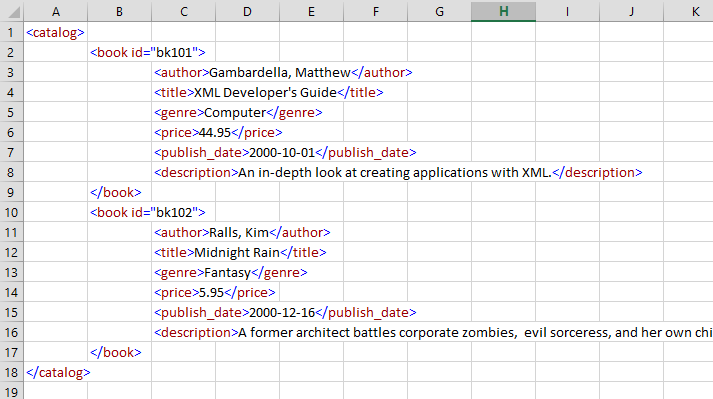
The screenshot below is (an edited version) of a Microsoft sample xml file, Books.xml. Inevitably, I save my test files in a different location to you, dear reader, so please amend the file path in the test routine. For workspace, the code also uses a subfolder of the system's temp folder called 'modXmlReports'.

I had previously writetn the code as opening the xml text file as a workbook because Excel nicely parses the tabs and prints the xml indents onto the worksheet for us. I have switched to reading the xml text file manually and counting the tabs myself. This led to more stable code; I prefer not to keep opening and closing workbooks.

That's about it. This is meant for developers rather than end users. I have been working with mpeg files and I rewrote my mpeg file parser but I wanted a file to view, so I choose to parse the Mpeg file into an Xml file. So I am a client of the module below. I'll publish that Mpeg code soon.

So here is the code

modXmlReports

Option Explicit

'***********************************************************************************
'* Module Name: modXmlReports
'* Copyright exceldevelopmentplatform.blogspot.com 2nd November 2019
'*
'* Requires Tools Reference
'*  Microsoft Scripting Runtime
'*  Microsoft XML, v6.0
'*
'* Description:
'*  This module will pretty print an Xml file i.e. it will place each element on at least a separate line
'*  and will tab indent to show the level of recursive depth.  Also it will read the prettified Xml file
'*  and write onto a worksheet.  It will even color the Xml syntax to make the contents clearer though this
'*  colorisation code can be slow and so is cancellable
'*
'***********************************************************************************

'************************************************************
'* test routine
'************************************************************
Private Sub TestPrettyReportXml()

    Dim sXmlInputFile As String
    sXmlInputFile = "N:\Dash\Books.xml"   '*<----- this will differ for you, dear reader!

    PrettyReportXml ThisWorkbook, sXmlInputFile, False, ""
End Sub


'*********************************************************************************************************
'* Name:        PrettyReportXml
'* Description: Sole entry point for this module
'*********************************************************************************************************

Public Function PrettyReportXml(ByVal wbReports As Excel.Workbook, _
                ByVal sXmlInputFile As String, _
                ByVal bCancelColoring As Boolean, _
                ByVal sWorkFolder As String) As Boolean

    Debug.Assert (Not wbReports Is Nothing) And (Len(sXmlInputFile) > 0)
    
    '* this is a three step process:
    '* (1) first load the Xml.txt file into a workshete and copy in
    '* (2) associate each line with an element of the dom, taking into account open and close on different lines
    '* (3) color in the text
    
    Dim xmlDoc As MSXML2.DOMDocument60
    Set xmlDoc = New MSXML2.DOMDocument60
    
    If Not xmlDoc.Load(sXmlInputFile) Then
        Debug.Print "Xml file '" & sXmlInputFile & "' does not parse!  Aborting."
    Else
    
        Dim sXmlPrettifiedFileName As String
        sXmlPrettifiedFileName = ReportFileName(sXmlInputFile, sWorkFolder)
        
        Dim wsReturn As Excel.Worksheet
        Set wsReturn = OpenAndCopyXmlReportIntoWorkbook(wbReports, xmlDoc, sXmlPrettifiedFileName)
        
        Dim dicLinesAndElements As Scripting.Dictionary, dicColors As Scripting.Dictionary
        
        If Not bCancelColoring Then

            Set dicLinesAndElements = AssociateLineNumbersWithElements(wsReturn, xmlDoc)
            Set dicColors = New Scripting.Dictionary

            dicColors.Add "Punctuation", VBA.Information.RGB(0, 0, 255)  '* feel free to change these colors
            dicColors.Add "XmlToken", VBA.Information.RGB(153, 0, 0)
            dicColors.Add "Content", VBA.Information.RGB(0, 0, 0)

            ColorInText wsReturn, dicLinesAndElements, dicColors

            CleanUpLinesAndElements dicLinesAndElements
        End If
        
        '* force tidy up
        Set dicLinesAndElements = Nothing
        Set dicColors = Nothing
        Set wsReturn = Nothing
        Set xmlDoc = Nothing
        Set wbReports = Nothing
        sXmlInputFile = vbNullString
        sXmlPrettifiedFileName = vbNullString
        '* end of tidy up
        
        PrettyReportXml = True
    End If
End Function

'************************************************************
'* function which govern the working file location
'************************************************************

Private Function LeafName(ByVal sInputFile As String) As String
    Dim fso As Scripting.FileSystemObject
    Set fso = New Scripting.FileSystemObject

    Dim filMpeg As Scripting.File
    Set filMpeg = fso.GetFile(sInputFile)
    
    LeafName = filMpeg.name
    Set filMpeg = Nothing
    Set fso = Nothing

End Function

Private Function ReportFileName(ByVal sInputFile As String, ByVal sWorkFolder As String) As String
    Dim fso As Scripting.FileSystemObject
    Set fso = New Scripting.FileSystemObject
    '* we want to work with our file which we will place in same directory as ThisWorkbook

    If sWorkFolder = "" Then sWorkFolder = TempFolder

    ReportFileName = fso.BuildPath(sWorkFolder, LeafName(sInputFile) & ".txt")
    Set fso = Nothing
End Function

Private Function TempFolder() As String
    Dim fso As Scripting.FileSystemObject
    Set fso = New Scripting.FileSystemObject
    
    Const TemporaryFolder As Long = 2
    TempFolder = fso.GetSpecialFolder(TemporaryFolder)
    
    If Not fso.FolderExists(fso.BuildPath(TempFolder, "modXmlReports")) Then
    
        Dim fldTemp As Scripting.Folder
        Set fldTemp = fso.GetFolder(TempFolder)
        fldTemp.SubFolders.Add "modXmlReports"
    
        Debug.Assert fso.FolderExists(fso.BuildPath(TempFolder, "modXmlReports"))
    End If
    TempFolder = fso.BuildPath(TempFolder, "modXmlReports")
    
    Set fso = Nothing
    
End Function

'Private Function ThisWorkbookHomeFolder() As String
'    Dim fso As Scripting.FileSystemObject
'    Set fso = New Scripting.FileSystemObject
'
'    'Debug.Assert ThisWorkbook.Saved = True
'    ThisWorkbookHomeFolder = fso.GetFile(ThisWorkbook.FullName).ParentFolder.ShortPath
'    Set fso = Nothing
'
'    '* alternative
'    'Dim vSplit
'    'vSplit = VBA.Split(ThisWorkbook.FullName, "\")
'    'ReDim Preserve vSplit(0 To UBound(vSplit) - 1)
'    'ThisWorkbookHomeFolder = VBA.Join(vSplit, "\")
'End Function


'************************************************************
'* prettify Xml and load into workbook routines
'************************************************************
Private Function OpenAndCopyXmlReportIntoWorkbook(ByVal wbReports As Excel.Workbook, _
            ByVal xmlDoc As MSXML2.DOMDocument60, ByVal sXmlPrettifiedFileName As String) As Excel.Worksheet

    Debug.Assert (Not wbReports Is Nothing) And (Not xmlDoc Is Nothing) And (Len(sXmlPrettifiedFileName) > 0)

    If StrComp(Right$(sXmlPrettifiedFileName, 4), ".txt", vbTextCompare) <> 0 Then
        Debug.Print "File '" & sXmlPrettifiedFileName & "' must end in .txt so as to bypass Excel's Xml file opening logic.  Aborting."
        GoTo SingleExit
    Else
    
        Dim vSrc As Variant, lLineCount As Long, lColCount  As Long
        vSrc = WriteAndReadPrettifiedReport(xmlDoc, sXmlPrettifiedFileName, lLineCount, lColCount)
    
        Dim wsDest As Excel.Worksheet
        Set wsDest = wbReports.Worksheets.Add(After:=wbReports.Worksheets.Item(wbReports.Worksheets.count))
        
        Dim sSheetName As String
        sSheetName = VBA.Split(LeafName(sXmlPrettifiedFileName), ".")(0)
        If SheetExists(wbReports, sSheetName) Then
            Application.DisplayAlerts = False
            wbReports.Worksheets.Item(sSheetName).Delete
            Application.DisplayAlerts = True
        End If
        Set wbReports = Nothing
        wsDest.name = sSheetName
        wsDest.Cells(1, 1).Resize(lLineCount, lColCount).Value2 = vSrc
        vSrc = Empty
        

        Set OpenAndCopyXmlReportIntoWorkbook = wsDest
        Set wsDest = Nothing
        
        Set wbReports = Nothing
        
        DoEvents '* allow repaint
    End If
SingleExit:

End Function

Private Function WriteAndReadPrettifiedReport(ByVal xmlDoc As MSXML2.DOMDocument60, _
                    ByVal sXmlPrettifiedFileName As String, _
                    ByRef plLineCount As Long, ByRef plColCount As Long)

    Dim fso As Scripting.FileSystemObject
    Set fso = New Scripting.FileSystemObject

    Dim txtOut As Scripting.TextStream
    Set txtOut = fso.CreateTextFile(sXmlPrettifiedFileName)
    txtOut.Write PrettyPrintXml(xmlDoc)
    txtOut.Close
    Set txtOut = Nothing
    Set xmlDoc = Nothing
    
    Dim lMaxTabCount As Long
    lMaxTabCount = 0
    
    Dim dicLines As Scripting.Dictionary
    Set dicLines = New Scripting.Dictionary
    
    Dim txtIn As Scripting.TextStream
    Set txtIn = fso.OpenTextFile(sXmlPrettifiedFileName)
    
    Dim sLine As String
    sLine = txtIn.ReadLine
    
    While Not txtIn.AtEndOfStream
        Dim lTabCount As Long
        lTabCount = CountChars(sLine, vbTab)
        If lTabCount > lMaxTabCount Then lMaxTabCount = lTabCount
        DoEvents
        dicLines.Add dicLines.count, sLine
        sLine = txtIn.ReadLine
    Wend
    dicLines.Add dicLines.count, sLine '* add final line
    txtIn.Close
    Set txtIn = Nothing
    Set fso = Nothing
    
    plLineCount = dicLines.count
    plColCount = lMaxTabCount + 1
    
    ReDim vRet(1 To dicLines.count, 1 To plColCount) As Variant
    
    Dim vLine As Variant, lRow As Long
    For Each vLine In dicLines.Items
        lRow = lRow + 1
        lTabCount = CountChars(vLine, vbTab)
        
        vRet(lRow, lTabCount + 1) = Replace(vLine, vbTab, "")
    
    Next vLine
    
    Set dicLines = Nothing
    
    WriteAndReadPrettifiedReport = vRet

End Function

Private Function CountChars(ByVal s As String, ByVal C As String)
    CountChars = Len(s) - Len(Replace(s, C, ""))
End Function

Private Function SheetExists(ByVal wb As Excel.Workbook, ByVal sSheetName As String) As Boolean
    SheetExists = SheetNames(wb).Exists(sSheetName)
End Function

Private Function SheetNames(ByVal wb As Excel.Workbook) As Scripting.Dictionary
    Dim dic As Scripting.Dictionary
    Set dic = New Scripting.Dictionary
    
    Dim ws As Excel.Worksheet
    For Each ws In wb.Worksheets
        dic.Add ws.name, ""
    Next
    Set SheetNames = dic

End Function

Private Function PrettyPrintXml(ByVal dom As MSXML2.DOMDocument60) As String

    Dim reader As MSXML2.SAXXMLReader60
    Set reader = New MSXML2.SAXXMLReader60
    
    Dim writer As MSXML2.MXXMLWriter60
    Set writer = New MSXML2.MXXMLWriter60
    writer.omitXMLDeclaration = True
    writer.indent = True

    reader.putProperty "http://xml.org/sax/properties/lexical-handler", writer
    
    Set reader.contentHandler = writer
    reader.Parse dom.XML
   
    PrettyPrintXml = writer.output
    Set reader = Nothing
    Set writer = Nothing
    
End Function

'************************************************************
'* walking the dom to associate elements with lines routines
'************************************************************
Private Function AssociateLineNumbersWithElements(ByVal wsReturn As Excel.Worksheet, _
                ByVal xmlDoc As MSXML2.DOMDocument60) As Scripting.Dictionary
    '* thankfully each line will have its own element
    '* so we can now assocaite an element with a line and
    '* leverage the Xml parser instead of doing regular expressions
    Dim dicLinesAndElements As Scripting.Dictionary
    Set dicLinesAndElements = New Scripting.Dictionary

    WalkDomDoc xmlDoc.DocumentElement, dicLinesAndElements

    Set AssociateLineNumbersWithElements = dicLinesAndElements
End Function

Private Sub CleanUpLinesAndElements(ByVal dicLinesAndElements As Scripting.Dictionary)

    Dim vKey
    For Each vKey In dicLinesAndElements
        Set dicLinesAndElements.Item(vKey) = Nothing
        dicLinesAndElements.Remove vKey
    Next
End Sub

Private Sub WalkDomDoc(ByVal xmlElem As MSXML2.IXMLDOMElement, ByVal dicLinesAndElements As Scripting.Dictionary)

    Dim bHasChildren As Boolean
    bHasChildren = False

    Dim lMyLine As Long
    lMyLine = dicLinesAndElements.count + 1
    dicLinesAndElements.Add lMyLine, Array("Both", xmlElem)

    Dim xmlNodeLoop As MSXML2.IXMLDOMNode
    For Each xmlNodeLoop In xmlElem.ChildNodes
        If xmlNodeLoop.NodeType = NODE_ELEMENT Then
            If Not bHasChildren Then
                bHasChildren = True
                '* replace
                dicLinesAndElements.Item(lMyLine) = Array("Open", xmlElem)
            End If

            WalkDomDoc xmlNodeLoop, dicLinesAndElements
        End If
    Next xmlNodeLoop

    If bHasChildren Then
        dicLinesAndElements.Add dicLinesAndElements.count + 1, Array("Close", xmlElem)
    End If
End Sub

'**************************************
'* the color routines
'**************************************
Private Sub ColorInText(ByVal wsReturn As Excel.Worksheet, ByVal dicLinesAndElements As Scripting.Dictionary, ByVal dicColors As Scripting.Dictionary)
    '* ASSUMPTION: thanks to the PrettyPrintXml() function beneath each element node is on its own line.

    Debug.Assert Not wsReturn Is Nothing

    Dim lRowLoop As Long
    For lRowLoop = 1 To wsReturn.Cells(1, 1).CurrentRegion.Rows.count

        Dim bFoundXmlCell As Boolean
        bFoundXmlCell = False

        Dim rngXmlCell As Excel.Range

        Dim lColumnLoop As Long
        For lColumnLoop = 1 To wsReturn.Cells(1, 1).CurrentRegion.Columns.count
            Set rngXmlCell = wsReturn.Cells(lRowLoop, lColumnLoop)
            If Len(rngXmlCell) > 0 Then
                bFoundXmlCell = True
                Exit For
            End If
        Next

        If bFoundXmlCell Then
            ColorXml rngXmlCell, dicLinesAndElements.Item(lRowLoop), dicColors
        End If
    Next
End Sub

Private Sub ColorXml(ByVal rngXmlCell As Excel.Range, ByVal vTagDetails, ByVal dicColors As Scripting.Dictionary)
    Dim vOpenOrClose
    vOpenOrClose = vTagDetails(0)

    Dim xmlElem As MSXML2.IXMLDOMElement
    Set xmlElem = vTagDetails(1)

    Dim lNodeNameLen As Long
    lNodeNameLen = Len(xmlElem.nodeName)

    If vOpenOrClose = "Close" Or vOpenOrClose = "Both" Then
        ColorCloseTagToken rngXmlCell, lNodeNameLen, dicColors, xmlElem, vOpenOrClose
    End If

    If vOpenOrClose = "Open" Or vOpenOrClose = "Both" Then
        ColorOpenTagToken rngXmlCell, lNodeNameLen, dicColors
        ColorAttributes rngXmlCell, lNodeNameLen, dicColors, xmlElem
    End If
End Sub

Private Sub ColorAttributes(ByVal rngXmlCell As Excel.Range, ByVal lNodeNameLen As Long, _
                        ByVal dicColors As Scripting.Dictionary, ByVal xmlElem As MSXML2.IXMLDOMElement)
    If xmlElem.Attributes.Length > 0 Then
        Dim sXml As String
        sXml = rngXmlCell.Value2

        Dim lQuotes As Long
        lQuotes = 1

        Dim xmlAttrLoop As MSXML2.IXMLDOMAttribute
        For Each xmlAttrLoop In xmlElem.Attributes

            Dim lFindId As Long
            lFindId = InStr(lQuotes, sXml, xmlAttrLoop.name, vbTextCompare)

            rngXmlCell.Characters(Start:=lFindId, Length:=Len(xmlAttrLoop.name)).Font.Color = dicColors.Item("XmlToken")

            Dim lEquals As Long
            lEquals = InStr(lFindId + 1, sXml, "=", vbTextCompare)

            rngXmlCell.Characters(Start:=lEquals, Length:=1).Font.Color = dicColors.Item("Punctuation")


            lQuotes = InStr(lEquals + 1, sXml, """", vbTextCompare)  '* assume double quotes, TODO make single quote aware

            rngXmlCell.Characters(Start:=lQuotes, Length:=1).Font.Color = dicColors.Item("Punctuation")

            lQuotes = InStr(lQuotes + 1, sXml, """", vbTextCompare)  '* assume double quotes, TODO make single quote aware
            rngXmlCell.Characters(Start:=lQuotes, Length:=1).Font.Color = dicColors.Item("Punctuation")
        Next
    End If
End Sub

Private Sub ColorCloseTagToken(ByVal rngXmlCell As Excel.Range, ByVal lNodeNameLen As Long, _
                        ByVal dicColors As Scripting.Dictionary, ByVal xmlElem As MSXML2.IXMLDOMElement, ByVal vOpenOrClose)

    Dim lStart As Long
    lStart = VBA.IIf(vOpenOrClose = "Both", InStr(1, rngXmlCell, Chr$(60) & "/" & xmlElem.nodeName, vbTextCompare), 1)

    rngXmlCell.Characters(Start:=lStart, Length:=2).Font.Color = dicColors.Item("Punctuation")
    rngXmlCell.Characters(Start:=lStart + 2, Length:=lNodeNameLen).Font.Color = dicColors.Item("XmlToken")
    rngXmlCell.Characters(Start:=lStart + 2 + lNodeNameLen, Length:=1).Font.Color = dicColors.Item("Punctuation")

End Sub

Private Sub ColorOpenTagToken(ByVal rngXmlCell As Excel.Range, ByVal lNodeNameLen As Long, ByVal dicColors As Scripting.Dictionary)

    rngXmlCell.Characters(Start:=1, Length:=1).Font.Color = dicColors.Item("Punctuation")
    rngXmlCell.Characters(Start:=2, Length:=lNodeNameLen).Font.Color = dicColors.Item("XmlToken")
    Dim lRightAngleBracket As Long
    lRightAngleBracket = InStr(1, rngXmlCell.Value2, Chr$(62), vbBinaryCompare)
    Debug.Assert lRightAngleBracket > 0

    rngXmlCell.Characters(Start:=lRightAngleBracket, Length:=1).Font.Color = dicColors.Item("Punctuation")

End Sub

Saturday, 10 November 2018

VBA - SVG - USA Stars and Stripes

A popular post on this blog from a while back was some VBA code to generate an SVG of the British Flag . SVG stands for Scalable Vector Graphics and is a key part of HTML5. Here I give more VBA code to draw the national flag on the United States of America, the stars and stripes. The code for the USA flag here is more compact.

There are two code modules below. I have split the flag specifications into a separate module because I want to go on and give code that will allow the stars and stripes to be drawn onto a VBA form using the Windows GDI API. Also, because of the upcoming GDI implementation I have borrowed some GDI type definitions such as RECT and POINTAPI.

The project requires references to two libraries. Microsoft XML, v6.0 and Microsoft Scripting Runtime. This is because SVG is a type of Xml and best manipulated as an Xml document. The Scripting Runtime is there to create output files.

I won't replicate the Mozilla Developer Network (MDN) documentation on SVG because it is excellent. So only a little explanation. For more information, follow the hypertext links to MDN in the following text.

Code walkthrough

Instructions for adding the modules are given below in the sections marked modUSAFlagSpecification and modUSAFlagSVG.

To run the code, go to procedure modUSAFlagSVG.DrawUSAFlagWithSVG() and press F5

To begin, we write a root svg element to a file as this is the easiest way to get started with the processing instruction and the namespace attribute of the root element. From then on, we load and manipulate the document with standard Xml library.

We set the viewbox attribute, and a single containing graphics element. It is possible to scale using the graphics element or to directly manipulate the co-ordinates. I set the dScalar variable for to scale the flag so that it fits nicely into this web page.

Much of the stars and stripes is based on drawing rectangles. It is easy to translate the rectangle co-ordinates into d attribute path commands.

There is code generate a five pointed star for a given coordinate pair, and we call this this 50 times with unique co-ordinates to give the 50 stars. Original code to generate the stars was found at the Draw a US Flag using C# and GDI+ - The Code Project, there it is written in C#. I add value here by converting to VBA. My thanks to original author Jack J. H. Xu. It is again easy to convert the series of star point co-ordinates into a d attribute path.

modUSAFlagSpecification standard module

So in a new project add a standard module and name it 'modUSAFlagSpecification' then copy in the code below.

Option Explicit

'*
'* Brought to you by the Excel Development Platform Blog
'* http://exceldevelopmentplatform.blogspot.com/2018/11/
'*

'*
'* https://en.wikipedia.org/wiki/Flag_of_the_United_States#Specifications
'*
Private Const mlHeight As Double = 1000#                            '* A
Private Const mlWidth As Double = 1900#                             '* B
Private Const mlHoist As Double = mlHeight * 7 / 13                 '* C
Private Const mlFly As Double = mlWidth * 2 / 5                     '* D
Private Const mlHoistTenth As Double = mlHoist / 10                 '* E,F
Private Const mlFlyTwelth As Double = mlFly / 12                    '* G,H

Private Const mlStripeWidth = mlHeight / 13                         '* L
Private Const mlStarDiameter = mlStripeWidth * 4 / 5                '* K


Public Type RGB
    R As Long
    G As Long
    B As Long
End Type

Public Type RECT
    Left As Long
    Top As Long
    Right As Long
    Bottom As Long
End Type

Public Type POINTAPI
    x As Long
    y As Long
End Type

Public Sub GetOldGloryRed(ByRef pURGB As RGB)
    pURGB.R = &HB2 '* https://en.wikipedia.org/wiki/Flag_of_the_United_States#Colors
    pURGB.G = &H22
    pURGB.B = &H34
End Sub


Public Sub GetOldGloryBlue(ByRef pURGB As RGB)
    pURGB.R = &H3C '* https://en.wikipedia.org/wiki/Flag_of_the_United_States#Colors
    pURGB.G = &H3B
    pURGB.B = &H6E
End Sub


Public Sub GetWhite(ByRef pURGB As RGB)
    pURGB.R = &HFF '* https://en.wikipedia.org/wiki/Flag_of_the_United_States#Colors
    pURGB.G = &HFF
    pURGB.B = &HFF
End Sub

Public Sub FivePointedStar(ByVal dMultiplier As Double, ByVal dRadius As Double, _
                ByVal dXCentre As Double, ByVal dYCentre As Double, _
                ByRef pauPoint() As POINTAPI, ByRef plPointCount As Long)

    ReDim auPoint(0 To 9) As POINTAPI


    Const Pi As Double = 3.14159265358979

    dRadius = dRadius * dMultiplier
    '*
    '* Algorithm by Jack J. H. Xu - https://www.codeproject.com/script/Membership/View.aspx?mid=3946205
    '* Code Project https://www.codeproject.com/Articles/18149/Draw-a-US-Flag-using-C-and-GDI
    '*

    Dim dSin36 As Double, dSin72 As Double, dCos36 As Double, dCos72 As Double
    dSin36 = Sin(36# * Pi / 180#)
    dSin72 = Sin(72# * Pi / 180#)
    dCos36 = Cos(36# * Pi / 180#)
    dCos72 = Cos(72# * Pi / 180#)

    Dim dInnerRadius As Double
    dInnerRadius = dRadius * dCos72 / dCos36

    auPoint(0).x = dXCentre
    auPoint(0).y = dYCentre - dRadius

    auPoint(1).x = dXCentre + dInnerRadius * dSin36
    auPoint(1).y = dYCentre - dInnerRadius * dCos36

    auPoint(2).x = dXCentre + dRadius * dSin72
    auPoint(2).y = dYCentre - dRadius * dCos72

    auPoint(3).x = dXCentre + dInnerRadius * dSin72
    auPoint(3).y = dYCentre + dInnerRadius * dCos72

    auPoint(4).x = dXCentre + dRadius * dSin36
    auPoint(4).y = dYCentre + dRadius * dCos36

    auPoint(5).x = dXCentre
    auPoint(5).y = dYCentre + dInnerRadius

    auPoint(6).x = dXCentre - dRadius * dSin36
    auPoint(6).y = dYCentre + dRadius * dCos36

    auPoint(7).x = dXCentre - dInnerRadius * dSin72
    auPoint(7).y = dYCentre + dInnerRadius * dCos72

    auPoint(8).x = dXCentre - dRadius * dSin72
    auPoint(8).y = dYCentre - dRadius * dCos72

    auPoint(9).x = dXCentre - dInnerRadius * dSin36
    auPoint(9).y = dYCentre - dInnerRadius * dCos36

    pauPoint = auPoint
    plPointCount = 10

End Sub

Public Sub WhiteStars(ByVal dMultiplier As Double, ByRef pauRect() As RECT)
    ReDim auRect(0 To 49) As RECT

    Dim lLoop As Long
    For lLoop = 0 To 49
        Dim lMod As Long
        lMod = lLoop Mod 11  '* Pattern repeats every 11 stars

        Dim lBlock As Long
        lBlock = lLoop \ 11

        If lMod <= 5 Then
            '*
            '* we are in a row of six stars
            '*
            auRect(lLoop).Left = ((lMod * 2) + 1) * mlFlyTwelth * dMultiplier
            auRect(lLoop).Right = auRect(lLoop).Left + (mlStarDiameter * dMultiplier)
            auRect(lLoop).Top = (1 + lBlock * 2) * mlHoistTenth * dMultiplier
            auRect(lLoop).Bottom = auRect(lLoop).Top + (mlStarDiameter * dMultiplier)

        Else
            '*
            '* we are in a row of fives stars
            '*
            Dim lMod2 As Long
            lMod2 = lMod Mod 6

            auRect(lLoop).Left = ((lMod2 + 1) * 2) * mlFlyTwelth * dMultiplier
            auRect(lLoop).Right = auRect(lLoop).Left + (mlStarDiameter * dMultiplier)
            auRect(lLoop).Top = (((1 + lBlock) * 2)) * mlHoistTenth * dMultiplier
            auRect(lLoop).Bottom = auRect(lLoop).Top + (mlStarDiameter * dMultiplier)

        End If

    Next lLoop

    pauRect = auRect
End Sub

Public Sub WhiteStripes(ByVal dMultiplier As Double, ByRef pauRect() As RECT)

    ReDim auRect(0 To 5) As RECT

    Dim lLoop As Long
    For lLoop = 0 To 5

        auRect(lLoop).Left = VBA.IIf(lLoop <= 2, mlFly * dMultiplier, 0)
        auRect(lLoop).Right = mlWidth * dMultiplier
        auRect(lLoop).Top = mlStripeWidth * ((lLoop * 2) + 1) * dMultiplier
        auRect(lLoop).Bottom = auRect(lLoop).Top + (mlStripeWidth * dMultiplier)
    Next lLoop

    pauRect = auRect


End Sub


Public Function RedStripes(ByVal dMultiplier As Double, ByRef pauRect() As RECT)

    ReDim auRect(0 To 6) As RECT

    Dim lLoop As Long
    For lLoop = 0 To 6

        auRect(lLoop).Left = VBA.IIf(lLoop <= 3, mlFly * dMultiplier, 0)
        auRect(lLoop).Right = mlWidth * dMultiplier
        auRect(lLoop).Top = mlStripeWidth * (lLoop * 2) * dMultiplier
        auRect(lLoop).Bottom = auRect(lLoop).Top + (mlStripeWidth * dMultiplier)

    Next lLoop

    pauRect = auRect


End Function


Public Function BlueCanton(ByVal dMultiplier As Double, ByRef pauRect() As RECT)
    ReDim auRect(0 To 0) As RECT

    auRect(0).Left = 0
    auRect(0).Top = 0
    auRect(0).Right = mlFly * dMultiplier
    auRect(0).Bottom = mlHoist * dMultiplier

    pauRect = auRect '* copy over to return

End Function

modUSAFlagSVG standard module

Again, add a standard module, this time name it 'modUSAFlagSVG'. This module will call into module modUSAFlagSpecification so you should add that first. The following module also requires some libraries, Microsoft Scripting Runtime and Microsoft XML, v6.0. You will need to change the output filename.

Option Explicit

'*
'* Brought to you by the Excel Development Platform Blog
'* http://exceldevelopmentplatform.blogspot.com/2018/11/
'*

'* Tools->References: Microsoft Scripting Runtime
'* Tools->References: Microsoft XML, v6.0

'* Requires module modUSAFlagSpecification

Private Sub DrawUSAFlagWithSVG()

    Dim fso As Scripting.FileSystemObject
    Set fso = New Scripting.FileSystemObject

    Dim sSVGPath As String
    sSVGPath = "N:\StarsAndStripes.svg"  '<--- change for you

    Dim txtOut As Scripting.TextStream
    Set txtOut = fso.CreateTextFile(sSVGPath)

    txtOut.WriteLine "<?xml version=""1.0"" encoding=""UTF-8"" standalone=""no""?>"
    txtOut.WriteLine "<svg:svg xmlns:svg=""http://www.w3.org/2000/svg"" />"

    txtOut.Close
    Set txtOut = Nothing

    If fso.FileExists(sSVGPath) Then

        Dim dom As MSXML2.DOMDocument60
        Set dom = New MSXML2.DOMDocument60

        dom.Load sSVGPath

        Debug.Assert dom.parseError = 0


        Dim uRed As RGB
        Call modUSAFlagSpecification.GetOldGloryRed(uRed)

        Dim sRed_Style As String
        sRed_Style = "fill:#" & Hex$(uRed.R) & Hex$(uRed.G) & Hex$(uRed.B) & ";fill-opacity:1"

        Dim uBlue As RGB
        Call modUSAFlagSpecification.GetOldGloryBlue(uBlue)

        Dim sBlue_Style As String
        sBlue_Style = "fill:#" & Hex$(uBlue.R) & Hex$(uBlue.G) & Hex$(uBlue.B) & ";fill-opacity:1"


        dom.setProperty "SelectionNamespaces", "xmlns:svg=""http://www.w3.org/2000/svg"""

        Dim xmlSVG As MSXML2.IXMLDOMElement
        Set xmlSVG = dom.SelectSingleNode("svg:svg")
        Call xmlSVG.setAttribute("viewbox", "0 0 600 300")
        'Call xmlSVG.setAttribute("width", "1200")
        'Call xmlSVG.setAttribute("height", "600")
        'Call xmlSVG.setAttribute("width", "210mm")
        'Call xmlSVG.setAttribute("height", "297mm")
        Call xmlSVG.setAttribute("version", "1.1")


        Dim xmlGTranslate As MSXML2.IXMLDOMElement
        Set xmlGTranslate = dom.createElement("svg:g")
        Call xmlGTranslate.setAttribute("id", "TranslateToCentre")

        Dim dScalar As Double
        dScalar = 0.7


        xmlSVG.appendChild xmlGTranslate
        dom.Save sSVGPath

        Dim auRects() As RECT
        Call modUSAFlagSpecification.BlueCanton(dScalar, auRects)
        DrawRects xmlGTranslate, "BlueCanton", sBlue_Style, auRects

        Call modUSAFlagSpecification.RedStripes(dScalar, auRects)
        DrawRects xmlGTranslate, "RedStripe", sRed_Style, auRects

        Call modUSAFlagSpecification.WhiteStripes(dScalar, auRects)
        DrawRects xmlGTranslate, "WhiteStripe", "fill:#FFFFFF;fill-opacity:1", auRects


        Call modUSAFlagSpecification.WhiteStars(dScalar, auRects)
        DrawStars xmlGTranslate, "WhiteStar", "fill:#FFFFFF;fill-opacity:1", auRects, dScalar

        dom.Save sSVGPath


    End If


End Sub

Private Sub DrawStars(ByVal xmlParentElement As MSXML2.IXMLDOMElement, ByVal sIdPrefix As String, ByVal sStyle As String, _
                                ByRef auRects() As RECT, ByVal dScalar As Double)
    If xmlParentElement Is Nothing Then Err.Raise vbObjectError, , "#Null xmlParentElement!"

    Dim dom As MSXML2.DOMDocument60
    Set dom = xmlParentElement.OwnerDocument

    '*  This line break is purely so I can inspect the output easier
    Dim xmlLineBreak As MSXML2.IXMLDOMText
    Set xmlLineBreak = dom.createTextNode(vbNewLine)

    Dim lStarLoop As Long
    For lStarLoop = LBound(auRects) To UBound(auRects)
        Dim uRect As RECT
        uRect = auRects(lStarLoop)

        Dim xmlStar As MSXML2.IXMLDOMElement
        Set xmlStar = dom.createElement("svg:path")
        Call xmlStar.setAttribute("id", sIdPrefix & lStarLoop)

        Call xmlStar.setAttribute("style", sStyle)


        Dim auPoints() As POINTAPI, lPointCount As Long
        Call modUSAFlagSpecification.FivePointedStar(dScalar, 30, uRect.Left, uRect.Top, auPoints, lPointCount)

        Dim uFirstPoint As POINTAPI, uSubsequentPointLoop As POINTAPI
        uFirstPoint = auPoints(0)


        Dim sPath As String
        sPath = "M " & uFirstPoint.x & "," & uFirstPoint.y


        Dim lPointLoop As Long
        For lPointLoop = 1 To 9
            uSubsequentPointLoop = auPoints(lPointLoop)
            sPath = sPath & " L " & uSubsequentPointLoop.x & "," & uSubsequentPointLoop.y
        Next

        Call xmlStar.setAttribute("d", sPath)

        xmlParentElement.appendChild xmlStar
        xmlParentElement.appendChild xmlLineBreak

    Next lStarLoop


End Sub

Private Sub DrawRects(ByVal xmlParentElement As MSXML2.IXMLDOMElement, ByVal sIdPrefix As String, ByVal sStyle As String, ByRef auRects() As RECT)

    If xmlParentElement Is Nothing Then Err.Raise vbObjectError, , "#Null xmlParentElement!"

    Dim dom As MSXML2.DOMDocument60
    Set dom = xmlParentElement.OwnerDocument

    '*  This line break is purely so I can inspect the output easier
    Dim xmlLineBreak As MSXML2.IXMLDOMText
    Set xmlLineBreak = dom.createTextNode(vbNewLine)


    Dim lLoop As Long
    For lLoop = LBound(auRects) To UBound(auRects)
        Dim uRect As RECT
        uRect = auRects(lLoop)

        Dim xmlRect As MSXML2.IXMLDOMElement
        Set xmlRect = dom.createElement("svg:path")
        Call xmlRect.setAttribute("id", sIdPrefix & lLoop)
        Call xmlRect.setAttribute("style", sStyle)

        Dim sPath As String
        sPath = "M " & uRect.Left & "," & uRect.Top
        sPath = sPath & " H " & uRect.Right
        sPath = sPath & " V " & uRect.Bottom
        sPath = sPath & " H " & uRect.Left
        sPath = sPath & " V " & uRect.Top

        Call xmlRect.setAttribute("d", sPath)

        xmlParentElement.appendChild xmlRect
        xmlParentElement.appendChild xmlLineBreak

    Next lLoop


End Sub

Friday, 7 September 2018

VBA - XML - OLEDB - US Treasuries Web Service

So the code below will call the web service of the United States Treasury department that publishes Yield Curve data (bond interest rates). I wanted the data so I wrote this program and I might as well share. The code below shows Xml being parsed using the standard Xml libraries available to the VBA developer. The Xml is parsed into a two dimensional array which is pasted onto a sheet called Batch.

Excel's OLEDB Provider supports outer joins and INSERT INTO SELECT

So most of the code is concerned with the Xml parsing and writing the data to Batch sheet. However, I need some logic to update the Master sheet. The Master sheet is meant to contain all previous results not just the batch of data acquired. The Master sheet must not have duplicates. Appending records to the Master is a task ideally suited for Microsoft Access and other database technologies. In the past I might have written VBA to loop through the rows individually to establish if Master doesn't yet have that record before appending it by pasting to the bottom.

But this is a good case to use Excel's OLEDB Provider. In ANSI SQL there is the INSERT INTO SELECT sql statement which selects from one table and inserts into another. But I want no duplicates so I use an outer join and test for nulls. I am pleased to say Excel's OLEDB Provider can handle this (whereas the deprecated JET driver might not have) and that this is achieved in so few lines of code, here it is ...

Sub UpdaterMaster()

    Dim oConn As ADODB.Connection
    Set oConn = New ADODB.Connection
    
    Debug.Assert UBound(Split(ThisWorkbook.Name, ".")) > 0  '* Workbook needs to be saved
    
    oConn.Open "Provider=Microsoft.ACE.OLEDB.12.0;" & _
           "Data Source=" & ThisWorkbook.FullName & ";" & _
           "Extended Properties='Excel 12.0 Macro'"

    oConn.Execute "INSERT INTO [Master$] Select B.* from [Batch$] AS B LEFT join [Master$] as M on B.Date=M.Date where IsNull(M.Date )"
    
    SortMaster
End Sub

Actually, it is one magic line, highlighted in blue.

In the future, for tabular data processing on worksheets I will always look first at Excel's OLEDB Provider to see if it is capable. So much code saved!

Caveat

The Master sheet cannot be empty. So to get going you need to copy over manually the first batch. That could be automated.

Full Listing

The full listing is shown here

Option Explicit
    
Private mvData()
Private mlRowCount As Long

Public Enum ycfYieldCurveFeed
    ycfId = 1
    ycfNEW_DATE
    ycfBC_1MONTH
    ycfBC_3MONTH
    ycfBC_6MONTH
    ycfBC_1YEAR
    ycfBC_2YEAR
    ycfBC_3YEAR
    ycfBC_5YEAR
    ycfBC_7YEAR
    ycfBC_10YEAR
    ycfBC_20YEAR
    ycfBC_30YEAR
    ycfBC_30YEARDISPLAY
    ycfMin = ycfId
    ycfMax = ycfBC_30YEARDISPLAY
End Enum

Function BatchSheet() As Excel.Worksheet
    Set BatchSheet = ThisWorkbook.Worksheets("Batch")
End Function

Function MasterSheet() As Excel.Worksheet
    Set MasterSheet = ThisWorkbook.Worksheets("Master")
End Function

Sub GetTreasuryData()

    Dim shBatch As Excel.Worksheet
    Set shBatch = BatchSheet

    Dim oXHR As MSXML2.XMLHTTP60
    Set oXHR = New MSXML2.XMLHTTP60
    
    mlRowCount = 0
    ReDim mvData(ycfMin To ycfMax, 0 To mlRowCount)
    AddColumnHeadings
    
    Dim lYearLoop As Long
    For lYearLoop = 2018 To 2018
    
        Dim dtStart As Date
        dtStart = DateSerial(lYearLoop, 1, 1)
        
        Dim dtEnd As Date
        dtEnd = DateSerial(lYearLoop, 12, 31)
        
        shBatch.Cells.ClearContents
        
        Dim dtLoop As Date
        For dtLoop = dtStart To dtEnd
            
            DoEvents
            Debug.Print VBA.FormatDateTime(dtLoop, vbLongDate)
            Dim lWeekday As Long
            lWeekday = Weekday(dtLoop, vbSunday)
            
            If Not (lWeekday = 1 Or lWeekday = 7) Then
        
                Dim sURL As String
                sURL = USTreasuryUrl(dtLoop)
            
                oXHR.Open "GET", sURL, False
                oXHR.send
                
                Dim xmlPage As MSXML2.DOMDocument60
                Set xmlPage = New MSXML2.DOMDocument60
                xmlPage.LoadXML oXHR.responseText
                
                xmlPage.setProperty "SelectionNamespaces", "xmlns:ust='http://www.w3.org/2005/Atom' xmlns:m='http://schemas.microsoft.com/ado/2007/08/dataservices/metadata' xmlns:d='http://schemas.microsoft.com/ado/2007/08/dataservices'"
                
                Dim xmlEntries As MSXML2.IXMLDOMNodeList
                Set xmlEntries = xmlPage.SelectNodes("ust:feed/ust:entry/ust:content/m:properties")
                
                'Dim dtLastSnapDate As Date
                
                Dim xmlEntryLoop As MSXML2.IXMLDOMElement
                For Each xmlEntryLoop In xmlEntries
                
                    mlRowCount = mlRowCount + 1
                    ReDim Preserve mvData(ycfMin To ycfMax, 0 To mlRowCount)
                    
                    Dim xmlProps As MSXML2.IXMLDOMNodeList
                    Set xmlProps = xmlEntryLoop.SelectNodes("*")
                    
                    Dim xmlProp As MSXML2.IXMLDOMElement
                    For Each xmlProp In xmlProps
                        
                        Dim sType As String
                        sType = xmlProp.getAttribute("m:type")
                        
                        If xmlProp.getAttribute("m:null") = True Then
                            '*skip the null
                        Else
                            If StrComp(sType, "Edm.Int32", vbTextCompare) = 0 Then
                                mvData(ycfId, mlRowCount) = CLng(xmlProp.nodeTypedValue)
                                
                            ElseIf StrComp(sType, "Edm.DateTime", vbTextCompare) = 0 Then
                                Dim vSplitDate As Variant
                                vSplitDate = VBA.Split(xmlProp.nodeTypedValue, "T")
                                Dim vSplit2 As Variant
                                vSplit2 = Split(vSplitDate(0), "-")
                                Dim dtSnapDate As Date
                                dtSnapDate = DateSerial(vSplit2(0), vSplit2(1), vSplit2(2))
                                
                                'Debug.Assert dtSnapDate > dtLastSnapDate
                                'dtLastSnapDate = dtSnapDate
                                mvData(ycfNEW_DATE, mlRowCount) = CLng(dtSnapDate)

                            ElseIf StrComp(sType, "Edm.Double", vbTextCompare) = 0 Then
                                mvData(LookupColumnOrdinal(xmlProp.BaseName), mlRowCount) = CDbl(xmlProp.nodeTypedValue)
                            Else
                                Stop '*unrecognized
                            End If
                        
                        End If
                    
                    Next
                
                Next xmlEntryLoop
            
            End If
        Next
        
    Next lYearLoop
    Dim rng As Excel.Range
    Set rng = shBatch.Range(shBatch.Cells(1, 1), shBatch.Cells(mlRowCount + 1, ycfMax))
    rng.Value = Application.WorksheetFunction.Transpose(mvData)

    UpdaterMaster
End Sub


Sub UpdaterMaster()

    Dim oConn As ADODB.Connection
    Set oConn = New ADODB.Connection
    
    Debug.Assert UBound(Split(ThisWorkbook.Name, ".")) > 0  '* Workbook needs to be saved
    
    oConn.Open "Provider=Microsoft.ACE.OLEDB.12.0;" & _
           "Data Source=" & ThisWorkbook.FullName & ";" & _
           "Extended Properties='Excel 12.0 Macro'"

    oConn.Execute "INSERT INTO [Master$] Select B.* from [Batch$] AS B LEFT join [Master$] as M on B.Date=M.Date where IsNull(M.Date )"
    
    SortMaster
End Sub

Sub SortMaster()

    Dim wsMasters As Excel.Worksheet
    Set wsMasters = MasterSheet

    Dim rngTable As Excel.Range
    Set rngTable = wsMasters.Cells(1, 1).CurrentRegion
    
    Dim rngKey As Excel.Range
    Set rngKey = rngTable.Columns(2).Resize(rngTable.Rows.Count - 1).Offset(1)
    
    
    wsMasters.Sort.SortFields.Clear
    wsMasters.Sort.SortFields.Add Key:=rngKey _
        , SortOn:=xlSortOnValues, Order:=xlAscending, DataOption:=xlSortNormal
    With wsMasters.Sort
        .SetRange rngTable
        .Header = xlYes
        .MatchCase = False
        .Orientation = xlTopToBottom
        .SortMethod = xlPinYin
        .Apply
    End With

End Sub

Private Function USTreasuryUrl(ByVal dtSnapDate As Date) As String

    Dim lDay As Long
    lDay = Day(dtSnapDate)
    
    Dim lMonth As Long
    lMonth = Month(dtSnapDate)
     
    Dim lYear As Long
    lYear = Year(dtSnapDate)

    Dim sTemplate As String
    sTemplate = "http://data.treasury.gov/feed.svc/DailyTreasuryYieldCurveRateData?$filter=day(NEW_DATE) eq $DAY$ and month(NEW_DATE) eq $MONTH$ and year(NEW_DATE) eq $YEAR$"
    
    USTreasuryUrl = Replace(Replace(Replace(Replace(sTemplate, "$DAY$", CStr(lDay)), "$MONTH$", CStr(lMonth)), "$YEAR$", CStr(lYear)), " ", " ")
    

End Function

Private Function LookupColumnOrdinal(ByVal sBaseName As String) As ycfYieldCurveFeed
    Static dicLookup As Scripting.Dictionary
    If dicLookup Is Nothing Then
        Set dicLookup = New Scripting.Dictionary
        dicLookup.CompareMode = TextCompare
        
        dicLookup.Add "Id", ycfId
        dicLookup.Add "NEW_DATE", ycfNEW_DATE
        dicLookup.Add "BC_1MONTH", ycfBC_1MONTH
        dicLookup.Add "BC_3MONTH", ycfBC_3MONTH
        dicLookup.Add "BC_6MONTH", ycfBC_6MONTH
        dicLookup.Add "BC_1YEAR", ycfBC_1YEAR
        dicLookup.Add "BC_2YEAR", ycfBC_2YEAR
        dicLookup.Add "BC_3YEAR", ycfBC_3YEAR
        dicLookup.Add "BC_5YEAR", ycfBC_5YEAR
        dicLookup.Add "BC_7YEAR", ycfBC_7YEAR
        dicLookup.Add "BC_10YEAR", ycfBC_10YEAR
        dicLookup.Add "BC_20YEAR", ycfBC_20YEAR
        dicLookup.Add "BC_30YEAR", ycfBC_30YEAR
        dicLookup.Add "BC_30YEARDISPLAY", ycfBC_30YEARDISPLAY
    End If

    Debug.Assert dicLookup.Exists(sBaseName)
    LookupColumnOrdinal = dicLookup.Item(sBaseName)
End Function

Private Sub AddColumnHeadings()
    mvData(ycfId, 0) = "Id"
    mvData(ycfNEW_DATE, 0) = "Date"
    mvData(ycfBC_1MONTH, 0) = "1M"
    mvData(ycfBC_3MONTH, 0) = "3M"
    mvData(ycfBC_6MONTH, 0) = "6M"
    mvData(ycfBC_1YEAR, 0) = "1Y"
    mvData(ycfBC_2YEAR, 0) = "2Y"
    mvData(ycfBC_3YEAR, 0) = "3Y"
    mvData(ycfBC_5YEAR, 0) = "5Y"
    mvData(ycfBC_7YEAR, 0) = "7Y"
    mvData(ycfBC_10YEAR, 0) = "10Y"
    mvData(ycfBC_20YEAR, 0) = "20Y"
    mvData(ycfBC_30YEAR, 0) = "30Y"
    mvData(ycfBC_30YEARDISPLAY, 0) = "*"
End Sub

Monday, 14 May 2018

VBA - MSXML2 uncompromising interface based programming can throw newbies

So on SO I have just written an answer for a self-professed VBA newbie concerning XML in VBA. Whilst writing the answer one has to judge how much information to pass on, too little does not help solve the problem, too much seems patronising and also one ought not recreate the documentation. But actually there is something about the MSXML2 library specifically which throws VBA newbies and a good blog post should explain what is happening.

COM and interface based programming

VBA is a COM (Microsoft Component Object Model) technology. COM is based on interface programming, every COM call executes via an interface and not directly on an object. Interface based programming advocates encourage polymorphism and breaking an object's identity into separate interfaces.

So for example one could have a banking application with business domain objects such as overdraft, mortgage, credit card. Interface based programming advocates would encourage the identification of a common interface for these objects and a separate interface to handle each object's idiosyncrasies.

Excel's Object Model hides default interfaces

But interface based programming can be confusing to newbies. Excel's object model is COM based and so uses interfaces but each Excel object typically has one default interface and VBA pulls a trick to make the calling the default interface look the same as calling the object. This sleight of hand by VBA is useful for productivity and helps quick scripting of the Excel object model but at some point the newbie might need to access Xml and use MSXML2 library when they may well be flummoxed at having to deal with interfaces.

So using the VBA Object Browser one can see many Excel classes such as Workbook, Worksheet, Application and Range and their methods so it looks like one is calling the objects. But if one uses OLEView.exe one can see that the underlying default interfaces are _Workbook, _Worksheet, _Application and IRange. Range does not exists as its own separate class but this is faked (along with others) some VBA programmers think they are dealing with an object.

Note how some interfaces begin with I, e.g. IRange.

What is a sideways cast?

If an object's functionality is broken down into more than one interface (as sometimes advocated) it becomes necessary to give a mechanism to hop from one interface to another on the same object. How is this interface hopping done in VBA? Answer, with a 'sideways cast'.

The code below is illustrative only, it won't run. It illustrates a sideways cast. The sideways cast is when one uses the Set keyword to equate one 'object variable' to another. But actually they are not 'object variables' but in fact interface variables.

Sub SidewaysCastIllustration()
    '* this is illustrative only, it won't run
    Dim oShape As IShape
    Set oShape = getShape("Square1")
    
    Dim oSquare As ISquare
    Set oSquare = oShape  '* <-- sideways cast take the object oShape and queries for interface ISquare 

End Sub

[For real geeks interested in what happens under the hood a sideways cast calls the QueryInterface method on the the canonical COM interface IUnknown but newbies need not concern themselves with this.]

MSXML2 is uncompromising interface based programming

When using MSXML2 to handle Xml in VBA one declares variables of interface types such as IXMLDOMNode, IXMLDOMElement and IXMLDOMAttribute. Note how they begin with I. Time for code to illustrate. The code at the bottom parses a mini Xml document and two parts, one element and one attribute, are retrieved from the document. Because the selection method SelectSingleNode can return elements or attributes it is defined to return a unifying interface IXMLDOMNode. To then access the details of the element one sideways casts from IXMLDOMNode to IXMLDOMElement.

This program shows Xml parsing with interface based programming and sideways casts to hop between interfaces on object.

Option Explicit

Sub Test()
    '* requires Tools->References->Microsoft XML, v6.0

    Dim sXml As String
    sXml = "<root><foo id='fooey'/><bar><baz>hi</baz></bar></root>"
    
    Dim oDom As MSXML2.DOMDocument60
    Set oDom = New MSXML2.DOMDocument60
    
    oDom.LoadXML sXml
    Debug.Assert oDom.parseError.ErrorCode = 0
    
    Dim oNode As MSXML2.IXMLDOMNode
    Set oNode = oDom.SelectSingleNode("root/foo/@id")

    '*
    '* to access the methods for interacting with an attribute
    '* one needs to "sideways cast" which queries for another interface
    '*
    Dim oAttrSidewaysCast As MSXML2.IXMLDOMAttribute
    Set oAttrSidewaysCast = oNode  '* <-- sideways cast from IXMLDOMNode to IXMLDOMAttribute 
    Debug.Print oAttrSidewaysCast.Value
    
    Set oNode = Nothing  '* reset the variable
    Set oNode = oDom.SelectSingleNode("root/bar/baz")

    '*
    '* to access the methods for interacting with an element
    '* one needs to "sideways cast" which queries for another interface
    '*
    Dim oElementSidewaysCast As MSXML2.IXMLDOMElement
    Set oElementSidewaysCast = oNode  '* <-- sideways cast from IXMLDOMNode to IXMLDOMElement 
    Debug.Print oElementSidewaysCast.nodeTypedValue

End Sub