With technology sometimes debugging and diagnostics are required, COM is no exception. Presently, I have been debugging a Python COM class that was not instantiating in VBA using the New keyword. That code works now, so watch out for a post on that soon. The following code was to be an appendix to that post but is useful in its own right so I am depositing it here.
Low level C++ Code to instantiate a COM Component
This code is to probe error messages of a COM component instantiation. VBA gives some error codes which are not necessarily useful. In VBA, when an object is created with the New keyword, 'under-the-hood' a call to CoCreateInstance is made, which in turn is made up of calls to CoGetClassObject to get a class factory and then a call to CreateInstance is called on the class factory. These steps which are implicit to VBA are given explicitly below in C++ so one can step through and better diagnose any errors.
In you want to use this code you will no doubt have to change CLSID_FooBar and IID_FooBar for your specific case.
Problems that can be examined with this technique include but are not limited to (a) registration issues, (b) path problems, (c) 32bit/64 bit mismatch problems.
P.S. It is possible to drill down even further because many COM servers are implemented as DLLs, we could write code to load the DLL into memory and then manually get the entry point DllGetClassFactory and call into it to get the class factory manually. One for another day perhaps because at the moment I am working with Python which does not use Dlls in that sense (at least I don't think so)
So Excel VBA developers may wonder how to make their code run as fast as compiled VB6 and I'm, afraid they can't as VB6 is no longer supported. To increase the speed of your code you need to use C++ and then call in from VBA using COM. So you need a C++ COM technology and this is what Active Template Library is.
The Books
So I have completed reading one ATL book, Beginning ATL Programming by Richard Grimes et al (Wrox 1999) and in the final stages of reading another, Inside ATL by King and Shepherd (MSPress 1999). So it is worth putting up some revision notes so I don't forget all that I have learnt. Whilst the prose of the books was better than the dry Microsoft documentation, the MS website remains the place to link to. To follow these notes you'll need to understand key C++ features such as templates and multiple inheritance. You also need to be very familiar with the COM specification, we shall not here explain the role of IUnknown or IDispatch. We'll limit the focus to in-process DLLs and ignore .EXEs
Walkthrough
So I am walking through creating a new ATL project, my project name is ATLProject2.
Once through the new ATL project wizard one is confronted with a great many files but don't be intimidated, there are more wizards from the Class View so ensure the Class View is visible.
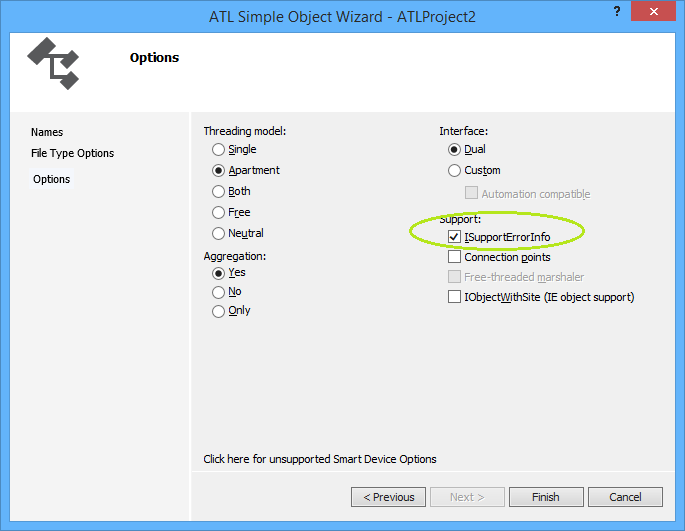
From the Class View go to right-click menu and take Add Class and then take ATL Simple Object which throws the ATL Simple Object Wizard. On the Names Dialog, in the C++ Short Name type "CoolCode" and the other fields are auto-generated for you. Click through the File Type Handler Options to the last dialog, Options which looks like this
So I have checked Support ISupportErrorInfo because we will want to throw rich error information from C++ to VBA. Click Finish and some code is generated for you.
What gets instantiated and what implements IUnknown::QueryInterface
Never new your class
So your class never gets instantiated with the new keyword, it can't because it has no vtable because of the ATL_NO_VTABLE macro. Instead, a creator class such creates an instance of CComObject (when not aggregated) with your class as a template.
To illustrate, it is worth looking at what happens when a client gets hold of IClassFactory and calls IClassFactory::CreateInstance, so find the definition of CComCoClass (select, F12) to get to this (abridged) code
So in the above code one can see CreateInstance being called in two use cases, (i) where there is an aggregating object and (ii) where there isn't but the code shares a common element of T::_CreatorClass::CreateInstance. It is worth knowing that T::_CreatorClass is defined by the DECLARE_AGGREGATABLE macro which was generated by your choice in the wizard to allow aggregation. This macro is defined as
#define DECLARE_AGGREGATABLE(x) public:\
 typedef ATL::CComCreator2< ATL::CComCreator< ATL::CComObject< x > >,
               ATL::CComCreator< ATL::CComAggObject< x > > > _CreatorClass;
Wow, that is really a complicated syntax and I won't try to explain it because that would replicate the book/documentation. Suffice to say one can see the CComObject as referred to in the class diagram above. I will give some links though ...
This class implements the IUnknown interface for an aggregated object. By definition, an aggregated object is contained within an outer object. The CComAggObject class is similar to the CComObject Class, except that it exposes an interface that is directly accessible to external clients.
CComCreator & CComCreator2
These are undocumented though referenced in a Don Box article
If not new then what?
So I mentioned above that one doesn't use new on your class. Let's suppose you have a use case where you have two com classes in your server project and the method on one returns an instance of the other. Without calling the COM API CoCreateInstance (which would be the long way round) how do you create an instance of your com class and return it to a client? The answer is use (some of) the same classes as the class factory above. So here is some sample code
STDMETHODIMP CUncoolCode::CreateCoolCode(ICoolCode ** ppCool)
{
    // From Grimes et al (1999) p. 143
    *ppCool = NULL;
    return CComCreator< CComObject<CCoolCode> >::CreateInstance(
          NULL, IID_ICoolCode, reinterpret_cast<void**>(ppCool) ) ;

}
Summary
Well, ATL is complicated if you come from a VBA background, it is advised to never change code generated by the wizards unless you totally know what you are doing. ATL demonstrates not just the power of templates but also multiple inheritance and templates. Awesome.
So during my research on Type Information it seems that Dispatch carries with it some amazing type querying functionality. Not only that it seems IDispatch and Type Libraries interrogation interfaces are pretty much the same
I always knew IDispatch had to do some work but looking into it seems both amazing and fascinating. Also, it seems that there are some COM system functions that act as low level helpers, one such function is DispCallFunc found in oleaut32.dll.
A clever man called Krivous Anatolii Anatolevich has used this to allow VBA programmers call into IClassFactory::CreateInstance; a problem I solved only with resort to C++/VBA hybrid code. Lots of interesting stuff there at his GitHub page.
Another clever man Mikael Katajamäki has discovered how to use DispCallFunc to form part of a solution for a recursive mathematical root finder. His code is over at Windows API DispCallFunc as function pointer in VBA
Whilst VBA already has AddressOf and Application.OnTime, often it is required to pass parameters to a callback function. DispCallFunc may give the solution to that problem instance.
As a footnote and coda and not related to DispCallFunc is an incredible project that writes assembly code into memory before calling it. This can be found at wonderful website called FreeVBcode.com to which I shall be returning. The said code is found at Call API functions by Name, without Declare, v 2.0
A lot of criticism of COM centres on the Registry. The Registry is a single point of failure and a quick Google will yield many articles condemning it. Com servers store a great deal in the Registry but actually it is possible to bypass the Registry completely.
If you know the location of the COM Server Dll then you can load it with LoadLibrary, you can then use GetProcessAddress to get a function pointer to the entry point DllGetClassObject. Calling DllGetClassObject gets you an interface pointer to IClassFactory and then one can call CreateInstance on that interface. You'll need to know the GUID of the CoClass you want to instantiate as well as the GUID of the interface you're requesting.
Some of this can be written in VBA but getting a function pointer and calling on it are solidly C++ tasks. Here I present code which does the above. First the C++ which needs to be housed in a Win32 Dll project with exports (a .Def file).
Option Explicit

Declare Function ClassFactoryCreateInstance Lib "ComCreateViaClassFactory.dll" _
           (ByVal hModule As Long, _
            ByRef pguidClass As GUID, _
            ByRef pguidInterface As GUID, _
            ByRef itfUnknown As stdole.IUnknown) As Long

Declare Sub TestClassFactoryCreateInstance Lib "ComCreateViaClassFactory.dll" ()

Declare Function LoadLibrary Lib "Kernel32" Alias "LoadLibraryA" _
            (ByVal lpLibFileName As String) As Long

Const IID_IUnknown          As String = "{00000000-0000-0000-C000-000000000046}"
Const IID_IClassFactory     As String = "{00000001-0000-0000-C000-000000000046}"
Const IID_IClassFactory2    As String = "{B196B28F-BAB4-101A-B69C-00AA00341D07}"

Declare Function CLSIDFromString Lib "OLE32" _
    (ByVal lpszCLSID As String, pclsid As GUID) As Long

Type GUID
    Data1 As Long
    Data2 As Integer
    Data3 As Integer
    Data4(7) As Byte
End Type


Sub Test_ClassFactoryCreateInstance()

    Debug.Assert Dir(ThisWorkbook.Path & "\ComCreateViaClassFactory.dll") = _
                "ComCreateViaClassFactory.dll"
    Call LoadLibrary(ThisWorkbook.Path & "\ComCreateViaClassFactory.dll")

    Dim clsiid As GUID
    Debug.Assert CLSIDFromString(StrConv( _
        "{EE09B103-97E0-11CF-978F-00A02463E06F}", vbUnicode), clsiid) = 0

    Dim riid As GUID
    Debug.Assert CLSIDFromString(StrConv(IID_IUnknown, vbUnicode), riid) = 0

    Dim hModule As Long
    hModule = LoadLibrary("C:\Windows\System32\scrrun.dll")

    Dim itfUnknown As stdole.IUnknown, hr As Long
    hr = ClassFactoryCreateInstance(hModule, clsiid, riid, itfUnknown)
    If hr <> 0 Then Err.Raise hr

    Dim oDict As Scripting.Dictionary
    Set oDict = itfUnknown
    oDict.Add "Foo", 2
    oDict.Add "Bar", 3
    Debug.Assert oDict.Keys()(0) = "Foo"
    Debug.Assert oDict.Keys()(1) = "Bar"


End Sub

Sub Test_TestClassFactoryCreateInstance()
    Debug.Assert Dir(ThisWorkbook.Path & "\ComCreateViaClassFactory.dll") = _
            "ComCreateViaClassFactory.dll"
    Call LoadLibrary(ThisWorkbook.Path & "\ComCreateViaClassFactory.dll")

    Call TestClassFactoryCreateInstance

End Sub