So magic DispIds (short for Dispatch IDs) have been on my mind today, a clutch of posts earlier about using bang syntax once you set a method dispid to zero. Here we talk about another magic number -4 which denotes an enumeration factory method that VBA will call on your object if found in a For Each .. In .. construct.
Other bloggers usually illustrate this with a canonical example about collection classes. Instead, I'll give a twist on Linq's Where filter function. We'll need a class, but first here is the client (standard) module.
This module also houses the predicate SheetIsOdd used to tell if a sheet gets added to the collection or not.
Option Explicit

Sub Test()
    Dim oWhere As New Where

    Dim wsOdd As Variant
    For Each wsOdd In oWhere.Init(ThisWorkbook.Worksheets, "SheetIsOdd")
        Debug.Print wsOdd.Name
    Next
End Sub

Function SheetIsOdd(sh As Excel.Worksheet) As Boolean
    Dim lSuffix As Long
    If IsNumeric(Right$(sh.Name, 1)) Then
        lSuffix = Right$(sh.Name, 1)
    End If

    If lSuffix Mod 2 = 1 Then
        SheetIsOdd = True
    End If
End Function
Where class
The Where class has an Init method that returns an instance of itself to allow chaining methods. The NewEnum method delegates the enumeration to a VBA.Collection populated during Init. The NewEnum method cannot take parameters because it is defined as parameterless. We supply parameters via Init and use chaining methods so it appears seamless.
VERSION 1.0 CLASS
BEGIN
  MultiUse = -1  'True
END
Attribute VB_Name = "Where"
Attribute VB_GlobalNameSpace = False
Attribute VB_Creatable = False
Attribute VB_PredeclaredId = False
Attribute VB_Exposed = False
Option Explicit

Private mcol As VBA.Collection

Private mSrcCol As Object
Private msCallbackPredicate As String

Public Function Init(ByVal col As Excel.Sheets, ByVal sCallbackPredicate As String) As Where
    Set mSrcCol = col
    msCallbackPredicate = sCallbackPredicate
    Set Init = Me '* allows chaining
End Function

Public Function NewEnum() As IEnumVARIANT
Attribute NewEnum.VB_UserMemId = -4
    'Attribute NewEnum.VB_UserMemId = -4

    Set mcol = New VBA.Collection

    Dim oLoop As Object
    For Each oLoop In mSrcCol

        If Application.Run(msCallbackPredicate, oLoop) Then
            mcol.Add oLoop
        End If
    Next

    Set NewEnum = mcol.[_NewEnum]
End Function
On this blog I have given a VBA implementation of Lambda functions built on the ScriptControl using JScript but I have read reports of the ScriptControl not working with 64-bit Excel VBA which is problematic. To avoid the operating system ground shifting beneath one's feet one should program against a platform, so Java or .NET. I would choose .NET.
I am pleased that a StackOverflow question arose which gave the excuse to go build a second implementation of lambdas in VBA this time using .NET as the engine. The questioner is already using a .NET collection and uses this for sorting but the filtering method Where requires delegates which have generics in the signature thus rendering them un-callable from VBA. Pondering on this obstacle, I wondered if it was possible to pass a lambda string and have it compiled in some C# code in some way. Indeed, it is possible with ExpressionTrees.
ExpressionTrees
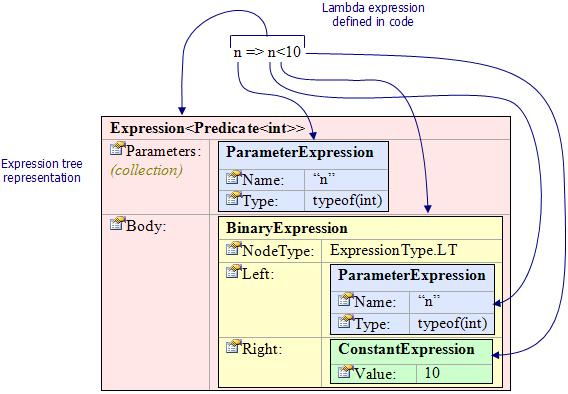
Here is a nice diagram taken from a Code Project article
which gives a deep dive into Expression Trees
So knowing it is possible, I pieced together some fragments of code from various sources. The full code is given further below but for now the magic line of code is
var e = myAlias.DynamicExpression.ParseLambda(pList.ToArray(), null, expression);
where the first parameter are the details of the argument(s) used and the third is the expression to the right of the arrow operator.
The Source Code
All the source code is available in a zip here. I also give some excerpts below
Source Talkthrough
I have talked through the source code in a Youtube video. (I recommend the subtitles as my diction is not the best)
VBA - Test Module - tstListOfCartesianPoints
This is the test routine. I have highlighted the lambda expressions in red.
Public Sub TestObjects2()

    Dim oList As LinqInVBA.ListOfPoints
    Set oList = New LinqInVBA.ListOfPoints

    Dim o(1 To 3) As CartesianPoint
    Set o(1) = New CartesianPoint
    o(1).x = 3: o(1).y = 4

    Set o(2) = New CartesianPoint
    o(2).x = 0.25: o(2).y = 0.5
    Debug.Assert o(2).Magnitude <= 1

    Set o(3) = New CartesianPoint
    o(3).x = -0.25: o(3).y = 0.5
    Debug.Assert o(3).Magnitude <= 1


    oList.Add o(1)
    oList.Add o(2)
    oList.Add o(3)


    Debug.Print oList.ToString2 'prints (3,4),(0.25,0.5),(-0.25,0.5)
    oList.Sort
    Debug.Print oList.ToString2 'prints (-0.25,0.5),(0.25,0.5),(3,4)

    Dim oFiltered As LinqInVBA.ListOfPoints
    Set oFiltered = oList.Where("(o)=>o.Magnitude() <= 1")

    Debug.Print oFiltered.ToString2 'prints (-0.25,0.5),(0.25,0.5)

    Dim oFiltered2 As LinqInVBA.ListOfPoints
    Set oFiltered2 = oFiltered.Where("(o)=>o.AngleInDegrees()>=0 && o.AngleInDegrees()<=90")

    Debug.Print oFiltered2.ToString2 'prints (0.25,0.5)


'    Dim i
'    For i = 0 To oFiltered.Count - 1
'        Debug.Print oFiltered.Item(i).ToString
'    Next i

End Sub
VBA - CartesianPoint Class Module
Option Explicit

'written by S Meaden

Implements mscorlib.IComparable '* Tools->References->mscorlib
Implements LinqInVBA.ICartesianPoint


Dim PI

Public x As Double
Public y As Double

Public Function Magnitude() As Double
    Magnitude = Sqr(x * x + y * y)
End Function

Public Function Angle() As Double
    Angle = WorksheetFunction.Atan2(x, y)
End Function

Public Function AngleInDegrees() As Double
    AngleInDegrees = Me.Angle * (360 / (2 * PI))
End Function

Private Sub Class_Initialize()
    PI = 4 * Atn(1)
End Sub

Private Function ICartesianPoint_AngleInDegrees() As Double
    ICartesianPoint_AngleInDegrees = Me.AngleInDegrees
End Function

Private Function ICartesianPoint_Magnitude() As Double
    ICartesianPoint_Magnitude = Me.Magnitude
End Function

Private Property Get ICartesianPoint_ToString() As String
    ICartesianPoint_ToString = ToString
End Property

Private Function IComparable_CompareTo(ByVal obj As Variant) As Long
    Dim oPoint2 As CartesianPoint
    Set oPoint2 = obj
    IComparable_CompareTo = Sgn(Me.Magnitude - oPoint2.Magnitude)

End Function

Public Function ToString() As String
    ToString = "(" & x & "," & y & ")"
End Function

Public Function Equals(ByVal oPoint2 As CartesianPoint) As Boolean
    Equals = oPoint2.Magnitude = Me.Magnitude
End Function

Private Property Get IToStringable_ToString() As String
    IToStringable_ToString = ToString
End Property
C# - ListsAndLambdas.cs File
This code needs to reside in a Class Library Dll project. You need to run with admin in order to register changes to the registry. You need to check the Register for interop checkbox and you need to make the assembly ComVisible(true). You will also need to install, using NuGet, the package System.Linq.Dynamic.
using System;
using System.Collections.Generic;
using System.Linq;
using System.Linq.Expressions;
using System.Runtime.InteropServices;
using myAlias = System.Linq.Dynamic;   //install package 'System.Linq.Dynamic' v.1.0.7 with NuGet

//https://stackoverflow.com/questions/49453260/datastructure-for-both-sorting-and-filtering/49453892#comment85912406_49453892
//https://www.codeproject.com/Articles/17575/Lambda-Expressions-and-Expression-Trees-An-Introdu
//https://stackoverflow.com/questions/821365/how-to-convert-a-string-to-its-equivalent-linq-expression-tree
//https://stackoverflow.com/questions/33176803/linq-dynamic-parselambda-not-resolving
//https://www.codeproject.com/Articles/74018/How-to-Parse-and-Convert-a-Delegate-into-an-Expres
//https://stackoverflow.com/questions/30916432/how-to-call-a-lambda-using-linq-expression-trees-in-c-sharp-net

namespace LinqInVBA
{
    // in project properties, build tab, check the checkbox "Register for Interop", run Visualstudio in admin so it can registers changes
    // in AssemblyInfo.cs change to [assembly: ComVisible(true)]

    public class LambdaExpressionHelper
    {
        public Delegate ParseAndCompile(string wholeLambda, int expectedParamsCount, Type[] paramtypes)
        {
            string[] split0 = wholeLambda.Split(new string[] { "=>" }, StringSplitOptions.None);
            if (split0.Length == 1) { throw new Exception($"#Could not find arrow operator in expression {wholeLambda}!"); }
            if (split0.Length != 2) { throw new Exception($"#Expecting only single arrow operator not {split0.Length - 1}!"); }

            string[] args = split0[0].Trim().Split(new char[] { '(', ',', ')' }, StringSplitOptions.RemoveEmptyEntries);
            if (args.Length != expectedParamsCount) { throw new Exception($"#Paramtypes array is of different length {expectedParamsCount} to argument list length{args.Length}"); }
            var expression = split0[1];

            List<ParameterExpression> pList = new List<ParameterExpression>();

            for (int lArgLoop = 0; lArgLoop < args.Length; lArgLoop++)
            {
                Type typLoop = paramtypes[lArgLoop];
                var p = Expression.Parameter(typLoop, args[lArgLoop]);
                pList.Add(p);
            }


            var e = myAlias.DynamicExpression.ParseLambda(pList.ToArray(), null, expression);
            return e.Compile();
        }
    }

    public interface IFilterableListOfPoints
    {
        void Add(ICartesianPoint x);
        string ToString2();
        IFilterableListOfPoints Where(string lambda);

        int Count();
        ICartesianPoint Item(int idx);
        void Sort();
    }

    public interface ICartesianPoint
    {
        string ToString();
        double Magnitude();
        double AngleInDegrees();
        // add more here if you intend to use them in a lambda expression
    }

    [ClassInterface(ClassInterfaceType.None)]
    [ComDefaultInterface(typeof(IFilterableListOfPoints))]
    public class ListOfPoints : IFilterableListOfPoints
    {

        private List<ICartesianPoint> myList = new List<ICartesianPoint>();

        public List<ICartesianPoint> MyList { get { return this.myList; } set { this.myList = value; } }

        void IFilterableListOfPoints.Add(ICartesianPoint x)
        {
            myList.Add(x);
        }

        int IFilterableListOfPoints.Count()
        {
            return myList.Count();
        }

        ICartesianPoint IFilterableListOfPoints.Item(int idx)
        {
            return myList[idx];
        }

        void IFilterableListOfPoints.Sort()
        {
            myList.Sort();
        }

        string IFilterableListOfPoints.ToString2()
        {
            List<string> toStrings = new List<string>();
            foreach (ICartesianPoint obj in myList)
            {
                toStrings.Add(obj.ToString());
            }

            return string.Join(",", toStrings.ToArray());

        }

        IFilterableListOfPoints IFilterableListOfPoints.Where(string wholeLambda)
        {
            Type[] paramtypes = { typeof(ICartesianPoint) };


            LambdaExpressionHelper lh = new LambdaExpressionHelper();
            Delegate compiled = lh.ParseAndCompile(wholeLambda, 1, paramtypes);

            System.Func<ICartesianPoint, bool> pred = (System.Func<ICartesianPoint, bool>)compiled;

            ListOfPoints newList = new ListOfPoints();
            newList.MyList = (List<ICartesianPoint>)myList.Where(pred).ToList();
            return newList;
        }

    }

}