Thursday, 22 June 2017

Object Linking and Embedding still going strong

OLE stands for Object Linking and Embedding and COM was invented to facilitate OLE. Nice to see all the COM interfaces still working.

Inserting a worksheet into Word document

Open Word, create new document go to VBA IDE and paste in the following code to see how to insert a worksheet and script against the worksheet as if you were in Excel VBA.

Option Explicit
'Paste into Word VBA
Sub ObjectLinkingAndEmbeddingExample()

    Dim shp As Shape
    Set shp = ThisDocument.Shapes.AddOLEObject("Excel.Sheet")
    
    shp.OLEFormat.Object.Sheets(1).Cells(1, 1) = "OLE works!"


End Sub

It would appear the gateway through to the Excel object model is given by OLEFormat.Object on the shape class.

Simulating an ActiveX command button click in code

Sometimes the gateway can require two successive calls to Object. In an Excel worksheet go to Developer mode and insert an *ActiveX* command button (not intrinsic Excel button), then double click to get to Click handler code and add the following

Option Explicit

Private Sub CommandButton1_Click()
    MsgBox "CommandButton1_Click"
End Sub

Then come out of developer mode and click the button to ensure the message box is thrown. Then insert the following code in a non-class module and run it.

Option Explicit

Sub SimulateButtonClick()

    '* After adding an *ActiveX* command button on the activesheet

    Dim shp As Shape
    Set shp = ActiveSheet.Shapes(1)
    
    Debug.Assert TypeName(shp.OLEFormat.Object.Object) = "CommandButton"
    
    Dim cmd As CommandButton
    Set cmd = shp.OLEFormat.Object.Object
    
    '* The next line compiles but Value is not is the Intellisense dropdown menu.
    '* It mimics the clicking on the button and should throw the message box in
    '* above handler code (see block above)
    cmd.Value = True

End Sub


Running this code will mimic the button click. You can see how in this case you need two calls to Object to get the plumbing right otherwise you get a type mismatch error

Thursday, 15 June 2017

ATL Notes 2 - Only Inherit from IDispatch Once

Continuing on ATL (Active Template Library) ...

So when writing an object with ATL for use in Excel VBA I recommend selecting dual interface from the Simple Object Wizard this gives both a binary vtable interface for early-binding clients as well as an IDispatch implementation for late-binding clients. Note, when I say 'late binding clients' I'm not talking about VBScript clients but VBA developers who'd prefer to call into a COM library with flexibility.

But there is a fly in the ointment here. COM is all about interface based programming where one is supposed to factor out the functionality of a class into separate interfaces, multiple dual interfaces will not compile in ATL because every Com class must only inherit from IDispatch once.

It isn't just the use case of factoring out functionality into separate interfaces but also the use case of shipping an additional interface to supplement, update or enhance the functionality of a class. In both use cases ATL will only allow one of these interfaces to be dual. To resolve the ATL compilation errors you will need designate one interface as being prime and only allow late-binding to that interface.

This pretty much scuppers the factoring out use-case. Developers coming from VBA will probably not grieve over this as they are used to using one interface only (VBA does have the Implements keyword but is rarely used). For the shipping updates use-case you should ship a new Com class with a new expanded all encompassing interface.

I could give some sample code but actually I have found some internet pages that illustrate the problem.

com problem inheriting twice from IDispatch
ATL inheritance mistake
They also give the solution which is to make one interface the goto interface when QueryInterface is called for IDispatch by using the COM_INTERFACE_ENTRY2 macro. So the following non-compiling code

BEGIN_COM_MAP(CAudioRecorder) 
        COM_INTERFACE_ENTRY(IAudioDevice) 
        COM_INTERFACE_ENTRY(IAudioRecorder)   <<<< ERROR 1 
        COM_INTERFACE_ENTRY(IDispatch)        <<<< ERROR 2 
END_COM_MAP()

should be changed to the following to direct QueryInterface calls for IDispatch to IAudioDevice

BEGIN_COM_MAP(CAudioRecorder) 
        COM_INTERFACE_ENTRY(IAudioDevice) 
        COM_INTERFACE_ENTRY(IAudioRecorder)   
        COM_INTERFACE_ENTRY2(IDispatch,IAudioDevice)        
END_COM_MAP()


When Is Late Binding Advantageous for VBA Developers?

What is Late Binding and when would you use it?

Syntax of Late Binding

In syntax terms, late binding is when you declare a variable with As Object instead of giving its Type. So for example scripting against the Excel object ...

Option Explicit

Sub Test()

    '* Early-bound - requires Type Library (Tools References)
    Dim ws As Excel.Worksheet
    
    '* Late-bound - uses IDispatch - slower but more flexible
    Dim objWs As Object
    
    Set ws = ThisWorkbook.Worksheets.Item(1)
    Set objWs = ThisWorkbook.Worksheets.Item(1)
    Debug.Print ws.Name
    Debug.Print objWs.Name
End Sub

In the above example objWs can access all of the methods of Worksheet without reference to a Type Library (Tools References) it does this via the IDispatch interface which is a flexible dynamic type discovery interface that interrogates an object at run-time instead of at compile time.

When would you use Late Binding?

Well the above example is not a good use case. There is no need to use late binding when the library you are scripting against is written and published by a proper software house such as Microsoft. Late-binding was invented for scripting clients like VBScript. However, VBA developers can find advantage from using late-binding when working in a large organisation and co-operation between development teams is not optimal.

At some point in your career, you may find your VBA code depends on a library from another team in your large organisation. The rules of COM interfaces are clear, don't break an interface once published, new behaviour needs to ship in a new interface or also in a new object that goes with the new interface. But sh*t happens, a team changes an interface which breaks your VBA code, how is the break handled?

If you are using early binding and type libraries then you will get a compile error. Imagine that scenario, you get a support call from an important user saying your spreadsheet broke along the lines of "Compile error in hidden module:foo"
You would have to visit (or remote into) their machine, unlock the code (assumes password protection) and go figure out what went wrong. This can be quite embarrassing.

On the other hand if you are using late-binding then your code will only break on a line of code directly affected with the error message

This kind of error is trappable with On Error Goto whilst a compile error is not!

What are downsides to Late-Binding?

Well, you lose Intellisense which can be a boon to writing code but there is nothing to stop you from writing code with early-binding and then changing to late binding when going to test and production.

Also, we have to address speed. There is no doubt that the extra calls into IDispatch carry a performance penalty though for in-process DLL calls I'd say this is minimal. When you have a remote component then I would suggest not using late-binding because network calls are very expensive. For components running locally on the computer but in another process, the call is 50/50.

Summary

Although IDispatch was invented for scripting clients like VBScript it also provides an option for VBA developers to defend against breaking changes in type libraries from other teams.

I'm not religious about this issue but the having the option to late-bind requires the developers of the component you rely on to ship an IDispatch implementation and sometimes this has its own consequences.

I've just rustled up this post because I want to address an ATL design dilemma and needed to sketch out the stakes.

Hat tip to Cybersecurity - Printer Microdots

I've never leaked a document and never had a desire to but this story caught my interest.  Colour printers also print microdots than give away the printer serial number and date and time of printing.  Leakers beware!

Some good advice at the bottom of this cybersecurity post, consider converting your image to two tone black and white to either make visible or eliminate microdots.

Wednesday, 14 June 2017

ATL Notes 1 - Inheritance Hierarchy

So Excel VBA developers may wonder how to make their code run as fast as compiled VB6 and I'm, afraid they can't as VB6 is no longer supported. To increase the speed of your code you need to use C++ and then call in from VBA using COM. So you need a C++ COM technology and this is what Active Template Library is.

The Books

So I have completed reading one ATL book, Beginning ATL Programming by Richard Grimes et al (Wrox 1999) and in the final stages of reading another, Inside ATL by King and Shepherd (MSPress 1999). So it is worth putting up some revision notes so I don't forget all that I have learnt. Whilst the prose of the books was better than the dry Microsoft documentation, the MS website remains the place to link to. To follow these notes you'll need to understand key C++ features such as templates and multiple inheritance. You also need to be very familiar with the COM specification, we shall not here explain the role of IUnknown or IDispatch. We'll limit the focus to in-process DLLs and ignore .EXEs

Walkthrough

So I am walking through creating a new ATL project, my project name is ATLProject2. Once through the new ATL project wizard one is confronted with a great many files but don't be intimidated, there are more wizards from the Class View so ensure the Class View is visible.

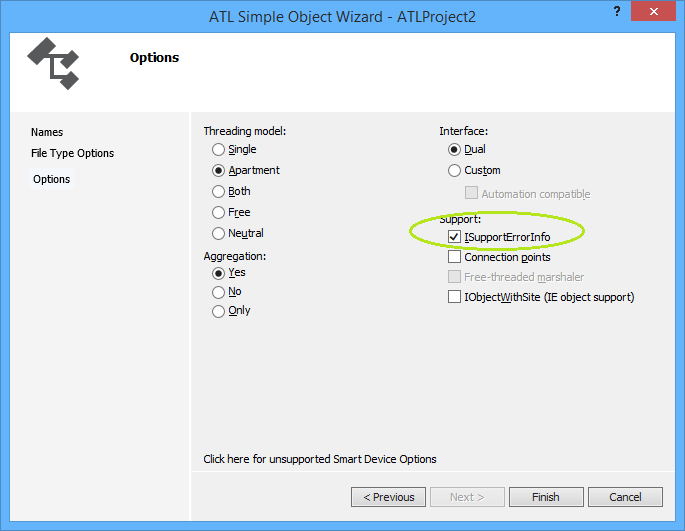
From the Class View go to right-click menu and take Add Class and then take ATL Simple Object which throws the ATL Simple Object Wizard. On the Names Dialog, in the C++ Short Name type "CoolCode" and the other fields are auto-generated for you. Click through the File Type Handler Options to the last dialog, Options which looks like this


So I have checked Support ISupportErrorInfo because we will want to throw rich error information from C++ to VBA. Click Finish and some code is generated for you.

// CCoolCode

class ATL_NO_VTABLE CCoolCode :
 public CComObjectRootEx<CComSingleThreadModel>,
 public CComCoClass<CCoolCode, &CLSID_CoolCode>,
 public ISupportErrorInfo,
 public IDispatchImpl<ICoolCode, &IID_ICoolCode, &LIBID_ATLProject2Lib, 
                                       /*wMajor =*/ 1, /*wMinor =*/ 0>
{
public:
 CCoolCode()
 {
 }

DECLARE_REGISTRY_RESOURCEID(IDR_COOLCODE)


BEGIN_COM_MAP(CCoolCode)
 COM_INTERFACE_ENTRY(ICoolCode)
 COM_INTERFACE_ENTRY(IDispatch)
 COM_INTERFACE_ENTRY(ISupportErrorInfo)
END_COM_MAP()

// ISupportsErrorInfo
 STDMETHOD(InterfaceSupportsErrorInfo)(REFIID riid);


 DECLARE_PROTECT_FINAL_CONSTRUCT()

 HRESULT FinalConstruct()
 {
  return S_OK;
 }

 void FinalRelease()
 {
 }

public:


};

OBJECT_ENTRY_AUTO(__uuidof(CoolCode), CCoolCode)

So it's worth showing the inheritance hierarchy image/svg+xml CComObjectRootBase ISupportErrorInfo IDispatchImpl<ICoolCode, &IID_ICoolCode, &LIBID> CComObject<CCoolCode> CComObjectRootBase CComCoClass<CCoolCode, &CLSID_CoolCode> CComObjectRootEx<CComSingleThreadModel> CCoolCode And we can give information as to what each class in the hierarchy does
ClassNamePurpose
CComObjectRootBaseHolds the reference count member
CComObjectRootExHandles reference counting based on the threading model
CComSingleThreadModelPassed as template parameter to CComObjectRootEx. This means reference counting need not be thread safe.
CComCoClassImplements IClassFactory with the help of a creator class.
ISupportErrorInfoDrives rich error information familiar to VBA devs.
IDispatchImplIf you selected a Dual interface (I recommend) then you get an implementation of IDispatch driven off the type library hence the parameters
CCoolCodeYour class and your logic but never gets directly instantiated
CComObject<CCoolCode>What gets instantiated and what implements IUnknown::QueryInterface

Never new your class

So your class never gets instantiated with the new keyword, it can't because it has no vtable because of the ATL_NO_VTABLE macro. Instead, a creator class such creates an instance of CComObject (when not aggregated) with your class as a template.

To illustrate, it is worth looking at what happens when a client gets hold of IClassFactory and calls IClassFactory::CreateInstance, so find the definition of CComCoClass (select, F12) to get to this (abridged) code

template <class T, const CLSID* pclsid = &CLSID_NULL>
class CComCoClass
{
public:
 DECLARE_CLASSFACTORY()
 DECLARE_AGGREGATABLE(T)
 typedef T _CoClass;

        ...

 template <class Q>
 static HRESULT CreateInstance(
  _Inout_opt_ IUnknown* punkOuter,
  _COM_Outptr_ Q** pp)
 {
  return T::_CreatorClass::CreateInstance(punkOuter, __uuidof(Q), 
                  (void**) pp);
 }
 template <class Q>
 static HRESULT CreateInstance(_COM_Outptr_ Q** pp)
 {
  return T::_CreatorClass::CreateInstance(NULL, __uuidof(Q),
                  (void**) pp);
 }
};

So in the above code one can see CreateInstance being called in two use cases, (i) where there is an aggregating object and (ii) where there isn't but the code shares a common element of T::_CreatorClass::CreateInstance. It is worth knowing that T::_CreatorClass is defined by the DECLARE_AGGREGATABLE macro which was generated by your choice in the wizard to allow aggregation. This macro is defined as

#define DECLARE_AGGREGATABLE(x) public:\
 typedef ATL::CComCreator2< ATL::CComCreator< ATL::CComObject< x > >,
               ATL::CComCreator< ATL::CComAggObject< x > > > _CreatorClass;

Wow, that is really a complicated syntax and I won't try to explain it because that would replicate the book/documentation. Suffice to say one can see the CComObject as referred to in the class diagram above. I will give some links though ...
ClassNamePurpose
CComObjectThis class implements IUnknown for a nonaggregated object.
CComAggObjectThis class implements the IUnknown interface for an aggregated object. By definition, an aggregated object is contained within an outer object. The CComAggObject class is similar to the CComObject Class, except that it exposes an interface that is directly accessible to external clients.
CComCreator & CComCreator2These are undocumented though referenced in a Don Box article

If not new then what?

So I mentioned above that one doesn't use new on your class. Let's suppose you have a use case where you have two com classes in your server project and the method on one returns an instance of the other. Without calling the COM API CoCreateInstance (which would be the long way round) how do you create an instance of your com class and return it to a client? The answer is use (some of) the same classes as the class factory above. So here is some sample code

STDMETHODIMP CUncoolCode::CreateCoolCode(ICoolCode ** ppCool)
{
    // From Grimes et al (1999) p. 143 
    *ppCool = NULL;
    return CComCreator< CComObject<CCoolCode> >::CreateInstance(
          NULL, IID_ICoolCode, reinterpret_cast<void**>(ppCool) ) ;

}

Summary

Well, ATL is complicated if you come from a VBA background, it is advised to never change code generated by the wizards unless you totally know what you are doing. ATL demonstrates not just the power of templates but also multiple inheritance and templates. Awesome.

Miscelaneous Links

As always surfing around in preparation of a blog post throws up some interesting links that are worth saving.
How ATL 7 uses attributes to save lines ATL 3 code
Microsoft Documentation ATL
MSDN ATL

Tuesday, 23 May 2017

COM Support Classes

Writing C++ code currently to enhance the VBA experience and so I'm dealing with Automation types very frequently. A good VBA ought to know that a VBA string is in fact a BSTR and that a VBA Variant also has a C++ counterpart.

So BSTRs have memory management rules which need to be observed otherwise one will leak memory. Thankfully C++ classes using RAII design patterns can assist. It just seems there are more than one to choose from and it is worth documenting them here on a blog entry.
BSTR helper classesVendorLibraryHeader
_bstr_t ClassMicrosoftNative C++ compiler COM supportcomutil.h
CComBSTR ClassMicrosoftATLatlbase.h


Variant also has helper classes
Variant helper classesVendorLibraryHeader
_variant_t ClassMicrosoftNative C++ compiler COM supportcomutil.h
CComVariant ClassMicrosoftATLatlbase.h


Also found a nice page of sample code demonstrating the Native C++ compiler COM support classes interacting with ADO objects which are normally scripted with VBA and thus have automation-typed interfaces. Visual C++ ADO Programming

Also Stack Overflow question discussing the classes available. Looks like the classes listed above represent the sum of Microsoft options.

Tuesday, 2 May 2017

DispCallFunc opens a new door to COM interfaces and VBA Function Pointers

So during my research on Type Information it seems that Dispatch carries with it some amazing type querying functionality. Not only that it seems IDispatch and Type Libraries interrogation interfaces are pretty much the same

I always knew IDispatch had to do some work but looking into it seems both amazing and fascinating. Also, it seems that there are some COM system functions that act as low level helpers, one such function is DispCallFunc found in oleaut32.dll.

A clever man called Krivous Anatolii Anatolevich has used this to allow VBA programmers call into IClassFactory::CreateInstance; a problem I solved only with resort to C++/VBA hybrid code. Lots of interesting stuff there at his GitHub page.

Another clever man Mikael Katajamäki has discovered how to use DispCallFunc to form part of a solution for a recursive mathematical root finder. His code is over at Windows API DispCallFunc as function pointer in VBA

Whilst VBA already has AddressOf and Application.OnTime, often it is required to pass parameters to a callback function. DispCallFunc may give the solution to that problem instance.

This idea is debated in an excellent thread discussion over at vbforums.com

As a footnote and coda and not related to DispCallFunc is an incredible project that writes assembly code into memory before calling it. This can be found at wonderful website called FreeVBcode.com to which I shall be returning. The said code is found at Call API functions by Name, without Declare, v 2.0

Solve VBA Potentially Massive Memory Leak

So I like object orientation, I also like object models like that of Microsoft Excel.  Excel's object model is very intuitive, you can see the application window, interact with workbooks and worksheets and the cells there.  Analogously, in code, you can navigate the object model from the Application object (normally implied) to the Workbooks collection, to a specific Workbook, then to the Worksheets collection, then to a specific Worksheet and finally a Cells object.  With the Cells object you can finally write code to write to the cell.

The Excel object model is wonderful to navigate, indeed the Excel object model is navigable in both directions as Cells object has a parent property as does the Worksheet, Worksheets, Workbook and Workbooks classes which allows navigation up the chain to the root Application object.

I like to emulate this sort of object model in my own VBA applications but there is a problem here; it is one of circular references and reference counting.  If not careful, this can lead to objects locked in memory and not being destructed.  Imagine a whole elegant rich hierarchy of objects such as that of Excel not being destructed, the memory leak would be massive.

If we have a two-way navigation then a Parent object will have a reference to a Child object and vice versa.  Upon termination of a Child object it is necessary to call a Dispose method on the Child to manually disconnect the Parent, i.e. Set the reference to Parent to Nothing.

(Incidentally this problem is one reason why .NET factored out the IDisposable interface)

Here is our first piece of code which is a Child class

VERSION 1.0 CLASS
BEGIN
  MultiUse = -1  'True
END
Attribute VB_Name = "Child"
Attribute VB_GlobalNameSpace = False
Attribute VB_Creatable = False
Attribute VB_PredeclaredId = False
Attribute VB_Exposed = False
Option Explicit

Private msName As String

Private moParent As Parent '<-- circular reference potential big problem!

Public Property Let Name(ByVal sName As String)
    msName = sName
End Property
Public Property Get Name() As String
    Name = msName
End Property

Public Sub SetParent(ByVal oParent As Parent)
    Set moParent = oParent
End Sub

Public Sub Dispose()
    '* before quitting remove reference to parent to break circular reference
    '* otherwise potential massive memory leak as Parent as Child have a
    '* circular reference where each other stops the other from being
    '* destructed
    Set moParent = Nothing
    '* but this must be called manually, so must be implemented in Parent
    '* class which also must be called manually.  But sometimes people forget!
End Sub

Private Sub Class_Terminate()
    Dispose
End Sub

So you can see the Parent reference being set in the Sub procedure SetParent(). You can also see the Parent reference being cleared in Dispose().

Now let us look at the Parent class

VERSION 1.0 CLASS
BEGIN
  MultiUse = -1  'True
END
Attribute VB_Name = "Parent"
Attribute VB_GlobalNameSpace = False
Attribute VB_Creatable = False
Attribute VB_PredeclaredId = False
Attribute VB_Exposed = False
Option Explicit

Private mcolChildren As New VBA.Collection

Public Sub AddChild(ByVal oChild As Object)
    Call oChild.SetParent(Me)
    
    mcolChildren.Add oChild
End Sub

Public Sub Dispose()
    Dim lLoop As Long
    
    '* loop through in reverse to avoid moving the goal posts re index
    For lLoop = mcolChildren.Count To 1 Step -1
        
        '* need to call Dispose on Child to break any circular reference with Parent
        '* unless using weak references
        mcolChildren.Item(lLoop).Dispose
        
        mcolChildren.Remove lLoop
    Next lLoop
End Sub

Private Sub Class_Terminate()
    '* Sadly putting Dispose() in Class_Terminate won't save you
    '* Class_Terminate only runs when reference count falls to zero
    '* and getting the reference count to zero is what Dispose is meant to do!
    '* you can uncomment and try it if you're skeptical...
    'Dispose
    Debug.Print "Parent Destructor called"
End Sub


You can see the Parent has a Dispose method which should be called when the Parent object is to be destructed. Parent's implementation of Dispose loops through the collection (in reverse so index is well behaved) and calls Dispose on each Child before removing it from the collection. This is the correct and proper way to untangle the circular references BUT it relies upon the client code calling Dispose on the Parent before termination and sometimes programmers forget.

Let us now see some client code, in a standard module paste the following code

Sub TestChildWithDispose()
    
    Dim oParent As Parent
    Set oParent = New Parent

    oParent.AddChild CreateChild("Luke")
    oParent.AddChild CreateChild("Leia")
    
    '* comment out following line to see proof that the
    '* parent's destructor is not called in the case
    '* of circular references
   'oParent.Dispose
    
    Set oParent = Nothing

End Sub

Function CreateChild(ByVal sName As String) As Child
    Dim oChild As Child
    Set oChild = New Child
    oChild.Name = sName
    Set CreateChild = oChild
End Function

You can experiment with the above code by commenting and uncommenting the line that reads "oParent.Dispose" to demonstrate how the Parent Child objects are not destructed unless you call the Parent's Dispose method.

So always ship a Dispose method and make sure it gets called!!!

Friday, 14 April 2017

Throw away Declare Function with IDL for Modules

So I had some grief recently with Declare Function foo Lib "bar" and passing strings but after discovering that they got cast to narrow ANSI strings I found a workaround. The explanation was found at a SO question Passing strings from VBA to C++ DLL. Also found here was the tantalising suggestion that MIDL.exe (Microsoft's IDL compiler) is meant to be used to replace Declare Function. Eagerly I set bounty to draw out a fuller response. But I have managed to crack the problem myself. Here I will show the code.

I knew a thing or two about Interface Definition Language (IDL) from working with Active Template Library (ATL) which is a Microsoft C++ library for building COM components for Automation clients like VBA. I always knew ATL could be used for COM classes but the SO question tipped that there are other keywords in the IDL language that could define functionality outside of classes.

The key is IDL's Module keyword It allows a Module to be defined and functions defined inside the module. Actually, VBA developers are familiar with this construct since many of the VBA functions are defined in Modules:Strings,DateTime, Math etc.

Let's look at some IDL in OLEView.exe. The joined green elipses should demonstrate how the library in OLEView ties in with VBA's Tools References dialog box. Within the VBA's IDL, I have selected the math module as will drill into this in a moment.

The second exhibit is a screenshot of OLEView.exe and Dependency Walker (Depends.exe). Dependency Walker shows a DLL's exported functions and we can see that VBE7.DLL exports a function called rtcAbsVar which has an entry point ordinal of 656. In the IDL you can also see 656 in the entry(656) attribute for the Abs function and so it can be seen this is how we tie "ABS" in VBA code to call into VBE7.DLL's rtcAbsVar.

Also at top of the IDL we can see dllname("VBA6.DLL") and I confess I do not know why this does not say VBE7.DLL, I could not find a file called VBA6.DLL on my machine. No matter, the code I will give works. We will replicate this technique.

I opened Microsoft Visual Studio 2013 with Administrator rights and I created a new C++, ATL Win32 project and I called it IDLForModules.

Then I click Finish and let VS2013 create the default project. I like to compile it fresh just to ensure no problems (if you forgot to open VS2013 with admin rights you'll get an 'unable to register' error). Once compiled happily then we need to rewrite the IDL code. So open IDLForModules.idl from the Solution Explorer.

Change the IDL to the following (you ought to regenerate your own GUIDs)

// IDLForModules.idl : IDL source for IDLForModules
//

// This file will be processed by the MIDL tool to
// produce the type library (IDLForModules.tlb) and marshalling code.

import "oaidl.idl";
import "ocidl.idl";

[
 helpstring("Idl For Modules"),
 uuid(EA8C8803-2E90-45B1-8B87-2674A9E41DF1),
 version(1.0),
]
library IDLForModulesLib
{
 importlib("stdole2.tlb");

 [
  /* dllname attribute https://msdn.microsoft.com/en-us/library/windows/desktop/aa367099(v=vs.85).aspx */
  dllname("IdlForModules.dll"),
  uuid(4C1884B3-9C24-4B4E-BDF8-C6B2E0D8B695)
 ]
 module Math{
  /* entry attribute https://msdn.microsoft.com/en-us/library/windows/desktop/aa366815(v=vs.85).aspx */
  [entry(656)] /* map function by entry point ordinal */
  Long _stdcall Abs([in] Long Number);
 }
  module Strings{
  [entry("pUpper")] /* map function by entry point name */
  BSTR _stdcall Upper([in] BSTR Number);
 }
};

You may compile again at this point as it should still compile. Next, we will write some C++ code, so open IDLForModules.cpp. At the top, add the following Standard libraries to the list of includes

#include <string>
#include <algorithm>

And then at the bottom of the module paste in the following code

INT32 __stdcall _MyAbs(INT32 Number) {
 return abs(Number);
}

BSTR __stdcall pUpper(BSTR sBstr)
{
 // Get the BSTR into the wonderful world of std::wstrings immediately
 std::wstring sStd(sBstr);

 // Do some "Mordern C++" iterator style op on the string
 std::transform(sStd.begin(), sStd.end(), sStd.begin(), ::toupper);

 // Dig out the char* and pass to create a return BSTR
 return SysAllocString(sStd.c_str());
}

Compile again as code is still valid but not yet complete. Finally open IDLForModules.def from the Solution Explorer and make the code look like this

; MidlForModules.def : Declares the module parameters.

LIBRARY

EXPORTS
 DllCanUnloadNow  PRIVATE
 DllGetClassObject PRIVATE
 DllRegisterServer PRIVATE
 DllUnregisterServer PRIVATE
 DllInstall  PRIVATE
 _MyAbs @656
 pUpper

Code is now complete and should compile. Next is to write a test client, we will create a macro-enabled Workbook called TestClient.xlsm. This should be housed in the same directory as the created Dll. (Please note there is a type library created but in a different place, don't worry for time being). Use "Open Folder in Explorer" right-click menu option in Solution Explorer then go up one directory and down into Debug (so that's "..\Debug" ) and you should find the created IDLForModules.dll, put TestClient.xlsm there.

Inside TestClient.xlsm open the ThisWorkbook module and write the following code

Option Explicit

Private Declare Function LoadLibrary Lib "kernel32" Alias "LoadLibraryA" (ByVal lpLibFileName As String) As Long

Private Sub Workbook_Open()
    '* next line establishes relative position of Dll
    Debug.Assert Dir(ThisWorkbook.Path & "\IDLForModules.dll") = "IDLForModules.dll"
    
    '* next line loads the Dll so we can avoid very long Lib "c:\foo\bar\baz\barry.dll"
    LoadLibrary ThisWorkbook.Path & "\IDLForModules.dll"
    
    '* next go to  Tools References are check "Idl For Modules"
    '* "Idl For Modules" Iis set in the IDL with helpstring("Idl For Modules")
    
End Sub

The above code loads your new Dll upon workbook opening and this helps the system find the Dll. You could hard code the path into the DllName attribute in the IDL (bad idea) or there must be some sort of DLL search path feature but I have not found that yet. Run this code to ensure you have workbook in the right place, i.e. same directory as the Dll.

Then you go to the Tools References dialog box and you check "Idl For Modules", this is the type library created by your project.
Finally, in a new standard module add the following code and then run it. It should work.

Option Explicit

Sub TestAbs()
    Debug.Print IDLForModulesLib.Math.Abs(-5)
End Sub

Sub TestUpper()
    Debug.Print IDLForModulesLib.Strings.Upper("foobar")
End Sub

If you want to step through the code then in the Project Properties set up Excel.exe as the Command and your TestClient.xlsm as a command argument. Same as bottom of this article.

Just to recap what just happened, we created an ATL project that exported some C++ functions and then we wrote some IDL to map some symbols useable in VBA to the C++ functions, so we did not need the same function name. An example is given of mapping by entry point ordinal as found in the DEF file or by name also as found in the DEF file.

So we can now throw away Declare Function foo lib "bar" as a mechanism.

Thursday, 13 April 2017

Look ma, no Registry! Get IClassFactory direct!

A lot of criticism of COM centres on the Registry. The Registry is a single point of failure and a quick Google will yield many articles condemning it. Com servers store a great deal in the Registry but actually it is possible to bypass the Registry completely.

If you know the location of the COM Server Dll then you can load it with LoadLibrary, you can then use GetProcessAddress to get a function pointer to the entry point DllGetClassObject. Calling DllGetClassObject gets you an interface pointer to IClassFactory and then one can call CreateInstance on that interface. You'll need to know the GUID of the CoClass you want to instantiate as well as the GUID of the interface you're requesting.

Some of this can be written in VBA but getting a function pointer and calling on it are solidly C++ tasks. Here I present code which does the above. First the C++ which needs to be housed in a Win32 Dll project with exports (a .Def file).

#include "Objbase.h"

COMCREATEVIACLASSFACTORY_API HRESULT __stdcall ClassFactoryCreateInstance(
 _In_ HMODULE hModule,
 _In_ _GUID *clsiid,
 _In_ _GUID *iid,
 void** itfUnknown)
{
 HRESULT hr = S_OK;

 IClassFactory* pClassFactory;

 // Declare a pointer to the DllGetClassObject function.
 typedef HRESULT(__stdcall *PFNDLLGETCLASSOBJECT)(REFCLSID clsiid, 
  REFIID RIID, void** PPV);

 PFNDLLGETCLASSOBJECT DllGetClassObject =
   (PFNDLLGETCLASSOBJECT)::GetProcAddress(hModule, "DllGetClassObject");

 // Call DllGetClassObject to get a pointer to the class factory.
 hr = DllGetClassObject(*clsiid, *iid, (void**) &pClassFactory);
 if (hr == S_OK)
 {
  // IClassFactory::CreateInstance and IUnknown::Release
  hr = pClassFactory->CreateInstance(NULL, IID_IUnknown, 
   (void**) itfUnknown);

  pClassFactory->Release();
 }
 return hr;

}


COMCREATEVIACLASSFACTORY_API void TestClassFactoryCreateInstance()
{

 HMODULE hModule = 0;
 hModule = LoadLibrary(L"C:\\Windows\\System32\\scrrun.dll");

 _GUID clsiid, iid;
 ::CLSIDFromString(L"{EE09B103-97E0-11CF-978F-00A02463E06F}", &clsiid);
 ::CLSIDFromString(L"{00000000-0000-0000-C000-000000000046}", &iid);

 HRESULT hr = S_OK;
 IUnknown* pUnknown = 0;

 ClassFactoryCreateInstance(hModule,
  &clsiid,
  &iid, (void**) &pUnknown);

}


And some client VBA

Option Explicit

Declare Function ClassFactoryCreateInstance Lib "ComCreateViaClassFactory.dll" _
           (ByVal hModule As Long, _
            ByRef pguidClass As GUID, _
            ByRef pguidInterface As GUID, _
            ByRef itfUnknown As stdole.IUnknown) As Long

Declare Sub TestClassFactoryCreateInstance Lib "ComCreateViaClassFactory.dll" ()

Declare Function LoadLibrary Lib "Kernel32" Alias "LoadLibraryA" _
            (ByVal lpLibFileName As String) As Long

Const IID_IUnknown          As String = "{00000000-0000-0000-C000-000000000046}"
Const IID_IClassFactory     As String = "{00000001-0000-0000-C000-000000000046}"
Const IID_IClassFactory2    As String = "{B196B28F-BAB4-101A-B69C-00AA00341D07}"

Declare Function CLSIDFromString Lib "OLE32" _
    (ByVal lpszCLSID As String, pclsid As GUID) As Long

Type GUID
    Data1 As Long
    Data2 As Integer
    Data3 As Integer
    Data4(7) As Byte
End Type


Sub Test_ClassFactoryCreateInstance()
    
    Debug.Assert Dir(ThisWorkbook.Path & "\ComCreateViaClassFactory.dll") = _
                "ComCreateViaClassFactory.dll"
    Call LoadLibrary(ThisWorkbook.Path & "\ComCreateViaClassFactory.dll")
    
    Dim clsiid As GUID
    Debug.Assert CLSIDFromString(StrConv( _
        "{EE09B103-97E0-11CF-978F-00A02463E06F}", vbUnicode), clsiid) = 0
    
    Dim riid As GUID
    Debug.Assert CLSIDFromString(StrConv(IID_IUnknown, vbUnicode), riid) = 0
    
    Dim hModule As Long
    hModule = LoadLibrary("C:\Windows\System32\scrrun.dll")
    
    Dim itfUnknown As stdole.IUnknown, hr As Long
    hr = ClassFactoryCreateInstance(hModule, clsiid, riid, itfUnknown)
    If hr <> 0 Then Err.Raise hr
    
    Dim oDict As Scripting.Dictionary
    Set oDict = itfUnknown
    oDict.Add "Foo", 2
    oDict.Add "Bar", 3
    Debug.Assert oDict.Keys()(0) = "Foo"
    Debug.Assert oDict.Keys()(1) = "Bar"
    

End Sub

Sub Test_TestClassFactoryCreateInstance()
    Debug.Assert Dir(ThisWorkbook.Path & "\ComCreateViaClassFactory.dll") = _
            "ComCreateViaClassFactory.dll"
    Call LoadLibrary(ThisWorkbook.Path & "\ComCreateViaClassFactory.dll")

    Call TestClassFactoryCreateInstance

End Sub


A nice diagram here shows what we are doing

Easier for a Camel to go through eye of the Needle than to pass strings from VBA to C++ Dll

It is easier for a Camel to go through eye of the needle than to pass strings from VBA to C++ Dll or at least that is how it has felt for the last day or so.

I have found a good StackOverflow question centred on the issue Passing strings from VBA to C++ DLL. The questioner solves the problem in his question and asks for an explanation before supplying his own. Oddly, the questioner's question is upvoted to 6 whilst his answer is downvoted. Anyway, the response from Ben carries a wonderful nugget. The Declare Function foo lib "bar" interface is constrained by Visual Basic 3 compatibility!

So, the strings get marshalled as narrow ANSI strings! As such, for them to be of any use they need to be converted to Unicode and for this we use the A2W conversion macro from Active Template Library (ATL).

I've put together some sample code and it is given below it demonstrates (1) passing a string as an input argument and (2) passing a string as a buffer for returning a string from the Dll.

A run through as to how create the Dll. In Visual Studio create a new C++ Win32 project.

Then in the application wizard select a Dll and also select 'Export symbols'

Click Finish and let Visual Studio create the project skeleton, when it has finished add a Source.def file, do this via New Item and search for "def" in templates, see diagram.

Edit the Source.def file to contain the following

LIBRARY MyDll  
EXPORTS  
   PassingStrings @1

In the PassStrings.cpp make the code like the following

#include <atlbase.h>

PASSSTRINGS_API  void __stdcall PassingStrings(
 LPCSTR pcsStringIn,
 LPCSTR* pcsBufferToWriteOut,
 INT* charsWritten
 )
{
 /* First Argument, using a string passed in
  * To do something useful with the string you need to convert to a wide
  * the following code demonstrates a dll filepath being loaded
  */
 USES_CONVERSION;
 LPCWSTR w = A2W(pcsStringIn);
 HMODULE hModule = 0;
 hModule = ::LoadLibrary(w);

 /* Second Argument, we can write to the buffer allocated by caller
  * We can use 3rd argument charsWritten to signal how many we've 
  * used or extra will need
  */
 LPCSTR csBufferToWriteOut = *pcsBufferToWriteOut;
 LPCSTR csCreatedInCPlusPlus = LPCSTR(W2A(L"Created in C++"));

 int lenArgIn = strlen(csBufferToWriteOut);
 int lenArgOut = strlen(csCreatedInCPlusPlus);
 if (lenArgIn < lenArgOut)
 {
  // we got a problem, then buffer is not big enough
  // signal size of the gap via *charsWritten
  *charsWritten = lenArgIn - lenArgOut;
 }
 else
 {
  // need to use the following because older functions throw security compilation errors
  strncpy_s((char *) csBufferToWriteOut, lenArgIn, csCreatedInCPlusPlus, lenArgOut);

  *charsWritten = lenArgOut;
 }
}


Where PASSSTRINGS_API is a macro that flips between import and export, this is created by Visual Studio at project creation and will be different for you and will in fact be based on the name of the project.

#ifdef PASSSTRINGS_EXPORTS
#define PASSSTRINGS_API __declspec(dllexport)
#else
#define PASSSTRINGS_API __declspec(dllimport)
#endif

Build the project with F7. Resolve any compilations errors like typos. When built ok proceed to test client.

You'll need a VBA Client, we'll use a macro-enabled Excel workbook, the best location wouild be same directory as the built dll, thjis will be in the Debug folder. To get to the Debug folder from the Solution Explorer right-click menu take 'Open Folder in File Explorer', go up one folder and down into Debug. There create a macro-enabled Excel workbook called TestClient.xlsm.
In TestClient.xlsm add the following code to either ThisWorkbook or a new standard module.

Option Explicit

Private Declare Sub PassingStrings Lib "PassStrings.dll" ( _
        ByVal pcsStringIn As String, _
        ByRef pcsBufferToWriteOut As String, _
        ByRef charsWritten As Long)

Private Declare Function LoadLibrary Lib "Kernel32" Alias "LoadLibraryA" _
(ByVal lpLibFileName As String) As Long


Sub TestPassingStrings()
    '* ensures workbook in the right place
    Debug.Assert Dir(ThisWorkbook.Path & "\PassStrings.dll") = "PassStrings.dll"
    
    '* calling LoadLibrary to manually load library allows our Declare
    '* Function statement to skip the full path to the dll
    '* also allows flexibility in deployment
    Call LoadLibrary(ThisWorkbook.Path & "\PassingStrings.dll")
    
    '* and now the client logic
    Dim sFilePath As String, sBuffer As String, lCharsWritten As Long
    
    sFilePath = "C:\Windows\System32\scrrun.dll"
    
    '* create a buffer for the C++ to write into
    '* it is important we create it and will will free it
    sBuffer = String(20, " ")
    lCharsWritten = 0
    
    '* call the Dll
    Call PassingStrings(sFilePath, sBuffer, lCharsWritten)
    
    '* either buffer was big enough and lCharsWritten > 0
    '* or not and lCharsWritten < 0
    If lCharsWritten > 0 Then
        Debug.Print "'" & Left$(sBuffer, lCharsWritten) & "'"
    Else
        Debug.Print _
         "You need to dimension a buffer larger by '" & Abs(lCharsWritten) & "'"
    End If
End Sub


The code should run. You can play with the size of the buffer to test the buffer overrun defence.

To debug and step though the C++ code you'll need to set the startup program and command line arguments thus.


Now set a break point on the first line of code, switch to the VBA and run the VBA, the C++ break point should hit. At this point you can see the strings passed in in the Locals/Autos window.

Saturday, 8 April 2017

CreateObjectEx VBA to create remote COM object

In my library are some venerable COM books, an excellent tome is by Guy and Henry Eddon, called Inside Distributed COM ISBN 1-57231-849-X.  This has undergone some revisions and was last retitled Inside COM+ Base Services.  There are precious few examples of Visual Basic code, but here is a beauty that allows the creation of a COM server on a remote machine, a capability that C++ developers have always had but which is not easily achieved in VB/VBA.

Enjoy some vintage 1998 code, published under fair usage provisions.


Option Explicit

'* From Inside Distributed DCOM
'* By Guy Eddon and Henry Eddon
'* Copyright 1998 By Guy Eddon and Henry Eddon
'* ISBN 1-57231-849-X
'* Microsoft Press
'* https://www.amazon.co.uk/Inside-Distributed-COM-Guy-Eddon/dp/157231849X

'* Part I: Fudamental Programming Architecture
'* Chapter Three: Type Libraries and Language Integration
'* pages 106-108

'* excerpt published under fair usage provisions

Private Type GUID
    Data1 As Long
    Data2 As Integer
    Data3 As Integer
    Data4(7) As Byte
End Type

Private Type COSERVERINFO
    dwReserved1 As Long  ' DWORD
    pwszName As Long     ' LPWSTR
    pAuthorInfo As Long  ' COAUTHINFO
    dwReserved2 As Long  ' DWORD
End Type

Private Type MULTI_QI
    piid As Long    ' const IID+
    pitf As Object  ' IUnknown
    hr As Long      ' HRESULT
End Type

Enum CLSCTX
    CLSCTX_INPROC_SERVER = 1
    CLSCTX_INPROC_HANDLER = 2
    CLSCTX_LOCAL_SERVER = 4
    CLSCTX_REMOTE_SERVER = 16
    CLSCTX_SERVER = CLSCTX_INPROC_SERVER + CLSCTX_LOCAL_SERVER + _
                CLSCTX_REMOTE_SERVER
    
    CLSCTX_ALL = CLSCTX_INPROC_SERVER + CLSCTX_INPROC_HANDLER + _
            CLSCTX_LOCAL_SERVER + CLSCTX_REMOTE_SERVER
End Enum

Private Const GMEM_FIXED = &H0
Private Const IID_IDispatch As String = "{00020400-0000-0000-C000-000000000046}"
Private Declare Function GlobalAlloc Lib "kernel32" _
    (ByVal wFlags As Long, ByVal dwBytes As Long) As Long
Private Declare Function GlobalFree Lib "kernel32" _
    (ByVal hMem As Long) As Long
Private Declare Function IIDFromString Lib "OLE32" _
    (ByVal lpszIID As String, ByVal piid As Long) As Long
Private Declare Function CLSIDFromString Lib "OLE32" _
    (ByVal lpszCLSID As String, pclsid As GUID) As Long
Private Declare Function CLSIDFromProgID Lib "OLE32" _
    (ByVal lpszProgID As String, pclsid As GUID) As Long
Private Declare Function CoCreateInstanceEx Lib "OLE32" _
    (rclsid As GUID, ByVal pUnkOuter As Long, ByVal dwClsContext As Long, _
    pServerInfo As COSERVERINFO, ByVal cmq As Long, _
    rgmqResults As MULTI_QI) As Long
Private Declare Function lstrcpyW Lib "kernel32" _
    (ByVal lpString1 As String, ByVal lpString2 As String) As Long
    
Public Function CreateObjectEx(ByVal Class As String, _
    Optional ByVal RemoteServerName As String = "") As Object
    
    Dim rclsid As GUID
    Dim hr As Long
    Dim ServerInfo As COSERVERINFO
    Dim Context As Long
    Dim mqi As MULTI_QI
    
    mqi.piid = GlobalAlloc(GMEM_FIXED, 16)
    ' Convert the string version of IID_Dispatch to a binary IID.
    hr = IIDFromString(StrConv(IID_IDispatch, vbUnicode), mqi.piid)
    If hr <> 0 Then Err.Raise hr
        
    ' Convert the CLSID or ProgID string to a binary CLSID.
    If ((Left(Class, 1) = "{") And (Right(Class, 1) = "}") And _
        (Len(Class) = 38)) Then
        ' Create a binary CLSID from string representation
        hr = CLSIDFromString(StrConv(Class, vbUnicode), rclsid)
        If hr <> 0 Then Err.Raise hr
    Else
        ' Create a binry CLSID from a ProgID string.
        hr = CLSIDFromProgID(StrConv(Class, vbUnicode), rclsid)
        If hr <> 0 Then Err.Raise hr
    End If

    ' Set up the class context
    If RemoteServerName = "" Then
        Context = CLSCTX_SERVER
    Else
        Context = CLSCTX_REMOTE_SERVER
        Dim MachineArray() As Byte
        ReDim MachineArray(Len(StrConv(RemoteServerName, _
            vbUnicode)) + 1)
        ServerInfo.pwszName = lstrcpyW(MachineArray, _
                StrConv(RemoteServerName, vbUnicode))
    End If

    
    ' Create the object
    hr = CoCreateInstanceEx(rclsid, 0, Context, ServerInfo, 1, mqi)
    If hr <> 0 Then Err.Raise hr
    GlobalFree mqi.piid
    Set CreateObjectEx = mqi.pitf
End Function

Sub TestCreateObjectEx()
    Dim obj(0 To 1) As Object
    Set obj(0) = CreateObjectEx("Scripting.Dictionary")
    Debug.Assert TypeName(obj(0)) = "Dictionary"
    Set obj(1) = CreateObjectEx("{EE09B103-97E0-11CF-978F-00A02463E06F}")
    Debug.Assert TypeName(obj(1)) = "Dictionary"
    
End Sub


I only have one machine at the moment and cannot test the remoting functionality. But this shows good use of COM System functions

Use Shell to give you multitasking

Often on StackOverflow I see questions regarding long-running file handling using Scripting Runtime.  They really should learn to shell out to the command line, this way their VBA code does block.

So the simplest case is Shell and Forget here is some code.  You need to read the ComSpec environment variable and you need to pass the command switches /S /C.

Here we are opening the workbook's home folder in Windows Explorer.


Sub ExploreMyHomeDir()
    Shell (Environ("comspec") & " /s /c explorer.exe " & ThisWorkbook.Path)
End Sub